Access Permissions for Custom CRM Fields
1 min
5244
Updated: March 1, 2022
Updated: March 1, 2022

Dear Bitrix24 users,
We've added a new useful option to custom fields in Bitrix24 CRM - you can now configure access permissions for custom CRM fields by making custom fields visible to selected users only. This option will allow you to control which CRM fields can be seen by which employee or employees.
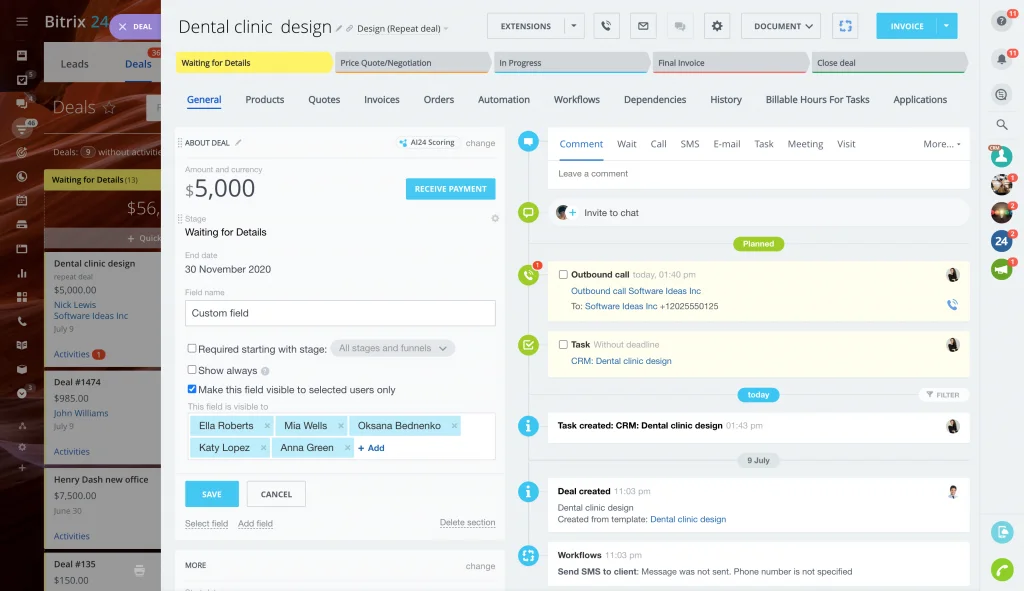
This cool option determines the ability to view the custom CRM field as well as its value. To edit the field, a user needs to have appropriate access rights to edit the element.
For more information and detailed instructions, please see this article.
Happy customer relationship management,
Your Bitrix24 team
We've added a new useful option to custom fields in Bitrix24 CRM - you can now configure access permissions for custom CRM fields by making custom fields visible to selected users only. This option will allow you to control which CRM fields can be seen by which employee or employees.
This cool option determines the ability to view the custom CRM field as well as its value. To edit the field, a user needs to have appropriate access rights to edit the element.
For more information and detailed instructions, please see this article.
Happy customer relationship management,
Your Bitrix24 team