Successful CRM Implementation Process Step-by-Step


Many CRM projects are already in trouble before users ever log in.
The usual mistake is starting with configuration before the business has agreed on process, data rules, ownership, and daily usage. Once that happens, the pattern is familiar: low adoption, messy records, dashboards nobody trusts, and reps quietly working around the system.
Johnny Grow puts the CRM failure rate at 55%, a figure that’s barely moved in two decades.
Switching platforms won’t change that by itself. The implementation process matters more than the logo on the login screen.
This article gives you the order that works: audit, plan, design, migrate, and launch. It also covers the operational detail most guides skip, including who owns each phase, how long it takes, and where CRM projects usually go off track.
What is a CRM implementation process?
A CRM implementation process is the structured work required to plan, configure, migrate, test, launch, and drive adoption of a CRM system. It covers both the technical setup and the operating model around it.
Implementation isn't just turning on a platform and adding users. It spans:
- Workflow design and lifecycle stages
- Data standards and permissions
- Reporting logic and integration behavior
- Change management across teams
Get those right and you've shaped how the business uses the system every day. Get them wrong and the rest doesn't save you.
A CRM can be technically live and still failing if users avoid it, reports contradict each other, or handoffs still happen in spreadsheets and chat threads.
Buying the software is the easy part. Making it operational is the real project.
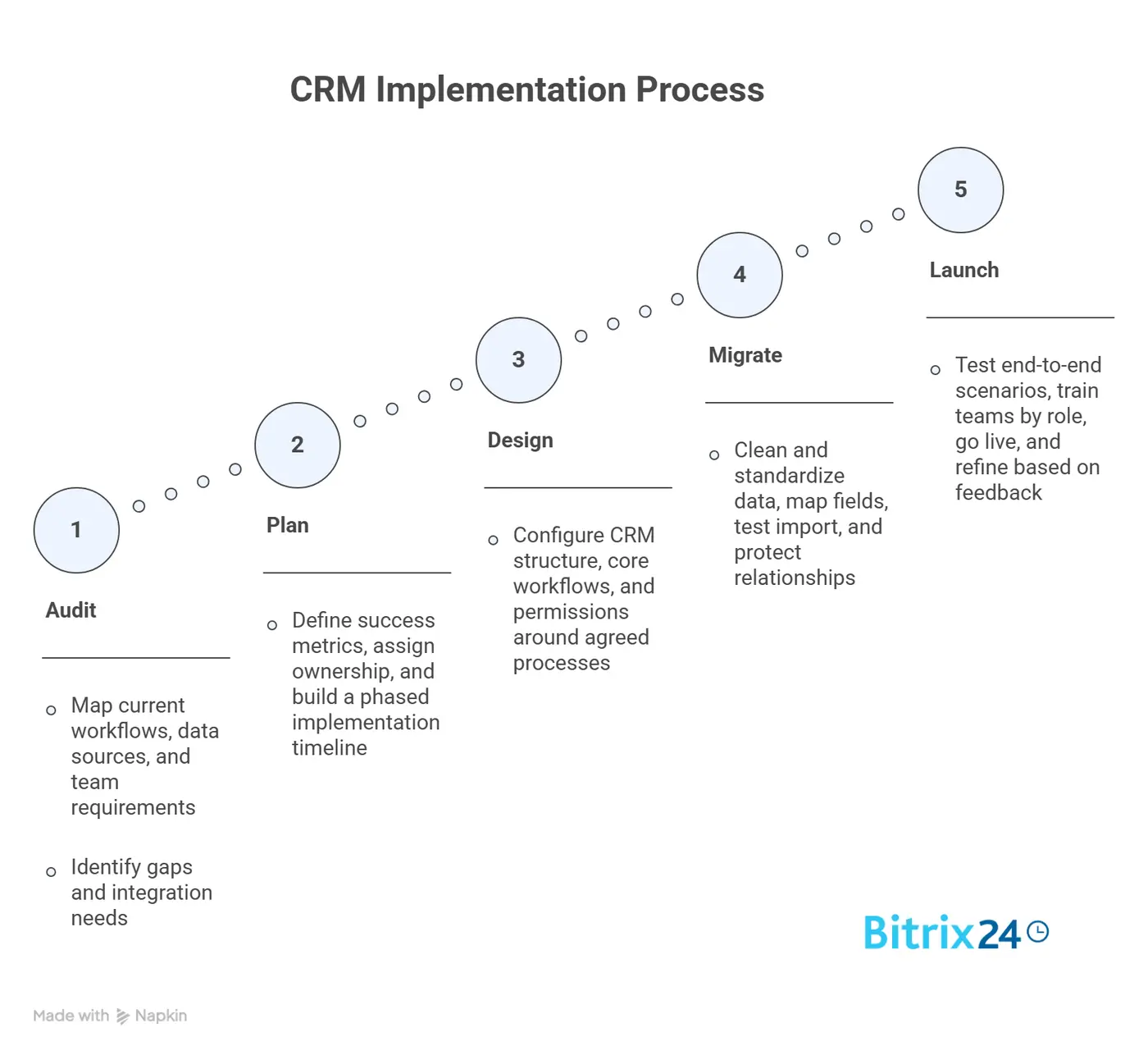
Why the CRM implementation process breaks down
Most failures trace back to four root causes, and none of them is the software:
- Unclear goals: When leadership says "we need a CRM" but can't define what should improve, teams fill the gap with assumptions. Sales wants cleaner pipeline stages, marketing wants attribution, service wants case visibility, ops wants reporting discipline. Without alignment, the build becomes a compromise nobody likes.
- Bad source data: Duplicate records, inconsistent field formats, orphaned contacts, and outdated ownership do more damage than teams expect. Import that data without cleanup and the new CRM inherits old credibility problems on day one.
- Overcustomization: It starts with good intentions. Every team asks for one more field, one more automation, one more exception path. Before long the CRM reflects every edge case anyone has ever hit instead of the few workflows that drive most of the business.
- Weak executive ownership: If nobody senior will make decisions, resolve cross-functional conflicts, or enforce adoption, implementation becomes a software exercise run by admins and vendors.
A Forrester survey of 650 CRM practitioners found the leading obstacles were cultural resistance to new ways of working (45%) and trouble achieving user adoption (44%), with inadequate leadership close behind.
The pattern is consistent: most failed implementations are process, data, or adoption failures wearing a technical disguise.
CRM Implementation Readiness Checklist + Risk Mitigation Plan
Enter your email address to get a comprehensive, step-by-step guide

Step 1: Audit current processes, data, and CRM requirements
Before configuring anything, map how work actually happens today. Not how leadership thinks it happens, and not how the future-state diagram looks in a workshop. Trace the real flow of leads, opportunities, handoffs, support requests, escalations, renewals, and reporting inputs.
This audit usually falls to an operations lead or the incoming CRM admin, and it takes longer than people expect, often one to three weeks for a mid-sized team with several systems in play.
Skipping it doesn't save time. It moves the confusion downstream, where fixing it costs more.
Map the major workflows
Start with the workflows that span revenue and service teams:
- Lead capture and qualification
- Sales stage progression and exit criteria
- Marketing-to-sales handoff rules
- Implementation or customer success handoffs
- Support case intake and escalation paths
- Forecasting and management reporting
Document where each step happens today. You'll usually find a mix of inboxes, spreadsheets, forms, chat threads, an old CRM, and tribal knowledge. That picture is useful: it shows where the new CRM must replace manual work and where it needs to integrate with existing tools.
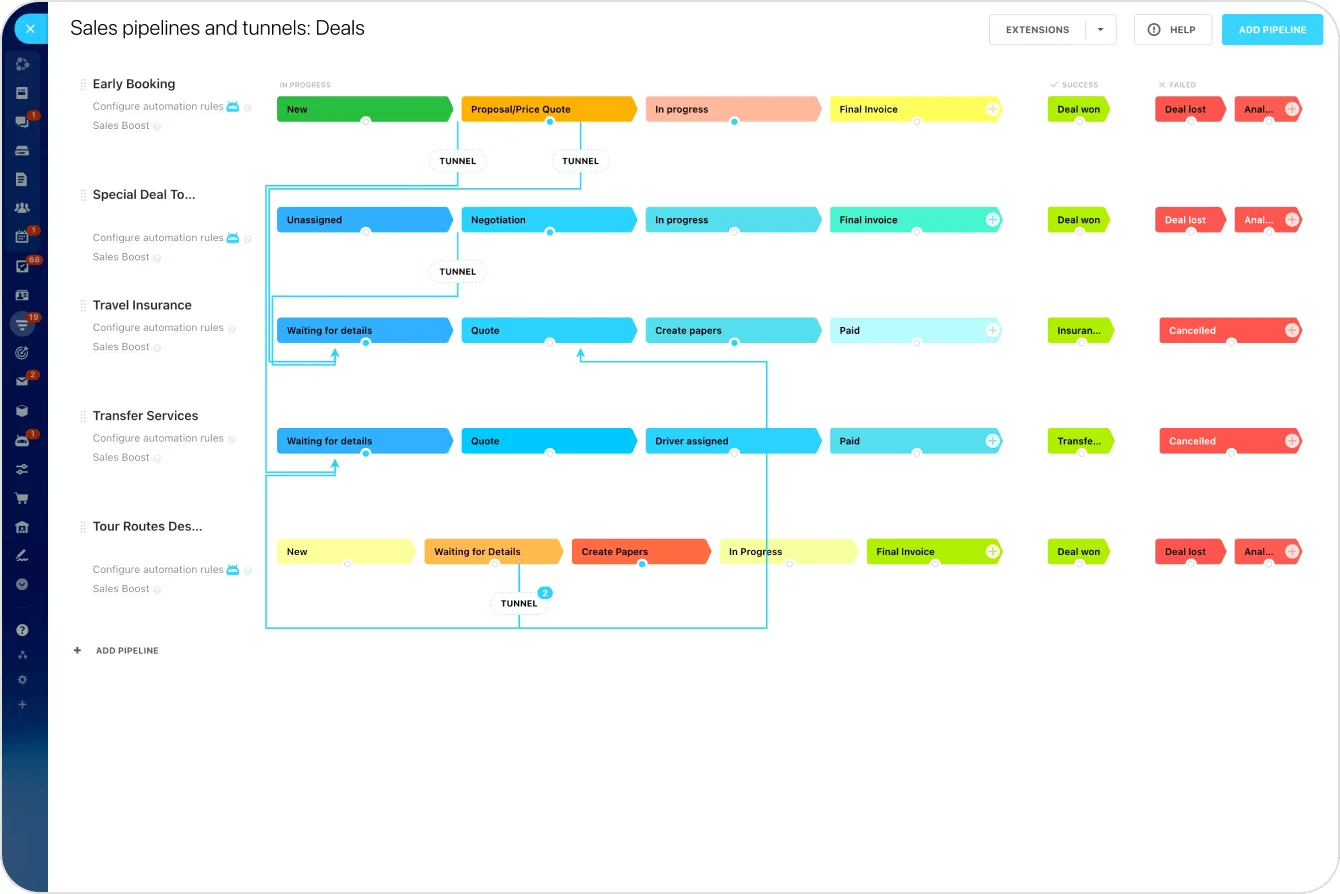
In Bitrix24, this audit helps decide which work belongs in CRM pipelines, which follow-ups should become tasks or reminders, which teams need shared workspaces, and which handoffs should be handled through automation rather than chat messages.
Review the data before you trust it
Pull samples from each source and look for duplicate accounts, missing required fields, inconsistent picklist values, broken ownership assignments, and stale records.
A sales team that's tracked deals in a spreadsheet for years will typically have the same company spelled three different ways and a stack of deals "owned" by someone who left months ago.
Note which systems feed the CRM or depend on it: marketing automation, support platforms, quoting tools, ERP, call software.
Gather requirements by team
Structure requirements by function, not by whoever talks the most in the workshop.
Ask each team to define its must-have workflows, required permissions, essential reports, and approval needs. Then separate true requirements from preferences, because "nice to have" requests have a way of sneaking into the first build.
The audit should produce:
- Current-state workflow maps
- Data quality findings by source
- Integration dependency list
- Team-by-team requirement document
- Open decisions that need leadership input
Step 2: Set success metrics, ownership, and an implementation plan
Once the audit is done, define success in measurable terms. Vague targets like "better visibility" won't help you make decisions mid-project. You need metrics that settle arguments and give the work a finish line.
Useful implementation metrics include adoption rate, opportunity stage compliance, speed to lead (how fast a new lead gets a first response), case response time, forecast accuracy, report usage, and data completeness.
Pick a manageable set tied to the workflows you're changing, not a dashboard of everything that could possibly improve.
Assign ownership explicitly
Name a business sponsor, a system owner or admin, department leads, data owners, and any external implementation partner.
Each person should know whether they're deciding, supplying requirements, approving configuration, or supporting rollout. When ownership is fuzzy, delays and rework follow almost immediately.
|
Role |
Primary responsibility |
|---|---|
|
Executive sponsor |
Set priorities, remove blockers, enforce adoption |
|
CRM admin / system owner |
Manage configuration, testing, release control |
|
Department leads |
Validate workflows, approve role-specific needs |
|
Operations / data owner |
Define data rules, migration standards, reporting logic |
|
Implementation partner |
Provide technical execution and platform guidance |
In Bitrix24 implementations, the system owner should also control CRM structure, permissions, automation rules, dashboards, and change requests after launch. Without that ownership, small configuration changes can quickly create inconsistent fields, duplicate workflows, and reports that different managers interpret in different ways.
Build a phased plan
Keep the plan phased, with milestones for configuration, migration prep, testing, training, and launch. Include decision deadlines, dependency tracking, and a short list of risks reviewed weekly.
Pro tip: Don't hide uncertainty behind fake precision. Showing where assumptions still need validation beats publishing an aggressive timeline that collapses two weeks in.

Step 3: Design the CRM structure and configure core workflows
Now design the CRM around the business, not the other way around.
Start with the foundation: core objects, required fields, lifecycle stages, ownership rules, territories if you need them, and permission models. These shape how data moves and who can act on it.
In Bitrix24, this usually means configuring deal pipelines, stages, custom fields, user permissions, task automation, notifications, and reporting views around the workflows agreed during the audit.
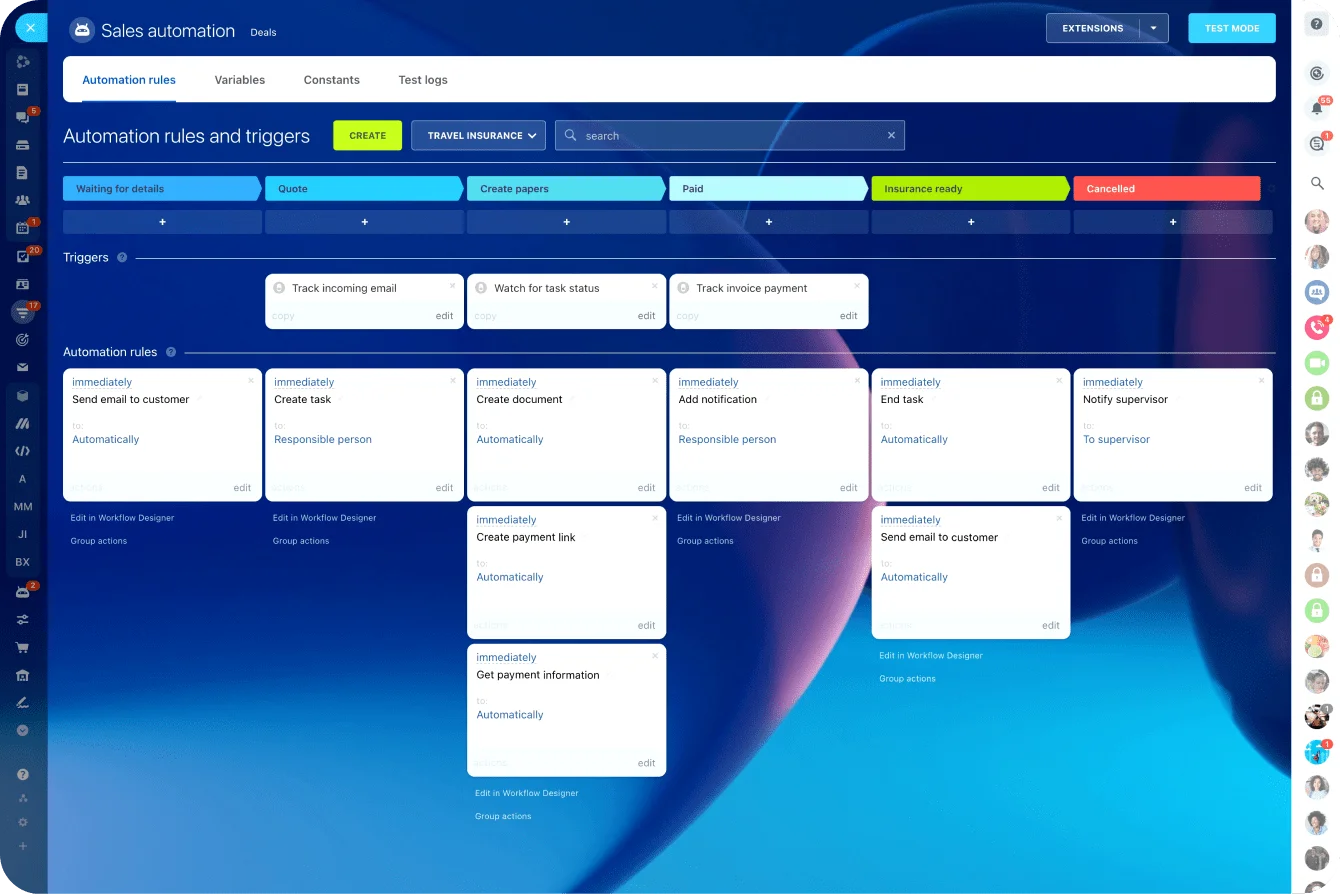
The goal is to make the CRM match the main revenue process first, then add more detailed workflows once users are working confidently inside the system.
Get pipeline stages right
Each stage should represent a real business state with clear entry and exit criteria. If stages are vague or overly optimistic, pipeline reporting turns into fiction.
Keep the count practical. A seven-stage pipeline where reps can't tell stage 3 from stage 4 produces worse forecasts than a four-stage one they actually understand.
Set permissions deliberately
Permissions matter as much as fields. People need access that supports their job without creating risk or clutter. Too broad, and you get bad edits and confusion. Too narrow, and people route around the system through side channels, which is exactly the behavior you're trying to eliminate.
Automate only the high-value actions
Configure lead routing, task creation, alerts, and approval flows where they remove repetitive work or enforce a real control.
Task and workflow automation earns its place when it saves a rep from manually assigning every inbound lead, not when it fires three notifications nobody reads. Avoid stacking automation on weak process decisions. Fast confusion is still confusion!
A useful rule for the first build: standardize first, customize later. If native capabilities plus a little configuration can support the workflow, take that route. Heavy customization in phase one increases testing effort, admin burden, and long-term fragility.
Good first-release design principles:
- Use a limited set of required fields
- Standardize naming and picklist values
- Keep lifecycle stages easy to understand
- Automate only high-value, repeatable actions
- Document every workflow and field purpose
If users need a training deck just to understand basic record movement, the design is too complicated.
Step 4: Clean, map, and migrate data without bringing old problems forward
Data migration is where many projects lose discipline. Teams get nervous about leaving anything behind, so they import everything: dead leads, duplicate companies, half-complete contacts, outdated opportunities, and legacy fields nobody has touched in years.
That makes the new system harder to trust and harder to use.
Clean before you map
Remove duplicates, standardize formats for things like phone numbers and country names, archive stale records, and decide which historical data should live somewhere else rather than in the new CRM. Not all old data deserves a seat in the new system.
Map fields with intent
Map each source field to the new structure deliberately. Some old fields merge into one standardized field. Others get dropped. Validate required fields before import, or users inherit incomplete records that break workflow logic and reporting.
Protect relationships and ownership
Loading accounts, contacts, and opportunities separately isn't enough. Verify parent-child links, contact-to-account associations, deal ownership, activity history where it matters, and any reporting dependencies tied to those relationships.
A migration that loads thousands of contacts but loses which account each belongs to is worse than no migration, because it looks complete while quietly breaking every account-level report.
Test before the full load
Run a test migration on a representative sample, then check record counts, field population, formatting, ownership, deduplication, and report outputs. If leadership expects forecast or funnel reports on day one, validate those during the test, not after users spot the gaps.
Migration checkpoint list:
- Data cleanup rules approved
- Field mapping documented
- Required field validation completed
- Record relationships tested
- Ownership assignments verified
- Reporting outputs reviewed
One practical call: if a record will never be worked, measured, or referenced in the new CRM, think twice before migrating it.
Step 5: Test, train teams, go live, and improve after launch
Test against real work
Testing should mirror real work, not just confirm that screens load and records save. Run user acceptance testing across the workflows that matter: lead assignment, opportunity progression, case routing, handoffs, approvals, dashboards, integrations, and exception scenarios. Exceptions matter most, because brittle setups break there first.
Include actual users from each function, not just admins and managers. Ask them to complete common tasks end to end and flag friction, confusion, missing data, or unclear ownership. A workflow that looks clean in a demo can still fall apart in live use.
Train by role
Generic CRM training feels efficient and performs badly. Tailor it:
- Sales reps need pipeline and activity guidance
- Marketing users need campaign and lead-flow visibility
- Service teams need case-handling standards
- Managers need reporting and inspection skills, beyond basic screen navigation
Spell out usage expectations: which records each team must create or update, what data-entry standards apply, how handoffs happen in the system, which reports managers will use for review, and where to get help after launch.
For Bitrix24, training should show users how CRM records connect to daily work: updating deals, logging calls or activities, assigning tasks, moving records through stages, using notifications, and checking the dashboards managers will actually review.
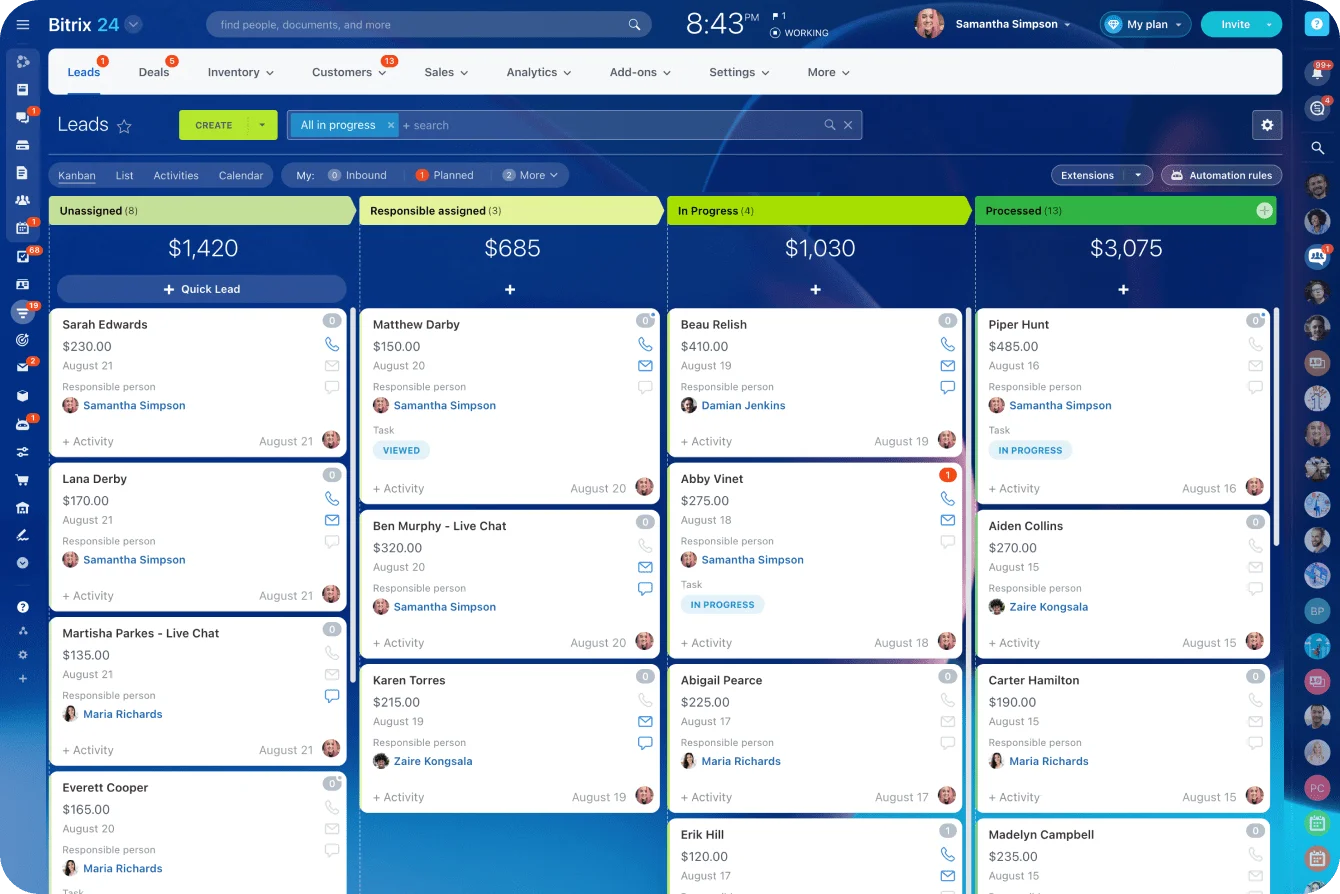
Adoption improves when users can see how the system reduces follow-up work rather than adding another admin layer.
Support go-live with real urgency
Plan short-term support: office hours, issue triage, admin coverage, and a fast channel for user questions. The first two weeks carry disproportionate weight. Small frustrations in that window harden into long-term avoidance.
For distributed teams, strong communication and collaboration habits matter even more, since you can't lean over and fix a problem at someone's desk.
Improve carefully after launch
Watch adoption and workflow health: login rates, record updates, missing fields, routing errors, report usage, common support tickets. Then refine with restraint.
Early feedback is useful, but don't turn every complaint into a config change. Some problems are real design issues. Others are the normal discomfort of changing habits, and they fade on their own.
Common mistakes
Mistakes that show up again and again
Some mistakes are common enough to flag directly:
- Copying broken processes into the new system: If qualification, handoffs, or approval paths already slow the business down, don't preserve them just because they're familiar.
- Migrating all historical data without questioning its value: Old clutter becomes new clutter quickly.
- Skipping proper testing: Usually when timelines slip and teams try to save time before launch. They pay for it later in confusion and cleanup.
- Underinvesting in training: When users don't grasp role-specific workflows and field expectations, adoption drops even on a technically sound system.
- Customizing too much too early: One of the fastest ways to make a CRM hard to maintain.
How to scale CRM implementation with governance
To scale, treat CRM governance as an operating discipline, not a one-time project artifact. That means clear admin ownership, documented field and workflow logic, change-approval rules, integration monitoring, release management, and recurring data hygiene.
Growth adds complexity fast, and without governance the CRM drifts into a messy pile of exceptions.
In Bitrix24, governance should cover who can create or edit fields, who approves automation changes, how pipelines are added, how reports are maintained, and how integrations are monitored. This keeps the system flexible without letting every team build its own version of the CRM.
Reliable scaling practices:
- Maintain a change log for fields, automations, and reports
- Review integration failures on a schedule
- Run periodic duplicate and stale-record cleanup
- Use a release process before making production changes
- Revisit permissions and ownership as teams grow
- Keep documentation current enough to be usable
Build a CRM implementation process your team can trust
Successful CRM implementation depends on the work done before and after launch. The software matters, but the bigger results come from clear workflows, clean data, named ownership, practical training, and steady governance.
Bitrix24 gives teams the CRM, automation, task management, communication, and reporting tools to support that process in one place.
Set it up around how your team really sells, follows up, hands work over, and reports progress.
Ready to build a CRM your team can trust? Start with Bitrix24 and use this checklist to plan the rollout:
- Map current workflows across sales, marketing, service, and ops
- Assess source data quality and integration dependencies
- Define success metrics and named owners
- Build a simple first-release CRM structure
- Clean and test data migration before full import
- Run user acceptance testing with real scenarios
- Train teams by role and prepare go-live support
- Set governance rules for post-launch changes and data hygiene
Build a CRM your team will actually use
Bitrix24 brings CRM, automation, tasks, chats, and reporting together so teams launch cleaner workflows and sustain adoption.
Learn MoreFAQ
How long does a CRM implementation usually take?
It depends on scope, integrations, data condition, and team size. A focused implementation can run a few weeks; cross-functional enterprise rollouts can run for months. The more useful answer: timelines stretch when requirements are unclear and data cleanup starts too late.
Should we migrate all historical CRM data?
No. Migrate what users need for active selling, service, reporting, compliance, or context. Archive the rest somewhere searchable. Dragging every old record into the new CRM usually hurts usability.
How do we handle remote or distributed teams during implementation?
Use role-based virtual training, recorded walkthroughs, shared testing scripts, and a central support channel for go-live. Remote teams need more deliberate communication, especially around handoffs and data-entry rules.
When should we use a consultant or implementation partner?
When internal admin capacity is limited, integrations are complex, or the team lacks platform experience. But keep business decisions in-house. A partner can build the system; they shouldn't decide how your company operates.
Is a phased rollout better than a full rollout?
Usually yes, when processes differ by team or data risk is high. Phasing reduces disruption and lets you fix issues early. Full rollouts work too, but only when requirements are stable and preparation is unusually strong.
What should we do first if our current CRM implementation is already failing?
Stop adding fields and automations. Audit the current workflows, data quality, adoption patterns, and reporting gaps. Most recovery work starts by simplifying the system and rebuilding trust.