Why CRM Users Drift Away - and the Health Checks That Bring Them Back


TL;DR (Quick Summary)
- CRM adoption rarely dies at once. It drifts, as the system gets slower, less trusted, or less useful than the workarounds people build around it.
- Regular health checks catch that drift early by testing data quality, workflow friction, reporting reliability, and real usage, then fixing the cause before spreadsheets and stale records become normal.
- Keep the CRM easier to use than the spreadsheet, and adoption takes care of itself.
Takeaway: Keep the CRM easier to use than the spreadsheet sitting next to it, and adoption takes care of itself — health checks are how you catch the drift while it's still cheap to fix.
It's Monday morning and the sales manager is running the forecast call off a spreadsheet, because the CRM dashboard "felt off." Nobody reported an outage. The system is still live, still paid for, still technically in use. The real work just moved to where the numbers feel safer.
That's how CRM adoption dies: not in a crash, but in a slow slide toward spreadsheets, private notes, and side trackers that feel faster than the system you bought.
Every workaround looks harmless on its own. Stacked together, they hollow out pipeline visibility, forecasting, and any number leadership is willing to trust.
Health checks are how you catch that drift while it's still cheap to fix. This piece covers what drift looks like, the warning signs worth watching, and how to build a review routine that keeps the CRM worth using.
Why CRM adoption fades after launch
Most CRM programs don't fail loudly. The implementation gets marked complete, the platform stays up, and for a few weeks nothing changes. Then daily behavior starts sliding away from the system. A rep keeps opportunity notes in a personal doc "just for now." Customer success moves renewal follow-ups into another tool because CRM task alerts turned into noise.
Each shortcut solves a real, immediate problem. The system of record quietly stops being the place the work happens.
Why more training often misses the real problem
The default reaction to low adoption is to schedule more training. Which makes sense. Training fixes exactly one thing: someone who doesn't know how to complete a process. However, it does nothing for people who know the process and avoid it anyway.
Repeated avoidance points to something structural, like broken workflows, poor data quality, required fields nobody needs, duplicate data entry, murky ownership rules, or reports that don't match what the frontline sees.
Reps are already stretched thin before CRM admin even enters the picture. Pile unnecessary process on top of that, and shortcuts stop looking like laziness. They look like survival.
Treat retention as a commercial problem, because it is one. When adoption fades, pipeline visibility drops, forecasts wobble, handoffs get messier, and nobody can be held to a number they don't believe.
Where the first cracks usually appear
Watch recurring work, not annual training completion:
- Do reps update opportunities before forecast meetings, or only when a manager chases them?
- Are calls and emails landing on the right records?
- Are overdue tasks actually overdue, or stale reminders nobody trusts?
- Are managers reviewing CRM dashboards, or asking for a separate spreadsheet?
- Are teams keying the same information into several systems?
These tell you more about CRM health than any login count.
Pro tip: Ask three frontline users to walk you through one common workflow, like updating an opportunity after a customer call. Don't ask how it's supposed to work. Watch what they actually do. The extra spreadsheet, the copy-paste, the skipped fields, the reminder set on someone's phone: that's where the CRM is costing them time.
30-Minute CRM Adoption Audit Scorecard & Fix Plan
Enter your email address to get a comprehensive, step-by-step guide

What CRM user drift and CRM health checks actually mean
CRM user drift is the slow decline in meaningful use. People still sign in, run a search, glance at a dashboard, and stop updating records, closing tasks, or trusting the system to run their day.
A CRM health check is a recurring operational review that tests whether the system still works as intended. It looks at data quality, workflow usage, reporting reliability, automation behavior, and real activity patterns, and it catches friction before the workarounds set like concrete.
Activity differs from meaningful adoption
Adoption metrics tell you whether people enter the system. Health checks tell you whether they still rely on it.
A user who logs in every morning, updates no opportunities, closes no tasks, and exports everything to a spreadsheet is active on paper but drifting in practice.
A good health check also asks why a behavior changed. A drop in completed tasks might mean people disengaged. It could also mean an automation is spawning duplicate tasks, ownership shifted after a reorg, the task rules stopped matching the process, or the work is getting done somewhere the CRM can't see.
In a platform like Bitrix24 CRM, the owner can review deal activity next to tasks, ownership, pipeline stages, and reporting instead of treating login activity as the headline adoption signal.
Why preventing user drift matters for revenue, forecasting, and team efficiency
Stale records, slipping task discipline, and updates that lag real customer activity all lead to the same place: leadership stops trusting the numbers. Forecast meetings turn into arguments over data quality rather than conversations about deals.
Forecasts get less reliable
When opportunity stages are outdated and activity logging is patchy, a manager staring at low conversion can't separate the causes: market conditions, rep performance, qualification standards, a weak sales process, or plain CRM hygiene.
Picture a rep who already knows a deal will slip to next quarter but waits until the weekly forecast call to update it. One stale opportunity is noise. The same habit across a team keeps pipeline totals inflated for days or weeks, and every decision built on that number inherits the error.
Customer context starts splitting across systems
Offline spreadsheets make this harder to contain. They duplicate effort, scatter customer context across sales, marketing, and success, and create a governance headache, because a private tracker is nearly impossible to audit or standardize.
Spreadsheets earn their keep for analysis and quick modeling. The trouble starts when an offline file becomes the only place the current deal stage, a customer commitment, or a forecast decision actually lives.
KPI quality deteriorates
Pipeline coverage, activity completion, conversion rates, follow-up compliance: these numbers only mean something when the behaviors under them are captured consistently. Long-term adoption is what makes them trustworthy. A polished dashboard can't rescue weak inputs.

How CRM user drift develops over time
Drift rarely starts with open rejection. It starts with friction: too many required fields, constant notifications, duplicate accounts, unclear ownership, cluttered layouts, or reports people already know are wrong.
Stage 1: Small friction changes behavior
People delay updates because updates take too long. They ignore reminders because the task logic feels random. They fall back on memory because opening and editing a record breaks their flow. Alone, none of it looks like a problem.
Stage 2: Side systems appear
Reps start a pipeline tracker in a spreadsheet. Managers keep an offline forecast file. Notes, call lists, and follow-up dates land in whatever tool feels fastest for the task in front of them. Once those side systems become routine, the CRM is the backup copy.
Stage 3: Bad data reduces trust
Then the loop kicks in. Friction cuts compliance, poor data erodes trust, low trust cuts usage, and thinner usage degrades the data further. Once it's spinning, decline picks up speed.
A common workflow failure
Take a team required to fill eight fields every time an opportunity changes stage. A few of those fields mattered during implementation and now feed nothing: no routing, no report, no qualification.
So reps stop updating stages until Friday, because each update feels like paperwork. Forecast data goes stale. A manager spots the staleness and adds another mandatory field to tighten accountability, which piles more friction onto the exact process already driving people away.
A better health check asks which fields actually change a downstream decision, then removes or automates the rest.
The core signals and mechanisms behind CRM adoption decline
The warning signs usually show up well before adoption breaks.
The clearest warning signs
Look for:
- Stale opportunities
- Missing or inconsistently filled fields
- Accounts with no recent activity
- Growing overdue task queues
- Rising duplicate records
- Falling dashboard usage
- Repeated spreadsheet exports
The sharpest tell is the gap between customer activity and CRM activity. Meetings, calls, and follow-ups are clearly happening, but the CRM barely shows them. The system has stopped capturing execution.
What usually sits behind those symptoms
A short list of causes tends to sit under all of it: workflow overload, weak ownership, inconsistent definitions, thin manager reinforcement, badly configured automation, and reporting built on incomplete data.
|
Visible symptom |
Likely root cause |
|
Ignored reminders and overdue tasks |
Task logic is noisy, poorly prioritized, or disconnected from actual work |
|
Frequent spreadsheet exports for pipeline tracking |
Managers don't trust CRM reports or lack the reporting views they need |
|
Low completion of required fields |
Fields add effort without helping users complete their jobs |
|
Duplicate contacts and accounts |
Weak data governance, unclear ownership, or poor record creation controls |
|
Dashboards opened less often |
Reports are outdated, not role-specific, or no longer used in decisions |
|
Large gap between customer meetings and logged activities |
Manual logging takes too long or the CRM is no longer the working tool |
Symptoms are easy to spot and easy to misread. A spike in overdue tasks doesn't prove people got careless. It might mean the task structure no longer matches how the team works.
Check configuration before blaming behavior
When a metric jumps, look at what changed in the system first. A new integration might be minting duplicate contacts. A tweaked sales stage might have broken an automation. A reassigned employee might still own hundreds of open records.
If automation runs any part of the workflow, review the triggers and the tasks they create on a schedule. In Bitrix24, for instance, task automation can tie workflow events to assignments and follow-ups. The health check confirms those rules still produce useful work instead of piling up noise.
Pro tip: Sample records by hand, not just the aggregate dashboards. Ten recent closed deals or overdue tasks will surface things a percentage hides, like one automation dropping the same pointless task onto every record.

Common misconceptions CRM owners should avoid
A few standard reactions to falling adoption quietly make it worse.
# 1: Users are simply resisting the CRM
Usually they're avoiding effort, not the tool. If updating the system reliably takes longer than keeping a personal tracker, people pick, well, whatever gets them home on time! Before you call it resistance, put the official workflow next to the actual steps a user has to complete. The gap is the answer.
# 2: More automation means better adoption
Too many notifications, rigid validation, tangled routing, and forced process gates create fatigue. Automation earns its place when it removes repetitive work, cuts manual handoffs, keeps things consistent, and surfaces the next useful action. Configured badly, it just trains people to dismiss alerts, undo automatic assignments, and route around rules that don't fit the situation in front of them.
# 3: Login rates show healthy usage
A daily login can look healthy while hiding weak adoption. Real usage shows up in the work: records stay current, tasks get managed, customer activity gets captured, and decisions actually lean on CRM data. Opening the CRM tells you almost nothing about whether anyone depends on it.
# 4: A cleanup project fixes trust
Cleaning the data without fixing the process that dirtied it is the most repeated mistake in CRM ops. A one-time dedupe gives you a pristine system on Friday. If the record-creation rules are still vague, the duplicates are back by Monday.
Trust returns only when people see reports that match reality, managers who use those reports consistently, and recurring friction that actually gets removed and stays removed.
Manager behavior matters more than another reminder email
If a sales manager tells reps to maintain the CRM and then runs every forecast review off a separate spreadsheet, the spreadsheet is the system of record for that meeting. Full stop.
Managers set adoption by what they pull up in the room. Review opportunity stages, next actions, and risks straight from the CRM, and keeping those fields current becomes part of the job instead of extra admin.
Business use cases: How health checks bring users back
Monthly health checks catch operational decay before it hardens into the way things are done. They pay off most when they connect a visible symptom to the workflow causing it.
The pipeline looks healthy, but deals aren't moving
A team shows solid pipeline coverage while conversion quietly weakens. The health check turns up a big cluster of opportunities nobody's touched in weeks.
Before telling reps to "use the CRM more," sample those stale records and check whether the same stage, owner, lead source, or workflow keeps showing up. You might find stage-change automation that broke after a process update, or a required field the team abandoned because no one agrees what it means.
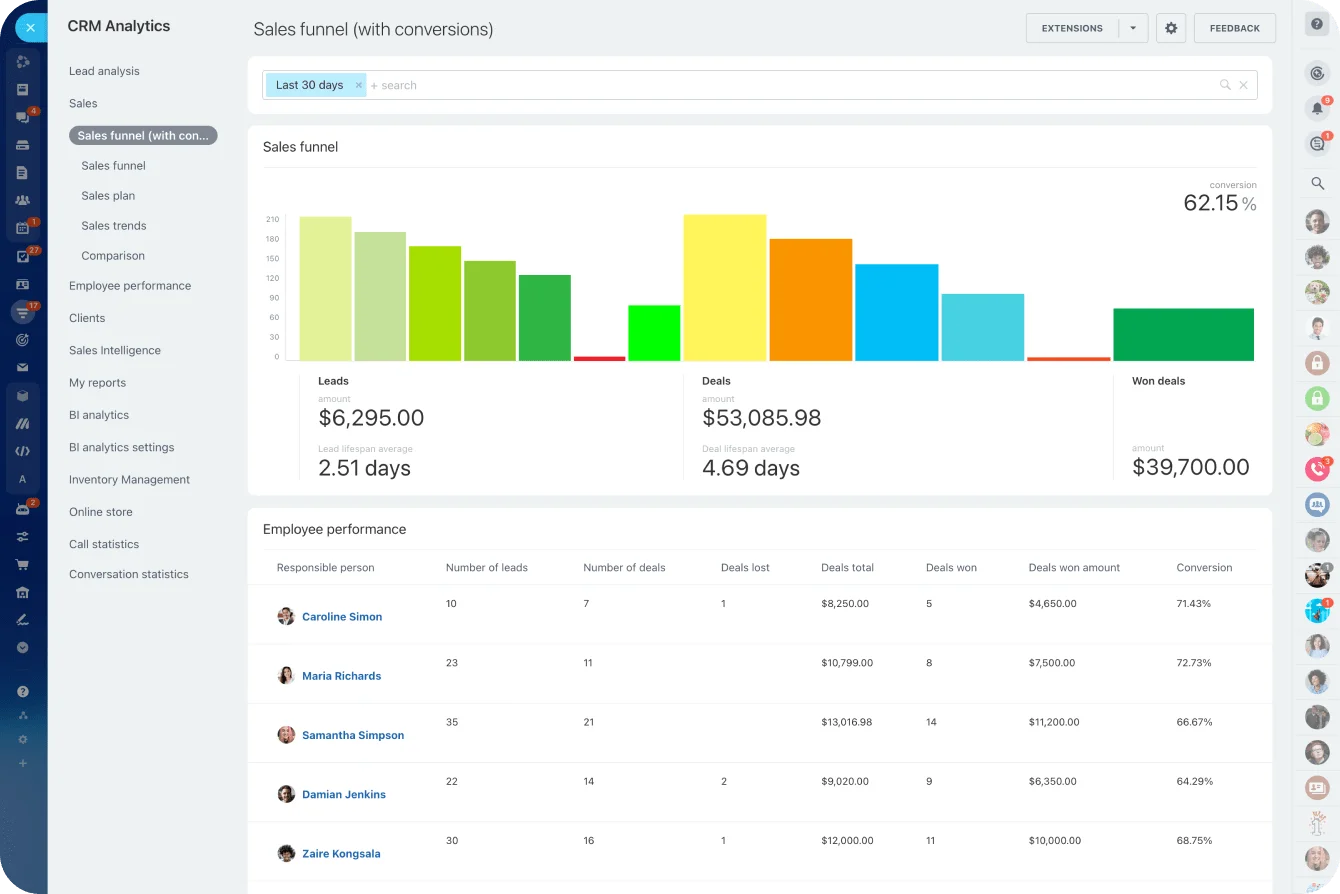
CRM analytics and reporting tools can carry this review in Bitrix24. Check deal stages, activity patterns, and funnel performance, then open the individual records behind any odd pattern instead of judging adoption from one dashboard number.
Task completion suddenly collapses
Say a customer success team's overdue task count climbs for three reviews straight.
Inspect the tasks before you book another training session. If finished customer interactions keep leaving old reminder tasks open, the fault sits in the task design, not the people. Retire the obsolete rules, clarify ownership, and retrain on the corrected workflow specifically.
Refreshers work when they're tied to a real friction point:
- Weak task handling: focus on task logic, ownership, and daily expectations.
- Managers distrust dashboards: focus on metric definitions and data sources.
- Reps skipping fields: check whether those fields still serve a purpose.
- Duplicates piling up: inspect record creation and integration rules.
A generic product walkthrough rarely changes behavior, because it never touches the reason people quit the system.
Spreadsheet forecasting becomes permanent
A forecast spreadsheet almost always starts innocently: a manager needs one calculation or view the CRM doesn't offer. The danger shows up when reps start updating the spreadsheet first and the CRM second.
During the health check, pin down exactly what the offline file gives people that the CRM doesn't:
- A particular grouping
- A calculated field
- Commentary captured nowhere else
- Scenario modeling
- An approval step
- A reporting format managers prefer
Then decide: change the CRM report, connect the spreadsheet to the system, or leave the offline process deliberately separate. If another system genuinely has to stay in the workflow, Bitrix24 integrations can cut the copy-paste and stop the same customer data from being maintained in three places at once.
What usually restores credibility fastest
Workflow cleanup buys back trust faster than broad retraining. Start here:
- Remove redundant fields
- Simplify page layouts
- Tighten task rules
- Retire obsolete automations
- Clarify ownership
- Fix the reports managers actually use
Recovery tends to run in three moves: health checks find where trust broke, targeted refreshers close the behavior gap, and workflow cleanup removes the design flaw that caused it.
Pro tip: Keep a small CRM friction backlog. Every time a user reports a problem, log the workflow, the role, how often it bites, and the business impact. Review it monthly. It stops the team from fixing whatever complaint happened to be loudest last week.
Scaling CRM adoption programs: Metrics, operating rhythm, and limits
As an organization grows, adoption needs a defined routine, not occasional cleanup sprees.
Track metrics that show real maintenance
Pick metrics that reveal whether the CRM is still a working system, not a login destination.
|
KPI |
What it indicates |
|
Active record update rate |
Whether users maintain live records rather than simply logging in |
|
Task completion rate |
Whether workflow-driven follow-up still functions |
|
Stale opportunity ratio |
How much of the pipeline may be outdated or inflated |
|
Duplicate rate |
Data governance quality and record creation discipline |
|
Report and dashboard usage |
Whether reporting is part of daily and managerial work |
|
Spreadsheet dependency indicators |
Whether critical work is moving outside the system |
Turn metrics into an operating routine
Metrics need an owner and a follow-up loop. Someone has to review them, chase the changes, assign the fixes, and confirm the fixes held.
For most teams, monthly is a sensible starting cadence. Insightly's 2026 CRM data clean-up guidance points the same way, with monthly spot checks and deeper quarterly reviews.
- Review adoption signals: Compare record updates, overdue tasks, stale opportunities, duplicates, and report usage against last period.
- Sample problem records: Open real examples instead of stopping at aggregate percentages.
- Find the workflow behind the problem: Check fields, automation, integrations, permissions, and ownership.
- Assign corrective action: Give every config change and process decision a clear owner and deadline.
- Check the result next month: Confirm whether behavior actually improved.
Quarterly governance reviews can push harder, asking whether specific fields, automations, reports, and ownership rules still need to exist at all.
For teams running follow-ups directly in Bitrix24, the task management tools can be reviewed alongside CRM records, so the owner can tell a sales-data problem apart from a broader task-workflow problem.
Define every metric before tracking it
A "stale opportunity" can't mean one thing to sales ops and something else to the sales manager. For one business, 14 days without activity is a red flag. For another running long enterprise procurement cycles, 45 days is normal.
Define thresholds by sales motion, stage, or segment where it matters. Skip that, and the health-check dashboard just generates new arguments.
Same goes for dashboard trust. Ask whether a manager would use the current pipeline total to make a hiring, forecasting, or budget call without rebuilding the number somewhere else first. That answer beats any generic "do you trust the CRM?" survey.
Know the limits of health checks
Health checks find operational decay. They can't fix:
- A sales process that doesn't fit the business
- Weak management enforcement
- Unclear CRM ownership
- Conflicting metric definitions
- Poor change control
They also won't kill every spreadsheet, and shouldn't. Some analysis belongs outside the CRM. The problem starts only when business-critical customer information splits into rival versions nobody can reconcile.
And someone still has to own definitions, process design, reporting standards, and change control. Without that owner, drift keeps coming back, because each cleanup treats the symptom while the process that caused it stays put.
FAQs
How often should CRM owners run health checks, and which signals are leading indicators versus lagging symptoms of adoption decline?
Monthly works for most teams. It catches patterns without turning CRM administration into a daily audit.
Leading indicators:
- Falling record update rates
- Rising overdue tasks
- Lower dashboard usage
- Declining completion of key fields
- Widening gaps between customer activity and CRM activity
Lagging symptoms:
- Stale pipeline
- Forecast distrust
- Duplicate customer records
- Missed handoffs
- Entrenched spreadsheet workarounds
Leading indicators give you a chance to fix a workflow before bad system behavior hardens into normal team behavior.
What should teams do when managers trust spreadsheet forecasts more than CRM dashboards, even after data cleanup and retraining?
Find out exactly why the spreadsheet keeps winning.
Put its formulas, filters, stage definitions, manual adjustments, and comment fields next to the CRM report. Often the manager is using it because it answers a real forecasting question the dashboard doesn't.
Align the forecast definitions, simplify the CRM views managers actually need, and once the two numbers reconcile, make CRM-based reporting the default input to the forecast meeting. Keep asking reps to update the CRM while the manager runs on a private spreadsheet, and you've guaranteed duplicate maintenance for good.
How can CRM owners measure hidden offline usage, such as side spreadsheets or private trackers, without relying only on self-reported user behavior?
Look for behavioral traces instead of trying to police individual files. Useful signals:
- Repeated exports
- Low update frequency on active accounts
- High meeting volume with little logged activity
- Unexplained forecast adjustments
- Manual roll-up requests despite available dashboards
- Long gaps between CRM activities on otherwise active opportunities
Workflow gaps help too. If an active opportunity keeps jumping from one stage to another after weeks with no recorded activity, part of the real process is happening off-system.
Then talk to the people doing the work. Find out why the workaround is worth it, and decide whether the main system should absorb that step, connect to it, or leave it alone on purpose.
Keep CRM adoption strong with Bitrix24
Bitrix24 unites CRM, tasks, automation, reports, and integrations so teams spot drift early and keep customer data reliable.
Get Started NowKeep the CRM useful and adoption follows
A CRM keeps its place only while it's easier to use than the workaround sitting next to it. The morning the spreadsheet is faster, you've already started losing, whatever the login count says.
That's the whole job of a health check: keep the system worth choosing. Not a quarterly cleanup project, but part of owning the CRM, so friction gets removed before the next tracker appears.
Bitrix24 pulls CRM records, sales workflows, tasks, automation, reporting, and integrations into one platform, so more of that operational picture sits in one place.
If you'd rather build a CRM your team keeps using than one you keep cleaning up, sign up for Bitrix24 for free and put these health checks to work.