Workflow Tools, Explained: Forms, Approvals, Automation Rules, and RPA


TL;DR (Quick Summary)
Workflow tools get conflated because a single process holds a request, a decision, a handoff, and a system action. Automate the wrong layer and you just speed up a broken process. The fix is to match the tool to the thing that's actually stuck, in the order that clears confusion before it adds automation.
- Forms capture structured inputs but don't move work on their own → good intake, zero execution
- Approvals settle who decides yes, no, or escalate → decision control, not fulfillment
- Automation rules move predictable handoffs and updates → fast while the logic holds still
- Classic RPA imitates what a person does on screen → a fix for legacy systems no integration reaches
- Each tool assumes a different level of process certainty → more automation demands clearer rules
- Add the layers in the order that removes chaos first → sequence beats feature count
Takeaway: Forms, approvals, automation rules, and RPA solve different parts of a workflow. Choose the lightest tool that fixes your current bottleneck, then automate further once the rules, owners, and exceptions are clear.
Why teams lump four different workflow tools into one category
Most "workflow automation" projects automate the wrong layer. A form collects information. An approval records a decision. An automation rule moves predictable work. Classic RPA repeats actions inside software.
Four different jobs, one shopping category, and that's where the budget gets wasted.
The tempting move is to buy the most capable-sounding tool and point it at the loudest complaint. The real problem sits a layer underneath: incomplete requests, unclear ownership, an approval nobody can justify. Automate over that and you get a faster version of the mess.
By the end you'll know which layer fixes your real bottleneck, which one you're missing, and why the most powerful tool is rarely the right first buy.
Workflow Builder Toolkit: Templates, Rules, and RPA Triggers
Enter your email address to get a comprehensive, step-by-step guide

Start with the request: forms capture structured inputs, but they don't move work on their own
A form is the intake layer. Its job: turn an informal request into structured information a person or system acts on. Instead of requests arriving through email, chat, spreadsheets, meetings, and hallway conversations, the team gets the same core facts in the same shape every time.
What good intake looks like
Take an IT equipment request. Instead of "Can you get Jamie a laptop before Monday?", IT asks for:
- Employee name and role
- Location
- Start date
- Device requirements
- Manager
- Cost center
- Required software or access
- Supporting documentation, where needed
That's enough to start work without a second round of questions.
The same discipline travels well beyond IT. A marketing team taking creative requests replaces a vague "can you make a banner for the launch?" with a brief that pins down the channel, dimensions, deadline, copy, and brand assets up front.
For customer-facing processes, Bitrix24 CRM keeps submitted information attached to a structured customer or lead record instead of scattering it across inboxes and chat threads.
Where forms save time
Forms earn their keep when the receiving team asks the same questions on repeat. A facilities team handling office-access requests keeps needing the same four details: location, manager, access level, start date. Move those into mandatory or conditional fields and the back-and-forth disappears.
Review the form whenever a policy or a downstream workflow changes. If staff still chase requesters for information the form could have captured, the form needs work.
Where forms go wrong
A polished form still feeds a badly designed process. The usual suspects:
- Asking for information nobody uses
- Making every field mandatory "just in case"
- Free-text boxes where fixed choices would be clearer
- Never updating the form after a policy change
- Collecting a request without assigning anyone to act on it
The most damaging failure is quieter than any of those: a form so long that people route around it. When submitting takes longer than firing off a message, requesters go back to emailing the team directly, and you've built intake nobody uses. Every mandatory field taxes submission. That tax is worth paying only when someone downstream uses the answer.
Forms don't decide whether work proceeds, and they don't make fulfillment happen afterward.
Pro tip: ask the team receiving requests which details they chase most. Those recurring questions are your missing fields.
Practical boundary: forms standardize requests and improve input quality. They don't carry work from request to completion.

Approvals answer a narrower question than most teams expect: who decides yes, no, or escalate
Approval routing is decision logic, and it answers one question: who has the authority to approve, reject, or escalate under defined conditions? Those conditions turn on cost, department, policy, budget owner, request type, or sequence.
What approval routing actually solves
Take an expense request. A routine reimbursement goes to the employee's manager. A larger purchase pulls in a department head. An unusual category needs finance to weigh in.
A useful approval workflow makes four things clear:
- Who owns the decision right now
- What that person is approving
- What happens after approval or rejection
- What happens if the approver is out
That kills the email chase around "Has finance approved this?" and "Who has it now?" It also leaves a record of the decision.
Approval doesn't mean the work is finished
An approved purchase still needs to be:
- Ordered
- Received
- Recorded
- Matched against the request
- Reconciled by finance
Approving a new hire doesn't set up their laptop, payroll, software accounts, or onboarding schedule either. This is where teams overestimate approval software. Approval grants permission. The work after it still needs owners, tasks, and handoffs.
Watch for approval creep
Processes collect sign-offs the way garages collect junk. Someone got burned once, a checkpoint went in, and it never came out. Software routes those decisions faster, but a faster pointless approval is still a delay, and every approver in the chain becomes a bottleneck the day they take leave. That fourth question, what happens if the approver is out, exposes how many of a process's stalls trace back to one dormant person.
For internal stage-based processes, Bitrix24 RPA and workflow automation supports multistep approvals and standardized internal workflows. Bitrix24 uses "RPA" for this kind of internal process automation, which differs from the classic screen-level RPA covered later.
Pro tip: for every approval step, name the risk it controls. If the process owner can't, that approval is a candidate for removal.
Practical boundary: approvals assign and document decision rights. They don't fulfill the work that follows.
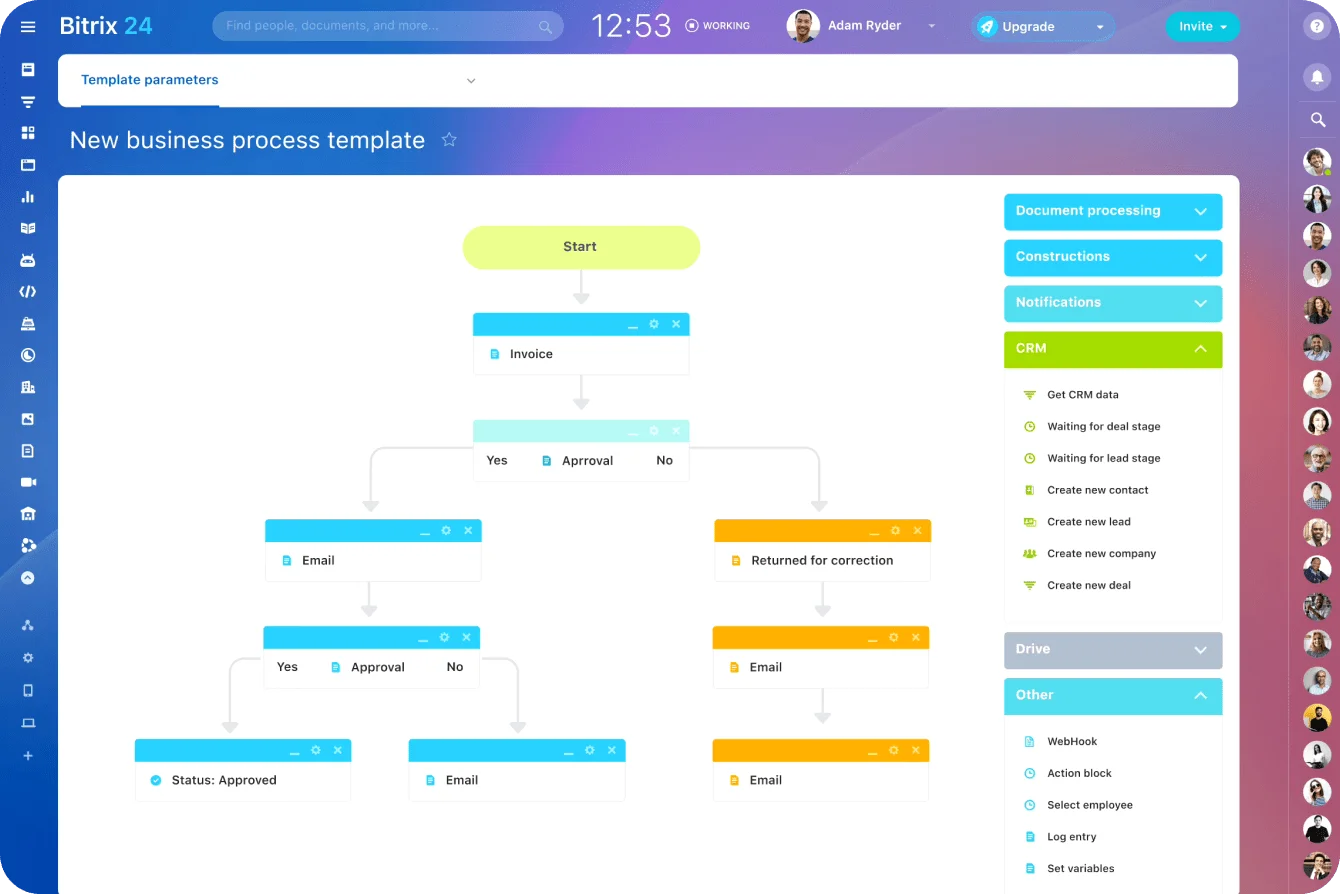
Automation rules handle predictable handoffs and updates when the condition is clear
Trigger-based automation runs on "if this happens, do that." A known event fires a predefined action:
- Create a task
- Assign an owner
- Send a notification
- Update a field
- Change a status
- Pass information to a connected system
This is where routine work starts moving without a person triggering every step.
Where rules remove manual coordination
Employee onboarding is the classic case. A signed offer lands, and a standard workflow:
- Creates an IT setup task
- Notifies payroll
- Assigns equipment actions
- Builds an onboarding checklist
- Updates the employee's status
The HR coordinator stops holding the whole sequence in their head for every new hire.
The pattern repeats everywhere. A signed contract kicks off implementation tasks. A support ticket in a given category routes to a specialist. A CRM deal hitting a defined stage starts the next sales or delivery action on its own.
Bitrix24 task automation drives automated workflows for tasks, assignments, emails, approval stages, and other standardized processes. Where another system has to take part, Bitrix24 integrations connect the pieces instead of leaving staff to copy the same data by hand.
The three questions every rule needs
Before you automate a step, nail down three things: what triggers the action, what the action is, and what happens when a case doesn't fit the rule.
Can't answer all three the same way every time? The process isn't ready to automate.
Where automation starts to break
Trouble shows up when teams automate a process that's still moving. New exceptions pile on. Rules branch. Departments each want their own slightly different version. Before long, nobody knows which condition controls which action.
The worse failure is invisible. A rule breaks quietly, and because the whole point was that nobody had to watch it, nobody notices until a downstream person asks where their task went. By then it's been stuck for days and the trail is cold. A manual handoff that breaks is obvious, since someone's standing there waiting. An automated one that breaks just goes silent.
So every automation needs an owner, someone who will:
- Review failed runs
- Investigate exceptions
- Update rules when policies change
- Recheck integrations after system changes
- Retire automation that no longer matches the process
Skip that, and a workflow that ran clean six months ago rots without anyone noticing.
Pro tip: give every automated process an exception queue and a named owner. When a rule fails, the work needs an obvious destination, not a gap between systems.
Practical boundary: automation rules suit predictable transitions, assignments, notifications, and updates. They fail when every case needs interpretation.

RPA mimics user actions in legacy systems, which makes it powerful and fragile at the same time
Classic robotic process automation runs software bots that imitate what a person does inside an application. A bot:
- Logs in
- Moves through screens
- Enters values
- Clicks buttons
- Downloads files
- Moves data between applications
This isn't an automation rule running inside a business platform. The bot works the application's user interface the way an employee would.
When classic RPA makes sense
RPA earns its place when a stable, repetitive task is trapped inside an old system with no decent integration. Invoice processing is the usual example. The data arrives in a structured file, but the aging finance application still wants someone to key it in screen by screen.
A bot takes the known values and keys them in, screen after screen, without getting bored or transposing a digit. That clears the repetitive work without waiting for a full system replacement.
Check for an API first
Direct integrations don't depend on the exact layout of a screen. Here's the trap: a screen-scraping bot ships in days while a proper integration waits on another team's roadmap, so RPA gets picked as the fast option. What it quietly buys is a permanent maintenance job, and that rarely makes it into the original business case.
US banking has already run this argument at national scale. For years, budgeting and payment apps got customer data by logging into online banking with the customer's own password and scraping the screens.
In 2024 the Consumer Financial Protection Bureau finalized a rule meant to move the industry onto standardized data access instead. Its then-director, Rohit Chopra, called screen scraping "a still common but risky practice," pointing to overcollection, inaccurate data, and credentials spread across third parties.
Why RPA is fragile
RPA works only while its environment holds still. A bot breaks on:
- A renamed field
- A redesigned screen
- A changed login
- An unexpected popup
- A new source-document format
- A slower application response
Every one of those means ongoing upkeep: monitoring failures, reading logs, coordinating with application owners, retesting after updates. A vendor's routine interface refresh, invisible to everyone else, breaks a bot overnight. That's why RPA belongs on systems that change rarely, not ones under active development.
RPA still needs clear business rules
A bot reproduces a repetitive task. It can't decide what the task is when the policy behind it is fuzzy. If finance staff themselves stop to interpret odd invoices, the bot needs a defined exception path for those cases. Otherwise it hits the same wall a person does, minus the judgment to work around it.
A terminology note for Bitrix24 users
Bitrix24 workflow automation uses "RPA" for no-code internal processes that move work through approval stages, assign tasks, send emails, and show the current stage. By design, that sits with the approval and workflow-automation layers above, not with desktop bots clicking through unrelated legacy apps. Keeping the two apart stops teams from comparing different things under one label, or expecting a no-code workflow tool to screen-scrape a legacy system.
Practical boundary: classic RPA handles repeatable execution inside hard-to-integrate applications. It can't fix unclear policies, unpredictable inputs, or a workflow that keeps changing.
What each tool assumes you already know
These tools get sold as a maturity ladder. The more useful cut is what your team already has to know before each one works.
|
Tool |
What must already be clear |
Main strength |
Main risk when misapplied |
|---|---|---|---|
|
Forms |
Required inputs |
Cleaner intake and visibility |
Capturing inconsistent requests in a prettier format |
|
Approvals |
Decision rights and thresholds |
Accountability and auditability |
Encoding unnecessary bureaucracy |
|
Automation rules |
Stable triggers, actions, and owners |
Faster handoffs and updates |
Rule sprawl around a changing process |
|
Classic RPA |
Repeatable screen-level execution |
Automation in difficult legacy environments |
Fragile bots masking deeper system issues |
More automation means more governance
Forms are easy to manage once you agree on the required fields. Approval workflows demand real policy agreement, because they formalize authority. Automation rules demand change control, because one altered condition ripples through several downstream actions.
Classic RPA adds a dependency you don't fully own: the workflow rides on another application's interface behaving as expected.
The bill for skipping that governance arrives during a migration or a staff change, the Monday after cutover, when the integration that quietly moved data for three years is gone, nobody wrote down how it worked, and the person who built it left two jobs ago.
Exception handling is the real test
The less human judgment a workflow carries, the more deliberately its exceptions have to be designed. Run an unusual case through each layer. A form lets a person read the odd submission and sort it out afterward. An approval needs somewhere to escalate. An automation rule needs a defined fallback when no condition matches. A bot needs instructions for the screen, value, or document it didn't expect.
This is where advanced automation projects expose weak process design. Rules that sounded obvious in a meeting turn out to ride on individual judgment. "Standard" handoffs differ by department. The exceptions everyone swore were rare show up weekly.
More capable software surfaces those disagreements. It doesn't settle them.
The order that removes chaos first
Most teams get the best results in one order:
- Standardize intake with forms
- Strip out approvals that control nothing, then formalize the ones left
- Automate predictable routing, assignments, notifications, and updates
- Bring in classic RPA only where a legacy system leaves no other route
Each step buys clarity that makes the next one easier.
Forms force the argument about what information matters before anything else moves. When requests show up incomplete, inconsistent, or through five channels, fixing intake returns more than any amount of downstream automation.
Then settle decision rights: who approves what, which thresholds matter, where exceptions go. Cut the approvals that no longer control real risk.
Once ownership and transitions hold steady, automate the repetitive work.
APQC's order-management research points the same way. Automation and digitization rank as a top priority for 35% of organizations, yet standardizing processes is the most-cited improvement strategy for 2026, named by 53%. Those are order-management numbers, so read them as a signal rather than a benchmark for every workflow.
RPA comes last, for the case where the workflow itself is understood but an old application still forces manual keying. At that point the problem is clear enough to automate without asking the bot to interpret the business for you.
Use the problem to choose the tool
Not sure where to start? Match the symptom:
- Requests land incomplete or through five different channels → forms
- Nobody knows who's allowed to make the call → approval routing
- People keep doing the same handoff between known steps → automation rules
- A stable manual task is stuck inside an old app with no practical integration → assess classic RPA
These layers stack. A request enters through a form, clears an approval, fires several automated assignments, and lands as operational work in Bitrix24 project management.
FAQ
What's the difference between an automation rule and RPA?
An automation rule fires inside a business platform when an event happens: a status changes, a task gets created, a notification goes out. Classic RPA works from the outside, driving another application's screens the way a person would, click by click. Rules suit systems built to talk to each other. RPA suits old systems that won't.
Is a form enough on its own, or do I need approvals too?
They solve different problems. A form standardizes the request; an approval decides whether it proceeds. A form with no owner collects tidy requests nobody acts on. An approval with no fulfillment step grants permission and stops there. Most real processes need intake and decision rights handled as separate things.
When is RPA the wrong choice?
Whenever an API or supported integration exists, whenever the target system is still changing, or whenever the underlying policy is unclear. In each case you'd be paying a bot to paper over something an integration or a policy decision would fix outright.
Automate clearer workflows with Bitrix24
Use Bitrix24 forms, approvals, tasks, and automation to standardize intake, assign owners, and move work without extra chaos.
Get Started NowAutomation multiplies whatever you point it at
Point it at a clear process and it multiplies the clarity. Point it at a vague one and it multiplies the exceptions, the rework, and the after-hours rescues. Manual work is easy to see, so teams attack it first.
The problems underneath (missing information, unclear ownership, approvals nobody can defend, conflicting rules) are the expensive ones, and automating over them just breeds more of them.
Bitrix24 puts the first three layers in one platform, with forms, approvals, and workflow automation feeding straight into project management. That leaves classic RPA for the one legacy screen nobody can integrate, which is exactly where it belongs.
Fix the process first. The automation is the easy part.
Takeaway: Every step up in automation is a step up in governance. The tool worth reaching for is the one whose triggers, owners, and exceptions you can already name.