How to Calculate Task Duration: A Simple Guide


Ask three people how long a task will take and you'll get three numbers. None of them right.
That's the planning fallacy at work. In a well-known study, students predicted their theses would take 33.9 days and actually took 55.5, with only 30% finishing by the date they'd predicted. The same pattern shows up in software sprints, marketing calendars, client work, and internal projects.
Estimates miss because teams commit too early, too vaguely, and without accounting for real working conditions. The scope's fuzzy. The handoffs are invisible. The person doing the work has less available time than assumed. Everyone rounds toward the best-case version.
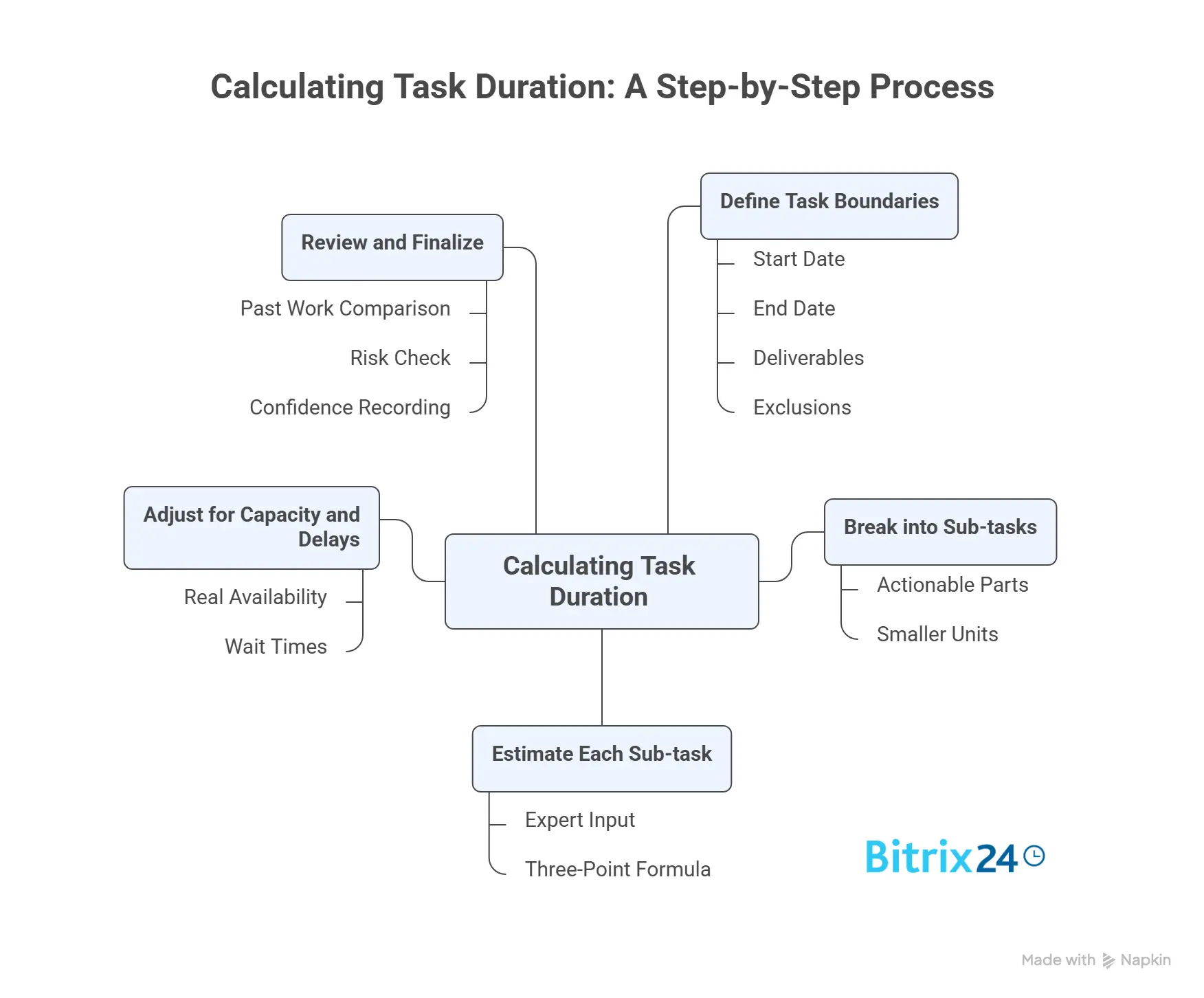
The fix isn't complicated, but it does need discipline: define the task, break it into smaller parts, estimate each one, adjust for capacity and delays, then review the number before it becomes a commitment.
This guide walks through the calculation step by step, with a simple formula and examples you can adapt to your own tasks.
What task duration means in project planning
Task duration is the working time needed to complete a task under expected conditions. It's the elapsed work period, not just the hours someone spends actively typing, building, or reviewing.
That distinction matters because duration gets confused with three other things:
- Effort is the labor required, usually measured in hours.
- Calendar time is the total elapsed time, including weekends, holidays, and idle gaps.
- Deadline is the date the task has to be finished.
Example-in-action: A report takes 8 hours of effort. If the assigned person can only give it 2 hours a day, the duration is 4 working days. Add a two-day wait for manager review and the calendar time stretches to 6 days or more, depending on where the weekend lands.
Steve McConnell, author of Software Estimation: Demystifying the Black Art, points out that "when executives ask for an 'estimate,' they're often asking for a commitment" or a plan to hit a target. Naming which one you're being asked for prevents a lot of downstream conflict.
Three things have to be clear before any estimate holds up:
- Scope: what's included and what isn't
- Resources: who's available and for how much of their day
- Dependencies: what can slow or block the work
If any of those are fuzzy, you can bet the estimate will be too.

Why task duration estimates break down
Vague scope
Most duration problems start here. If "create onboarding deck" actually means gathering content, designing slides, getting legal sign-off, and cycling through revisions, an estimate for "the deck" is wrong before anyone opens the template. Hidden work is where schedules quietly fail.
Invisible dependencies
A task can look like one person's job and actually depend on access, approvals, vendor input, or data from another team. A content designer waiting on brand assets from a busy marketing lead is blocked, and the estimate that ignored the handoff will read as a missed deadline.
Human bias
People are optimistic about their own speed, especially on familiar work, which is the planning fallacy doing its job. Others commit fast because a stakeholder wants a number now. Some lean entirely on memory: "last time it took about a day." Maybe, but under different conditions, with different people, on a simpler version.
Operational reality
This gets ignored most of all. People get interrupted. The American Psychological Association notes that shifting between tasks can consume up to 40% of someone's productive time. Reviewers run late. A senior specialist may finish in half the time a new hire needs, yet plenty of estimates quietly assume everyone works at one speed. They don't.
When estimates break down, look at the work model before you blame the math.
Task Time Estimation Worksheet + 3-Point Buffer Formula
Enter your email address to get a comprehensive, step-by-step guide

Step 1: Define the task boundaries before estimating
Before estimating anything, write down where the task starts, where it ends, and what "done" looks like. That's the minimum. Without it, you're estimating against a moving target. In practice, this is usually the task owner's job, takes two or three minutes, and lives right in the task description.
A workable task definition covers:
- Start point: what triggers the task
- End point: what counts as complete
- Deliverable: the output expected
- Assumptions: conditions you're treating as true
- Exclusions: related work that's out of scope
- Handoffs: where another person or team takes over
Take "prepare client proposal." Too vague to estimate. A bounded version: start when pricing inputs are approved, end when a formatted proposal PDF goes to internal review, deliverable is a complete first draft, excludes legal review and client revisions. Now there's something to estimate.
That rewrite removes the guesswork about what's included. It also kills the classic mismatch where one person estimates drafting only and another assumes drafting plus review plus revisions plus sending.
Quick check: if two people read the description and picture different finished outcomes, it isn't ready to estimate.
Step 2: Break the task into smaller work units
Once the boundaries are set, split the task into smaller parts. Doing so forces you to see the real steps instead of guessing at the whole. Keep it practical, though: a two-hour task doesn't need twenty line items, but work that spans several actions, reviewers, or risk points almost always estimates better in pieces.
One rule does most of the work here: separate active work from waiting time and rework. Lumping them together hides where delay actually comes from.
A simple breakdown table makes that split explicit, which helps most when you're onboarding someone who hasn't done the work before, since everyone follows the same structure.
|
Sub-task |
Type |
Owner |
Notes |
|---|---|---|---|
|
Gather pricing inputs |
Active work |
Account manager |
Needs approved pricing sheet |
|
Draft proposal |
Active work |
Project coordinator |
Uses current template |
|
Internal review |
Waiting/review |
Sales lead |
Usually one review cycle |
|
Revise draft |
Rework |
Project coordinator |
Depends on review comments |
A task tool earns its place here. In Bitrix24's task management, each sub-task becomes a subtask or checklist item with its own owner, so the breakdown lives where the work happens instead of in a separate spreadsheet someone forgets to update.
Teams running a lot of similar work often keep that structure on a Kanban board, where the split between active work and waiting is visible at a glance. The table itself does two jobs: it makes the estimate easier to challenge and improve, and it leaves a record for the next person estimating similar work.

Step 3: Estimate base time using a simple method or formula
Now estimate base time for each sub-task. Base time is the expected duration before you adjust for availability, dependency delays, or calendar constraints.
Three practical methods:
- Expert judgment: ask someone who's done similar work.
- Historical data: pull actual durations from comparable past tasks.
- Analogous estimating: compare to similar work and adjust for the differences.
For uncertain work, a three-point estimate is hard to beat for the effort involved:
(Optimistic + 4 × Most Likely + Pessimistic) / 6
It weights the most likely outcome while still accounting for the good day and the bad one.
Example. A sub-task to draft a proposal:
- Optimistic: 2 hours
- Most likely: 4 hours
- Pessimistic: 8 hours
(2 + 4×4 + 8) / 6 = (2 + 16 + 8) / 6 = 26 / 6 = 4.33 hours
So the realistic base estimate is about 4.5 hours, sitting between the optimistic 2 and the pessimistic 8.
A short worked example with three sub-tasks:
|
Sub-task |
Estimate method |
Base duration |
|---|---|---|
|
Gather inputs |
Historical data |
1.5 hours |
|
Draft proposal |
Three-point formula |
4.5 hours |
|
Revise after review |
Expert judgment |
1 hour |
Total base time: 7 hours. Useful, but not the final duration. It only reflects the work itself under expected conditions.
Step 4: Adjust for resources, dependencies, and non-working time
Estimates get realistic at this step. Seven hours of base effort does not mean the task finishes in one day. You still need to account for who is doing the work, how much time they actually have, and what can stall progress.
Start with available capacity
If the assigned person has only half their day for this task, the effort stretches across more calendar time.
Switching costs make it worse. Someone bouncing between meetings, client messages, and execution work moves slower than someone with protected focus blocks, which is exactly the productivity drain the APA research describes.
Account for dependencies
If the task cannot start until another team delivers data, or it pauses for approval, that gap extends the duration even though nobody is actively working.
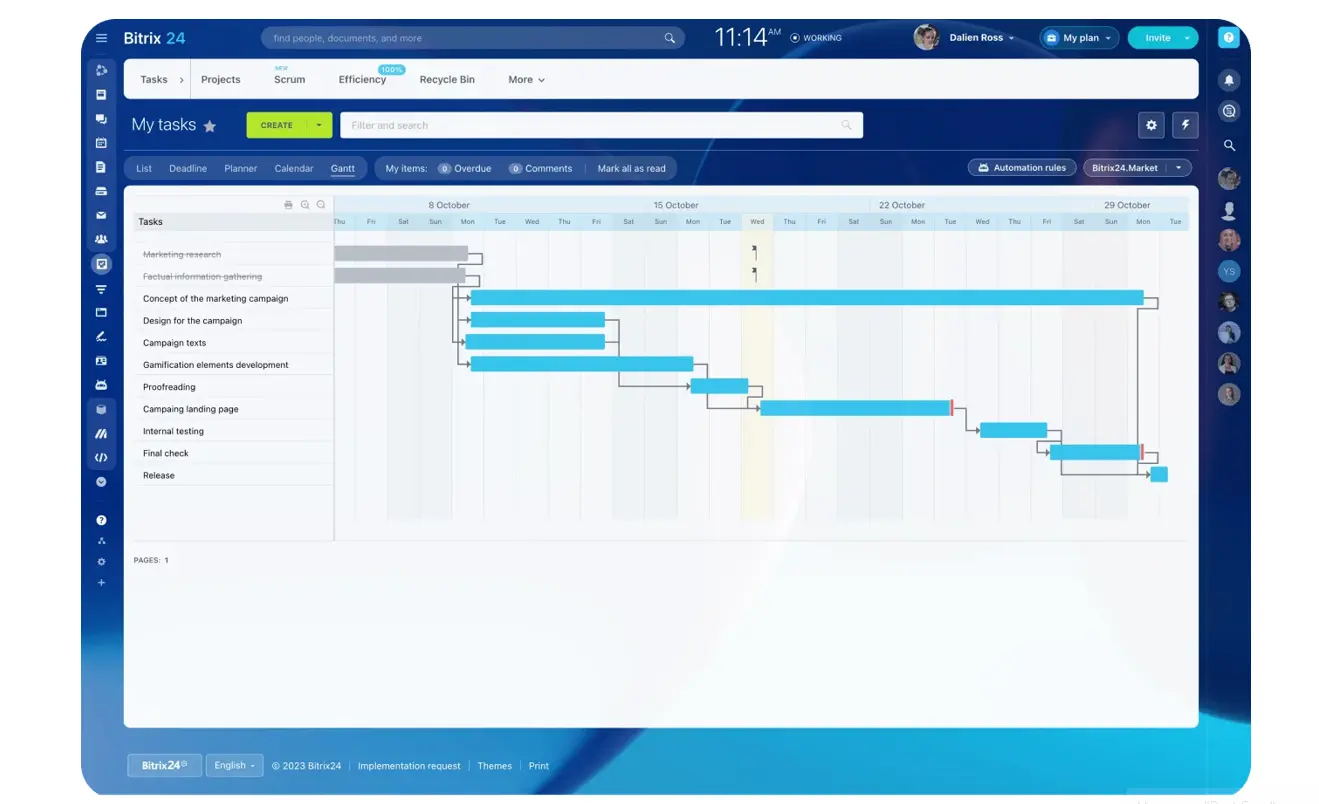
A Gantt chart with dependencies helps here: link the tasks, and when one slips, the tool pushes the dependent dates instead of leaving you to recalculate by hand. A sales team waiting on a credit check before sending a contract will see that wait sit on the timeline rather than discover it on the due date.
Factor in the calendar
Weekends, holidays, planned leave, and fixed review windows all change elapsed time. A task that needs one business day of approval, submitted Friday afternoon, may not move again until Monday or Tuesday.
Use this working formula:
Working duration = effort ÷ daily available capacity + known waiting time
Then check the result against the calendar for weekends, holidays, leave, and fixed review windows.
Example:
Base effort: 7 hours
Capacity: 3.5 hours per day
Internal review delay: 1 business day
No weekend impact
Effort-based duration = 7 ÷ 3.5 = 2 working days. Add the one-day review delay and the total is 3 working days.
Hand the same task to a part-time contributor with 2 hours a day, and the effort alone becomes 3.5 working days before any approvals. That's why effort and duration should never be treated as the same number.
Step 5: Review, stress-test, and finalize the estimate
Before you share the duration, test whether it can survive real project conditions. This does not need a long meeting. A quick comparison against past work and a short team check will catch most obvious misses.
Review the estimate from three angles:
- Past comparison: does it line up with similar completed tasks?
- Execution reality: did you include waiting time, handoffs, availability, and known constraints?
- Risk exposure: are there parts with genuine uncertainty?
If the uncertainty is real, add a buffer on purpose rather than by reflex. A sensible buffer maps to a visible risk, such as a likely second review cycle or a dependency that tends to slip. Padding every task by a flat 20% just hides weak estimating and makes the whole schedule harder to trust.
Finalize by recording three things:
- The final duration number
- A confidence level: high, medium, or low
- The reasoning, including assumptions and the main drivers
A short note might read: "Estimated duration: 3 working days. Confidence: medium. Based on 7 hours of effort, 50% contributor capacity, and a 1-day internal review."
That note matters. Once the estimate becomes part of a schedule, people need to know what the number depends on. If you can’t explain why the estimate is what it is, it’s probably not ready to share.
Common mistakes to avoid
Most duration mistakes come from an incomplete picture of the work, not bad arithmetic. Watch for these traps:
- Estimating before the scope is clear: Define the start point, end point, deliverable, assumptions, and exclusions before anyone gives a number.
- Ignoring waiting time: Reviews, approvals, handoffs, and blocked time still affect duration, even when no one is actively working.
- Assuming full availability: A six-hour task does not finish in one day if the person only has two focused hours available.
- Confusing effort with duration: Effort is active work. Duration is how long the task takes once capacity, dependencies, and waiting time are included.
- Estimating large tasks as one lump: If a task has multiple owners, handoffs, or review cycles, break it down before estimating.
Fix the model, and the number usually gets better. Skip the model, and even a neat estimate can mislead the schedule.
Scaling the process as you grow
As projects multiply, standardization beats individual estimating talent. A lightweight template for task boundaries, a shared breakdown structure, and a log of actual durations improve consistency quickly.
Standardize how estimates are made
Use the same estimating structure across projects: task boundaries, sub-tasks, base estimates, capacity assumptions, waiting time, confidence level, and final duration. That makes estimates easier to review, compare, and improve.
A five-minute estimate check during planning can surface missing dependencies and unrealistic assumptions before they reach the schedule.
Compare estimates with actual results
If your team repeats similar work, store estimate-versus-actual results and use them to calibrate future estimates. The point is not to assign blame. It is to understand where the model was too optimistic, too vague, or missing hidden work.
Standard reports in Bitrix24 tasks can pull actual time logged against tasks, so comparing what you predicted with what happened becomes routine instead of a manual audit.
Keep the system lightweight
A scaling checklist:
- Use the same estimate template across projects
- Track actual durations for repeatable tasks
- Review estimates in team planning, not in isolation
- Flag low-confidence estimates early
- Split large tasks before scheduling them
The goal is a repeatable habit, not an estimating bureaucracy.
The more the structure lives inside the place where work is assigned, tracked, and reviewed, the more likely the habit is to stick.
Plan task durations with fewer surprises
Use Bitrix24 to break down tasks, set owners, track time, map dependencies, and turn rough estimates into reliable project schedules.
Get Started NowFAQ
How do you estimate brand-new work with no history?
Use a three-point estimate with input from the closest available expert, then mark confidence low or medium. New work is exactly where you write the assumptions down clearly.
What tools help most?
A spreadsheet is enough at the start: somewhere to list sub-tasks, estimates, assumptions, and actual results. As volume grows, a task system that captures the breakdown, owners, and logged time in one place saves you from reconciling spreadsheets by hand. Clean records matter more than fancy software.
How often should you revise an estimate?
When scope changes, dependencies shift, or capacity changes materially. Don't re-estimate minor noise, but do update the number when the conditions behind it are no longer true.
How do you handle part-time contributors?
Estimate the effort, then divide by their real available capacity. Someone giving 2 hours a day turns a 6-hour task into about 3 working days before delays or reviews.
When is a task too large to estimate as one unit?
If it spans multiple owners, multiple deliverables, or more than one major review cycle, it's usually too large. Break it down. Big single-number estimates hide risk instead of measuring it.
Bottom line
Calculating task duration is less about perfect prediction and more about disciplined assumptions: Define the task, split the work, estimate the parts, adjust for capacity and delays, then review the number before it becomes a commitment.
Do that consistently and estimates stop being guesses people defend after the fact. They become planning inputs your team can challenge, improve, and learn from.
Bitrix24 keeps the estimating habit close to the work: task breakdowns, owners, dependencies, time tracking, reports, and project schedules all sit in one workspace.
Try it for your next project and turn rough guesses into estimates your team can actually plan around.