Project Scheduling Fundamentals: A Beginner’s Guide


Project scheduling is often mistaken for putting due dates on a calendar. In reality, it’s the process of turning project work into a usable delivery timeline: what needs to happen, what depends on what, who is needed, and where timing risk sits.
That difference matters quickly.
When a schedule only lists deadlines, teams miss the logic behind the work. One task slips, another team waits, a shared reviewer gets double-booked, and the delay turns into rework, overtime, or budget pressure.
A useful schedule does more than show when work is due. It gives the team a shared view of the path ahead, shows which tasks control the delivery date, and makes project commitments easier to explain and defend.
This guide shows you how to build a project schedule that reflects real work, real dependencies, and real delivery risk.
What project scheduling means in practice
Project scheduling turns project scope into a time-based structure of work. That structure usually includes tasks, duration estimates, dependencies, milestones, and target dates.
It answers one question: what needs to happen, in what order, and by when?
A schedule, not a to-do list
That's different from a to-do list or a calendar. A to-do list records activities. A calendar places events in time. A schedule adds the relationships between pieces of work, so you can see which tasks run in parallel, which ones have to wait, and where the whole thing is exposed to slippage.
Scheduling vs. project planning
People use these terms loosely, so it's worth separating them. Planning is the wider discipline: goals, scope, budget, risks, roles, delivery approach. Scheduling is one part of that picture, focused on the timing and sequencing of execution.
The two depend on each other. Planning defines what success looks like and which constraints matter; scheduling translates that into a timeline the team uses day to day.
Without planning, a schedule has no direction. Without scheduling, a plan stays abstract.
Why project scheduling matters for delivery and team Performance
It makes the work visible
A sound schedule shows not just what's due, but how work stacks up, where handoffs land, and whether the target date is realistic. That matters because delivery problems usually start as sequencing problems long before they show up as a missed deadline.
It aligns people around the same priorities
When several functions are involved, each one optimizes for its own work unless the broader timeline is visible. A shared schedule forces the practical conversation: what has to happen first, what can move, what can't slip, and where extra effort would actually help.
The payoff is concrete. Clear sequencing cuts waiting, duplicate effort, and last-minute scrambles, and it makes escalations useful, because someone can point to a real schedule impact instead of vague urgency.
It supports forecasting and trust
Stakeholders want delivery dates grounded in actual work logic, not hopeful commitments. The cost of getting this wrong is well documented: PMI's 2018 research found that nearly half of projects (48%) aren't completed on time, and organizations waste about 9.9% of every dollar to poor project performance.
A credible schedule won't erase uncertainty, but it makes progress easier to explain and delays easier to diagnose before they get expensive.
Plug-and-Play Project Schedule Template With Auto-Dependencies
Enter your email address to get a comprehensive, step-by-step guide

How project scheduling works: From work breakdown to timeline logic
Schedules get built by breaking outcomes into activities, estimating how long each takes, mapping the dependencies between them, and placing them on a timeline. That sounds mechanical. The value comes from the logic connecting the parts.
Start with a work breakdown
A work breakdown structure (WBS) splits a project into smaller deliverables or tasks that are easier to estimate and assign.
There's a balance to strike. Break the work too coarsely and the schedule stays vague. Break it too finely and you end up with hundreds of micro-tasks nobody wants to update, so the schedule rots within two weeks.
Estimate durations, then map dependencies
Once tasks are defined, you add duration estimates, then connect them. A dependency means one task relies on another starting or finishing first.
This is where a schedule stops being a list and becomes a model: a one-day slip in an upstream task can push several downstream tasks, even though each looked fine on its own.
Pro tip: Estimate elapsed time, not just effort
A task that takes three hours of work can still take three days on the schedule if it needs input, review, approval, or access to a shared specialist. Beginners often estimate effort and forget elapsed time, which makes the timeline look cleaner than the project will feel.
When you estimate a task, ask two questions: how much active work is required, and how long will it realistically take to move through the people or approvals involved?
Visualize it and find what controls the finish date
- Gantt charts show tasks as bars across a timeline, making overlaps, sequence, and milestone dates easy to read. A Gantt chart with dependency links updates the downstream bars automatically when one task moves, which is the whole point of building the logic in the first place.
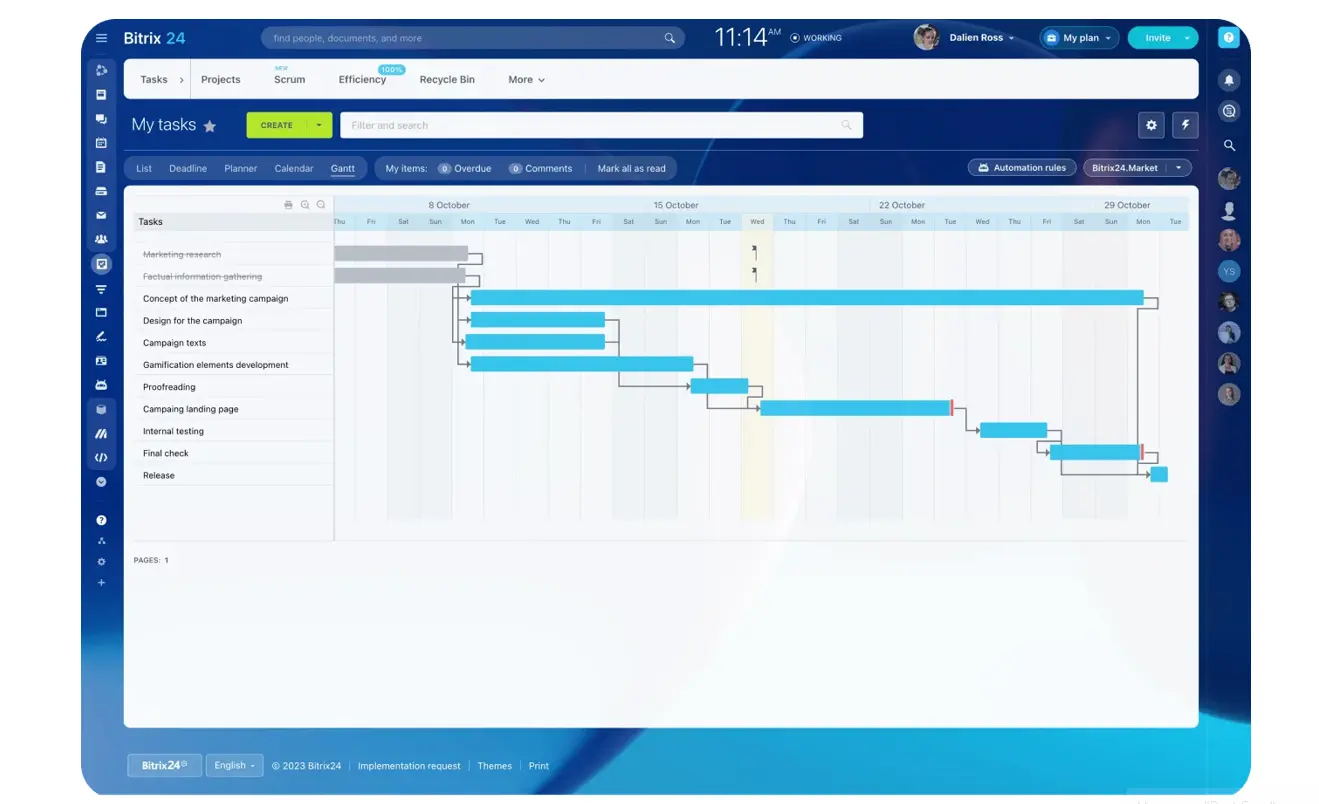
- Milestones mark checkpoints: approval, launch readiness, the end of a major phase.
- Critical path analysis identifies the chain of tasks that directly sets the finish date. If a task on that chain slips, the project slips unless something else gives.
Pro tip: Protect the critical path before you polish the rest
Once you know the critical path, use it to focus attention. Those tasks deserve the clearest owners, the earliest risk checks, and the fastest escalation route, because delay there is most likely to move the final date.
Non-critical tasks still matter, but they should not get the same level of urgency if they have slack. A good schedule helps the team see where pressure actually belongs.
Here's how the common tools and concepts compare:
|
Tool or technique |
What it shows |
Most useful when |
Common limitation |
|---|---|---|---|
|
Work Breakdown Structure |
The project divided into smaller pieces of work |
Defining scope clearly before scheduling |
Doesn't show timing or sequencing by itself |
|
Gantt Chart |
Tasks mapped on a timeline with overlaps and dates |
Communicating schedule structure and progress |
Gets cluttered on complex projects |
|
Milestones |
Key checkpoints or major deliverables |
Tracking commitments or review points |
Too many milestones reduce clarity |
|
Dependency Mapping |
Relationships between tasks |
Understanding sequence and coordination risk |
Missed dependencies create false confidence |
|
Critical Path Analysis |
The task sequence that controls the finish date |
Assessing schedule sensitivity and delay impact |
Less useful when durations are highly uncertain |
Summary: a schedule works when it explains both when work happens and why a timing change ripples through the rest of the project.
Core scheduling components: Tasks, dependencies, milestones, resources, and critical path
Every schedule is built from a few mechanisms. They sound basic, but each one decides whether the timeline is realistic.
Tasks define the work
Tasks describe the work to be done. Definition matters, because a vague task can't be estimated or assigned. "Prepare launch materials" tells you very little. "Draft landing page copy" and "Approve legal disclaimer" describe concrete work someone can pick up and finish.
Dependencies define the order
Dependencies show what has to happen before something else can start or finish. Some work runs in parallel; much of it can't. Design often has to finish before development starts. Client sign-off has to land before production begins.
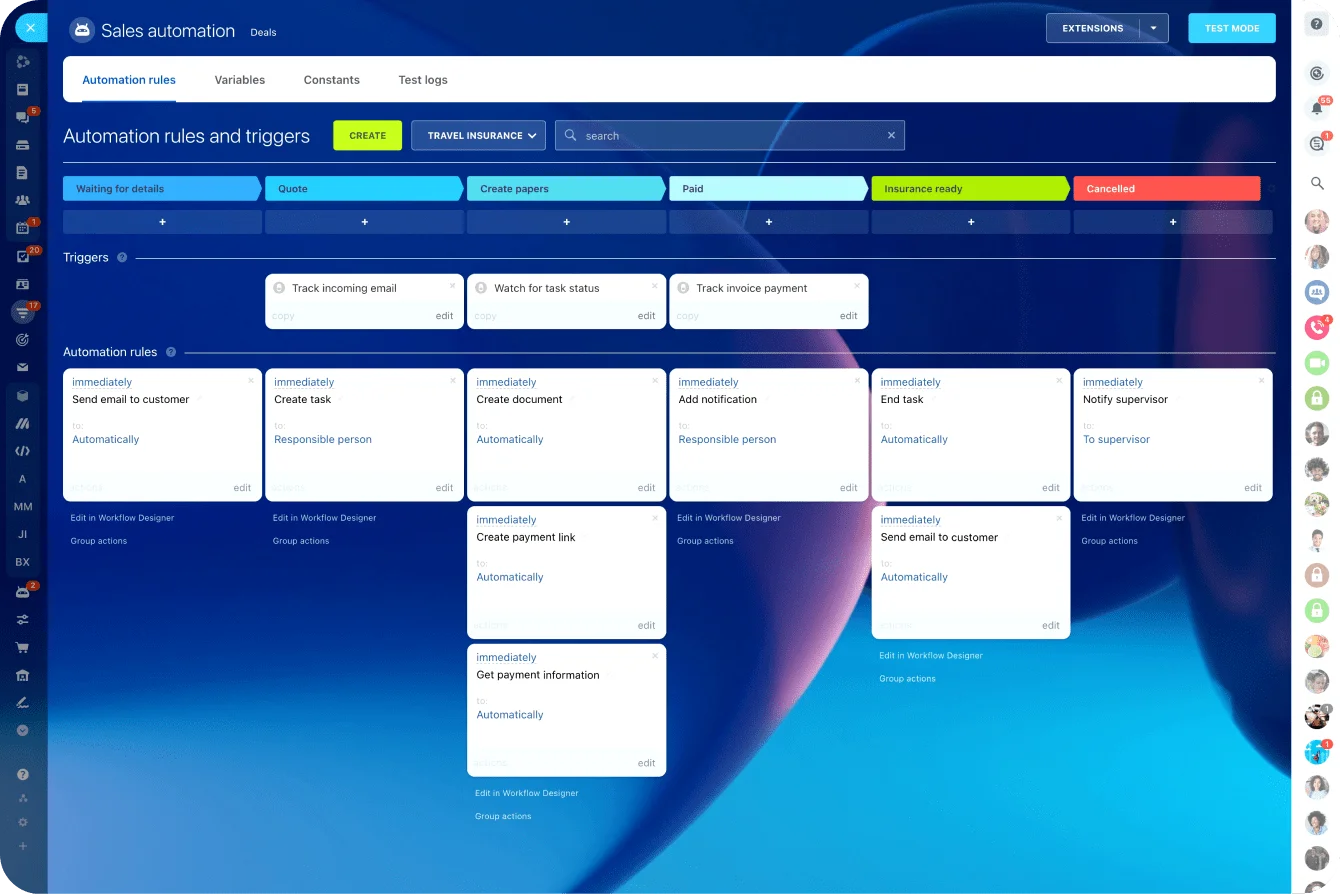
Miss a dependency and the schedule looks faster than reality. Tools that let you set automated triggers between tasks help here, moving a successor into "ready" the moment its predecessor closes instead of relying on someone to notice and chase it.
Milestones mark the checkpoints
Milestones mark moments rather than effort: contract signed, testing approved, launch complete. Stakeholders care about these checkpoints even when they don't track individual tasks.
Resources test the timeline against capacity
Resources matter because work doesn't happen in a vacuum. A schedule can look reasonable until two critical tasks both need the same engineer, analyst, or reviewer in the same week. Availability shapes real delivery capacity. Ignore it and the timeline is theoretical.
Slack shows where the schedule has room
Slack, also called float, is how long a task can slip without affecting the finish date. It shows where the schedule has give. Not every delay matters equally; some tasks can drift a few days with no wider effect.
Critical path shows what controls the finish date
The critical path is the sequence of dependent tasks with zero or minimal slack that sets the completion date. It's the most sensitive part of the project. Move a task on the critical path and the end date usually moves too.
These pieces interact constantly. A duration estimate affects dependency timing. A dependency affects whether slack exists. A resource limit can shift the critical path onto a different chain of tasks. That's why scheduling isn't merely date assignment; it's the logic of work under real constraints.

Common project scheduling mistakes and misconceptions
Beginner scheduling mistakes usually come from treating the schedule as a document to complete instead of a model to test. Watch for these traps:
- Detail is not the same as control: A schedule can be beautifully organized and still fail if the estimates are weak, the scope keeps shifting, or the team ignores real dependencies. Detail only helps when the assumptions underneath it are credible. Scope drift is the usual culprit: PMI found that 52% of projects experience scope creep, up from 43% five years earlier, and a tidy schedule does nothing to stop requirements from expanding underneath it.
- Not every task is equally urgent: Some activities gate later work; others have slack and can move without consequence. When beginners cannot tell the two apart, the team burns energy pushing everything at once instead of protecting the few tasks that actually control delivery. A marketing team prepping a campaign may treat creative production and legal review as equally pressing, when it is usually the review queue that quietly sets the launch date.
- People are shared resources: A schedule may assume every task starts exactly when planned, which only holds if the right people are free at the right time. In practice, reviewers are busy, specialists get pulled across projects, and approvals take longer than anyone budgeted. Beginner-built schedules tend to break here.
- Optimism gets baked into estimates: Many first schedules use best-case durations instead of evidence from past work. A software team assumes testing takes two days because that is the target, not because that is what testing usually takes. A sales team tracking a complex deal assumes procurement signs same-day because it should, even though it rarely does. The result looks efficient and carries hidden delay risk from day one.
- A changed schedule doesn’t mean the plan failed: Schedules need adjustment; that is normal. The problem is not change. It is changing one task without tracing the downstream effects. A live schedule should reflect reality, not preserve a comfortable fiction.
Real-world business use cases for project scheduling
Project scheduling shows up across almost every business function, even when nobody calls it that. The context changes, but the logic stays the same: define the work, sequence it realistically, and give people enough visibility to coordinate.
Product launches
In a product launch, scheduling coordinates design, messaging, pricing, technical readiness, sales enablement, and go-live timing. Skip the shared schedule and each function can finish its own work yet still miss the market window because the handoffs between them weren't sequenced.
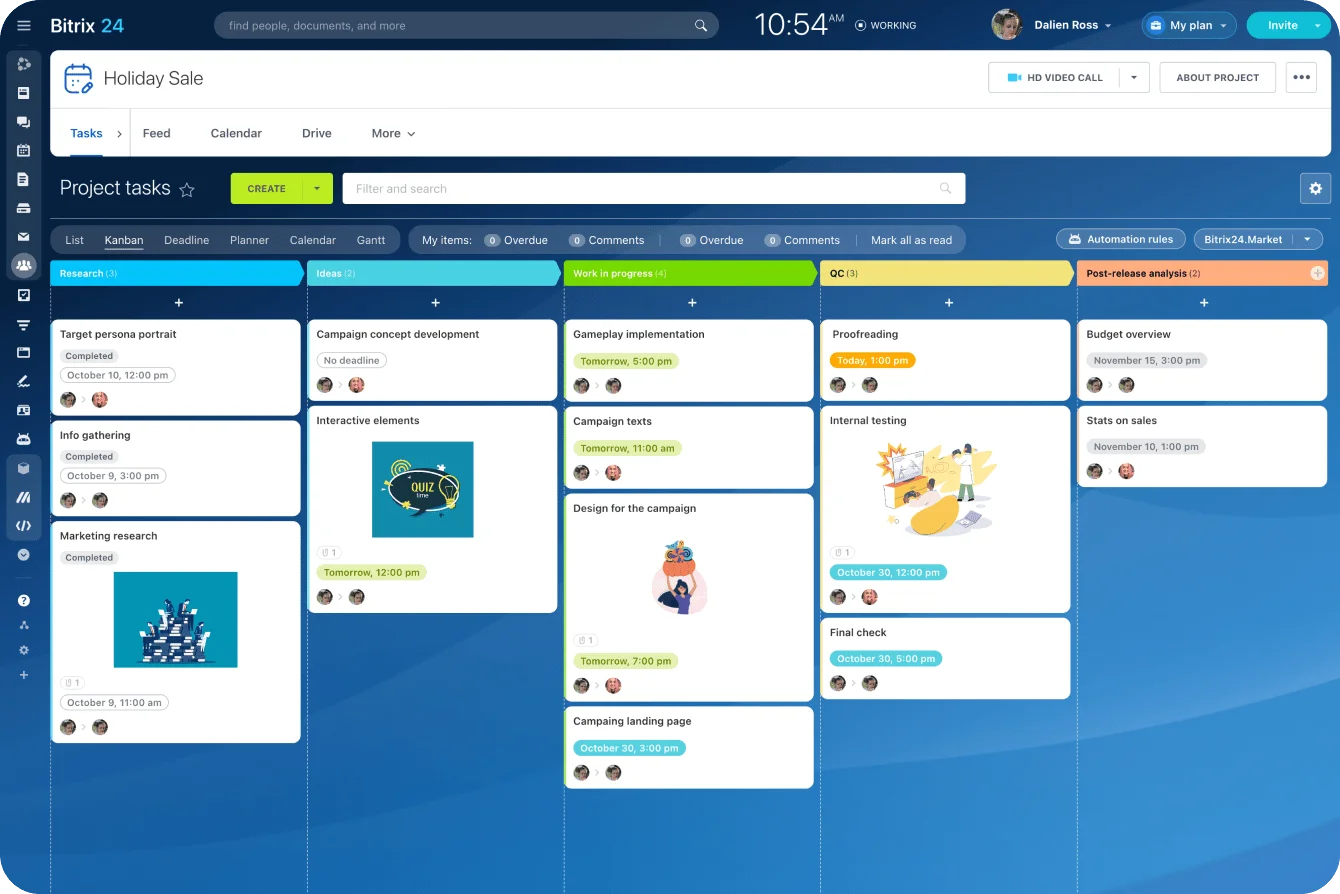
This is where a shared project management workspace earns its keep, since every function works against the same timeline rather than a private copy.
Software implementation
In software implementation, sequencing matters even more. A delay in data migration pushes testing, which pushes user training, which moves launch readiness. The dependency chain makes those links visible early instead of surfacing them the week before go-live.
Marketing campaigns
Marketing campaigns run on the same fundamentals. Creative production, channel planning, approvals, asset delivery, and activation all hinge on timing. Even a modest campaign slips when legal review or vendor turnaround was assumed rather than scheduled.
Construction and field work
Construction is the obvious case because the dependencies are physical and can't be faked. Site prep, permits, structural work, inspections, and finishing trades have to happen in order. A weak schedule shows up fast on-site as downtime and crews tripping over each other.
Client services and internal operations
Client service teams schedule onboarding, delivery phases, review cycles, and renewal or handoff moments. Internal operations does the same for system rollouts, process changes, and compliance work.
Different contexts, identical logic: scheduling helps teams see what has to happen next, what can happen in parallel, and where poor sequencing will create avoidable delays.
Scaling project schedules: Operational impact, tradeoffs, and limitations
Why scale makes schedules fragile
As projects grow, schedules get more fragile. More teams mean more handoffs, and more handoffs mean more dependencies. A small slip that's harmless on a simple project becomes a coordination problem when several workstreams are waiting on each other.
Where the value shows up
This is where scheduling matters beyond the project team.
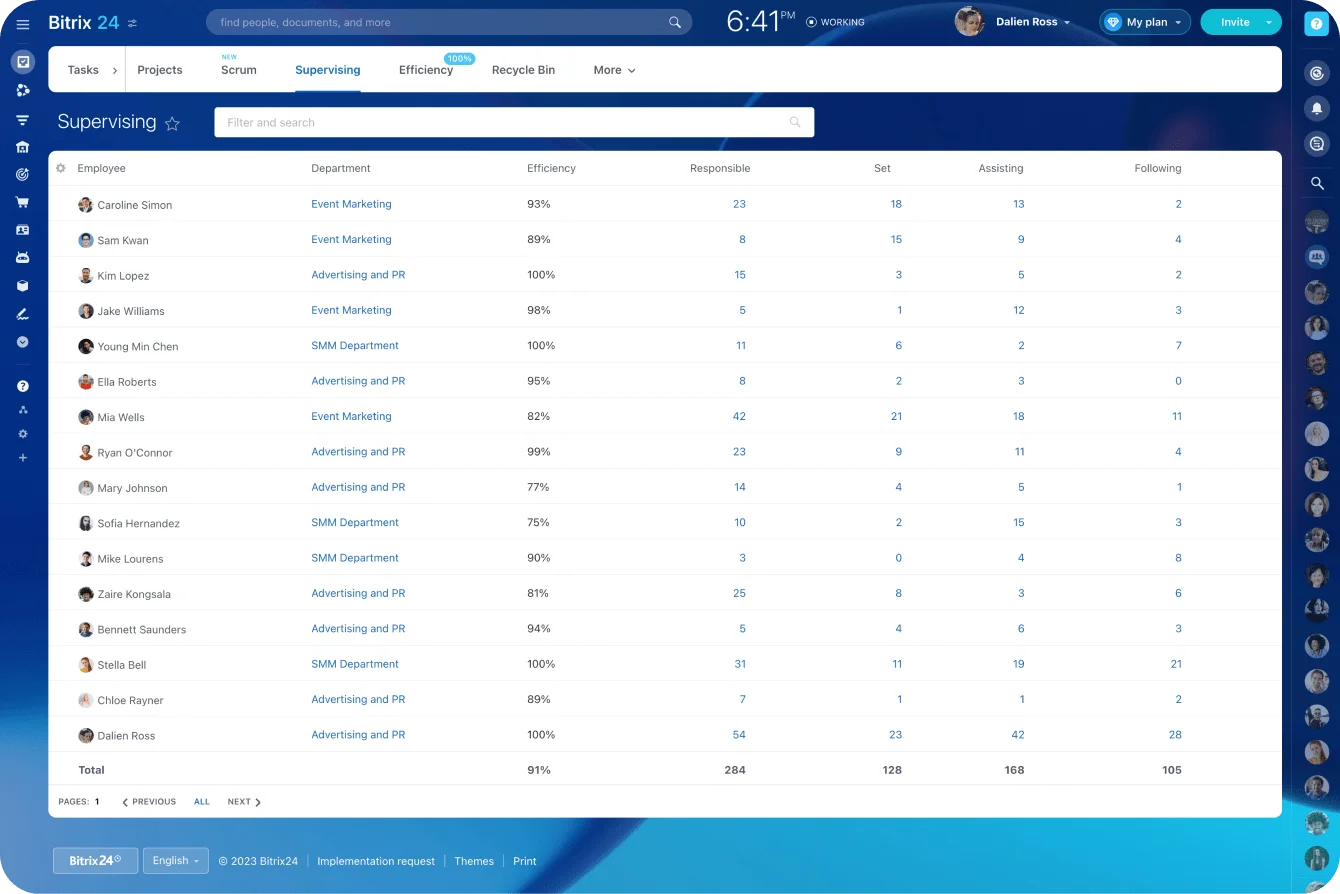
Good schedules sharpen forecasting, governance, and reporting, because leaders can see likely impact rather than just status. Portfolio decisions improve when timing rests on structured schedule logic instead of broad confidence.
Pulling standard schedule and workload reports across active projects gives that view without someone rebuilding a spreadsheet by hand every Monday.
The maintenance tradeoff
A more complex schedule needs more maintenance. Push the detail too far and the team spends its time updating the schedule instead of using it, which produces false precision: a plan that looks exact on paper but isn't actually more accurate.
Limits in fast-changing work
Scheduling tools pay off most when work has real dependencies, visible milestones, and shared resources, especially on cross-functional projects where timing transparency matters. But predictability has limits. In agile product development or exploratory projects, you can't lock everything down far in advance.
That doesn't make scheduling pointless. It changes the level of detail that makes sense. In uncertain work, a schedule leans on near-term commitments, review points, and dependency windows rather than fixed long-range dates.
The goal holds steady: better coordination and better decisions, not pretend certainty.
Summary: as scale increases, scheduling creates more business value, but only if the schedule stays usable, current, and matched to the level of uncertainty.
FAQs
How often should a project schedule change?
As often as reality requires, but not casually. Update it when task timing, dependencies, scope, or resource availability change in ways that affect delivery logic. Frequent updates are normal. Uncontrolled updates that erase accountability aren't.
What if duration estimates are unclear?
Use the best available range from similar past work, team input, and known constraints. The point is to acknowledge uncertainty, not hide it. When estimates are weak, the schedule should show it through buffers, review checkpoints, or shorter planning horizons.
Do small projects need Gantt charts?
Not always. For a simple project with few dependencies, a lightweight Kanban board or task list is usually enough. Gantt charts earn their place once tasks overlap, handoffs matter, or stakeholders need a clear visual of sequence and timing.
How do you handle shifting dependencies?
Reassess the schedule logic, not just the affected task. A changed dependency can move milestones, resource timing, and the critical path. The right move is to trace the ripple effects quickly, then reset expectations against the new sequence.
What matters more: hitting dates or keeping the schedule accurate?
An accurate schedule, because it's what enables better decisions. A team can't manage tradeoffs well when the schedule no longer reflects the actual state of the work.
Build project schedules your team can trust
Bitrix24 unites tasks, Gantt charts, dependencies, workloads, calendars, and collaboration so timelines stay clear and current.
Get Started NowBuild schedules people can actually use
The best project schedules are useful before anything goes wrong.
They show the work, the order, the pressure points, and the people involved. So when something slips, the team can see what changes, what still holds, and where to focus next.
That’s the point for beginners. You don’t need a perfect prediction of the future; you need a schedule that helps the team understand the work well enough to coordinate, adjust, and keep moving.
Bitrix24 brings tasks, projects, Gantt charts, dependencies, workload views, calendars, automation, and collaboration into one workspace, so your schedule stays close to the work it is meant to manage.
Build your next project schedule in Bitrix24 and give your team a timeline they can use when decisions matter. Start for free today.