7 Steps to Frictionless Hybrid Studio Scheduling

Running a studio that serves both in-person and online clients sounds great on paper - until you're juggling spreadsheets, fielding "is there still space?" emails at midnight, and manually tracking who owes what for their membership. Hybrid studio scheduling has become the operational backbone for fitness studios, yoga spaces, dance academies, and creative workshops that want to offer flexibility and still keep their sanity. The reality is simpler than it looks: most of the chaos can be automated when you have the right systems working together.
This article walks through seven practical steps to build a hybrid studio scheduling system where live streams run on autopilot, memberships manage themselves, and waitlists promote clients without you lifting a finger.
Hybrid Studio Scheduling: Live Streams, Memberships & Waitlists That Run Themselves
Whether you're operating a boutique Pilates studio or a multi-location dance school, these strategies will help you reclaim hours every week while keeping your clients happy.
1. Map Out Your Class Structure Before Touching Any Software
Before you start clicking buttons in scheduling software, grab a whiteboard (or a blank document) and sketch out what you're actually offering. Most studios run into trouble because they try to adapt their operations to fit a tool rather than finding tools that fit their operations. Getting this foundation right sets the tone for how smoothly your class bookings will flow once the system goes live.
Start by listing every class type you offer - both in-studio and virtual. Note which ones happen at fixed times weekly (your recurring sessions) and which are one-offs or workshops. Then identify which classes can run as hybrid (simultaneous in-person and streaming), which are in-person only, and which work better as pure online offerings.
This exercise reveals patterns you might not have noticed. Maybe your 6 AM yoga class attracts mostly streamers because nobody wants to commute that early, whereas your evening dance sessions fill up in-studio first. These insights shape how you configure your hybrid studio scheduling - determining camera placement, instructor positioning, and how many spots to allocate for each format.
Document your membership tiers, too. What does each level include? How many classes per month? Access to recordings? Priority booking? This clarity prevents the "I thought my membership included that" conversations that eat up administrative time.
Think about seasonal variations as well. Summer schedules often differ from winter ones. Holiday weeks might mean reduced offerings. Having a clear picture of your annual rhythm helps you build a hybrid studio scheduling system flexible enough to accommodate changes so you’re not starting from scratch each time.

2. Build an Integrated Calendar That Shows the Full Picture
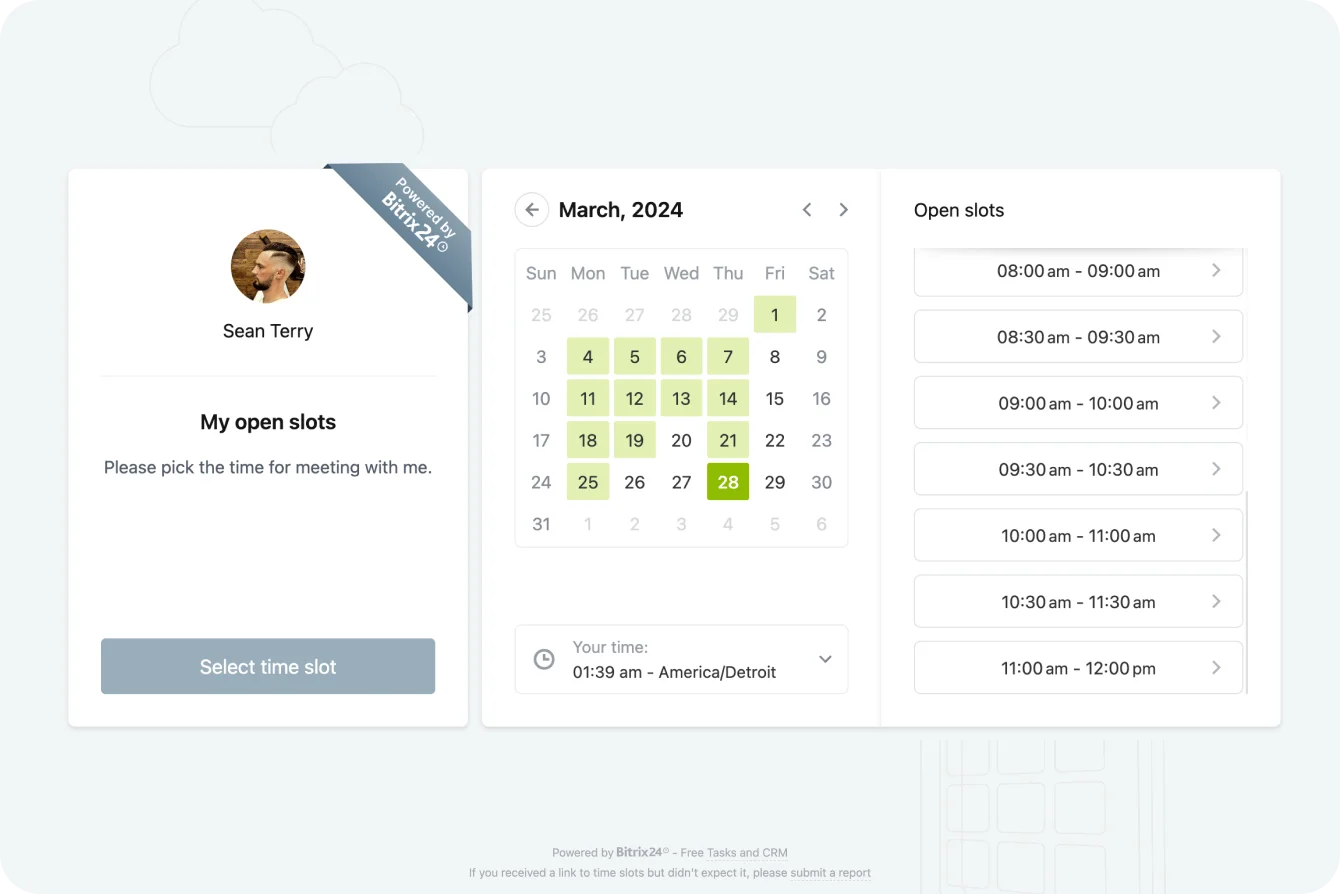
The calendar sits at the heart of any hybrid studio scheduling system. A scattered approach - where in-person bookings live in one place, Zoom links in another, and instructor availability in a third - creates gaps where double-bookings and missed sessions slip through.
Your integrated calendars should display:
- All scheduled classes with format indicators (in-person, virtual, hybrid)
- Instructor assignments and availability blocks
- Room or equipment reservations
- Client bookings with real-time capacity updates
- Buffer time between sessions for setup and breakdown
When a client books a spot, the calendar should automatically update capacity across all views. If someone grabs the last in-studio spot for Tuesday's 9 AM class, the online booking page should reflect that change instantly while still showing available streaming slots.
Color-coding helps instructors and staff parse information quickly. Blue for virtual sessions, green for in-person, orange for hybrid - whatever system makes sense for your team. The goal is to glance at the week ahead and immediately understand what's happening without reading every entry.
Sync capabilities matter here. Your scheduling calendar should talk to personal calendars (Google, Outlook, Apple) so instructors receive reminders and clients get automatic calendar invites with all relevant details attached.
Staff coordination becomes simpler when everyone works from the same scheduling view. The front desk knows what's happening each hour. Instructors can view their upcoming classes, including client counts and format details. Studio owners can review the week from anywhere. This shared visibility reduces the "wait, I thought you were covering that class" moments that happen when information lives in separate silos.
3. Configure Your Live-Stream Setup to Launch Automatically
Nothing derails a virtual class faster than technical fumbling. "Hold on, let me get the camera working", or "Can everyone see my screen?". These moments frustrate online participants and make your studio look unprofessional.
A well-configured live-stream setup removes the human error factor. When a hybrid class is scheduled, the system should automatically:
- Generate unique video meeting links for that session
- Embed those links in client booking confirmations
- Send reminder emails with access instructions 24 hours and 1 hour before class
- Provision the virtual room with appropriate settings (waiting room, recording options, participant controls)
Your video meeting links should be specific to each session rather than using a generic "studio Zoom room" that gets shared everywhere. Session-specific links improve security and allow you to track attendance accurately.
Consider the physical setup, too. Mark camera positions on the floor with tape so instructors know exactly where to stand for optimal framing. Pre-set audio levels and lighting configurations that can be activated with a single switch or button. The fewer decisions an instructor faces during class, the smoother the experience for everyone.
Recording policies deserve attention as well. Some clients expect on-demand access to missed classes; others have privacy concerns about being recorded. Build these preferences into your hybrid studio scheduling workflow so the system respects individual choices automatically.
Test your setup regularly. Technology that worked perfectly last month might glitch after an update. A quick technical check before busy class days - audio levels, camera angles, internet connection stability - catches problems before they affect paying clients. Create a simple checklist that takes two minutes to run through, so you’re not leaving things to chance.
4. Set Up Membership Tracking That Handles the Math
Membership tracking becomes complicated fast when you're offering hybrid options. A client might have a 10-class pack, attend 3 in-person sessions, stream 4 classes from home, and have 3 remaining. Multiply that by dozens or hundreds of members, and manual tracking becomes impossible.
Your system needs to deduct credits or update membership status the moment someone checks in or joins a stream. This attendance sync between booking and fulfillment prevents the "I thought I had two classes left" disputes that sour client relationships.
Build logic for different membership scenarios:
- Unlimited memberships that track attendance for analytics without decrementing
- Class packs that reduce by one per attended session, regardless of format
- Tiered memberships where certain classes cost extra credits
- Introductory offers with expiration dates
- Family or corporate accounts that share a credit pool
Automated notifications help members stay informed, freeing you from routine follow-ups. A message when they're down to their last two classes, an alert when their membership approaches renewal, a gentle nudge when they haven't attended in two weeks - these touchpoints keep members engaged and reduce surprise billing complaints.
Payment processing should tie directly into membership status. When a membership lapses, booking access pauses automatically. When payment processes successfully, reactivation happens automatically in the background. This hands-off approach works around the clock, processing renewals and updates while you sleep.
Reporting capabilities round out a solid membership tracking setup. At any moment, you should be able to pull reports showing active members by tier, upcoming renewals, at-risk accounts showing low engagement, and revenue projections for the coming months. This visibility supports business decisions about pricing, promotions, and capacity planning.
5. Create Waitlist Automations That Move Clients Forward
Popular classes fill up. That's a good problem to have, but only if you handle overflow gracefully. Waitlist automations transform the frustration of "class full" into an opportunity to retain customers by keeping interested clients engaged rather than sending them elsewhere.
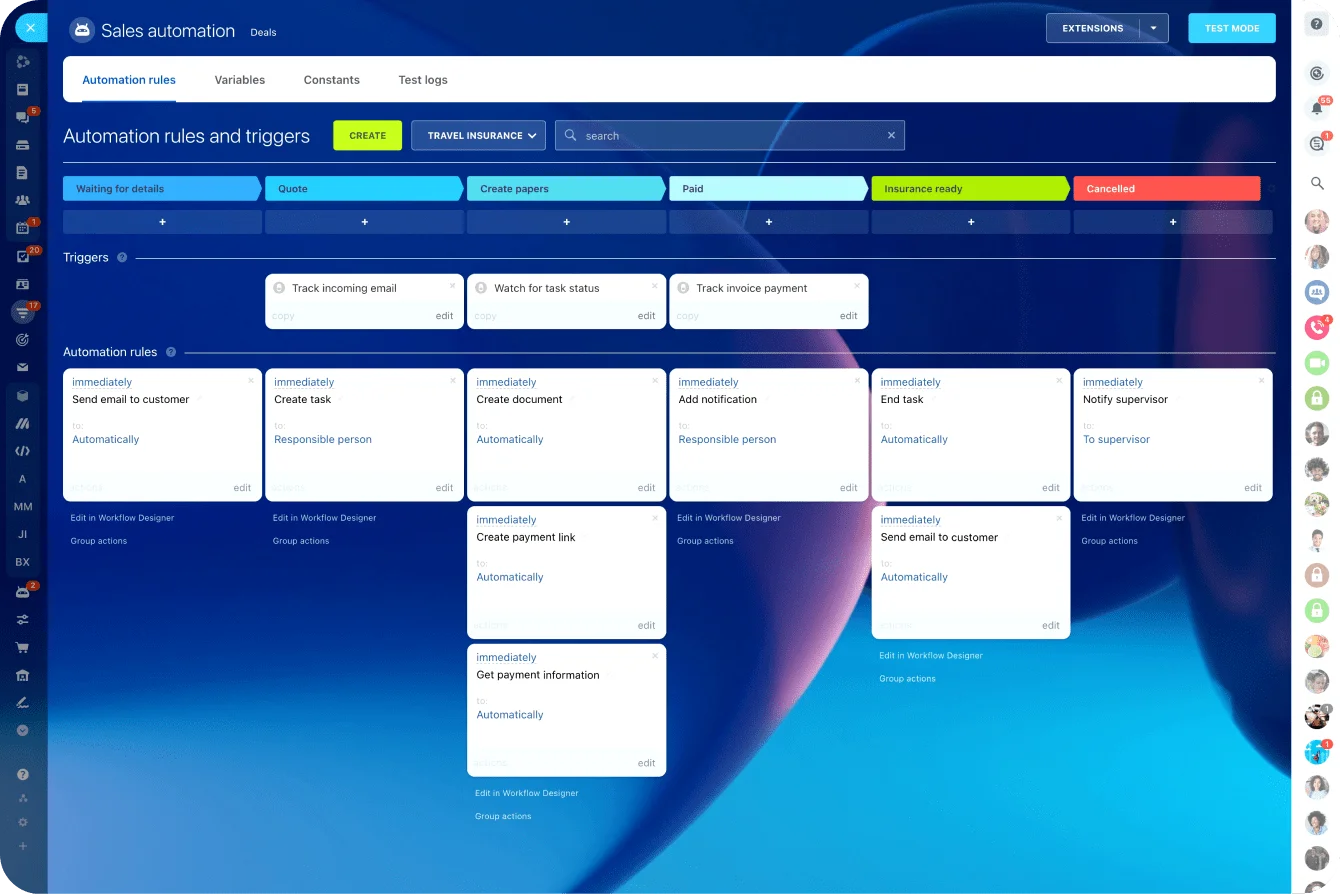
A smart waitlist system does more than collect names. When a spot opens - whether someone cancels, a no-show gets marked, or you decide to expand capacity - the next person in line should receive an immediate notification with a time-limited offer to claim the spot.
Configure your waitlist logic thoughtfully:
- How long does someone have to accept before the spot goes to the next person? (15-30 minutes works for most studios)
- Do members get waitlist priority over drop-in clients?
- Should the system auto-book when a spot opens, or require confirmation?
- What happens if no one on the waitlist responds?
The auto-promote feature saves enormous time. Instead of manually texting "Hey, a spot opened up!" and waiting for responses, the system handles the entire sequence. Client gets notified, confirms their spot, receives updated booking confirmation with any video meeting links for hybrid sessions, and the calendar updates accordingly.
Waitlists also generate valuable data. Which classes consistently have waitlists? That information justifies adding more sessions or expanding capacity. Which clients frequently join waitlists but rarely get spots? They might be candidates for membership upgrades with priority booking perks.
Communication matters throughout the waitlist experience. Clients should know their position (or at least a general sense of likelihood), receive updates when the situation changes, and receive clear instructions when it is their turn. Transparent communication builds trust even when you can't give someone the spot they wanted right away.
6. Implement Form-Based Signups That Capture What You Need
New client intake and class registration shouldn't require back-and-forth emails. Form-based signups collect the right information upfront, route it to appropriate systems, and trigger next steps automatically.
Your intake forms should capture:
- Contact information and emergency contacts
- Health considerations or injuries instructors should know about
- Experience level with your class types
- How they heard about your studio
- Preferred communication method
- Waiver and liability acknowledgments
Design forms with conditional logic so clients only see relevant questions. Someone signing up for gentle yoga doesn't need questions about dance experience. A returning member doesn't need to complete the full intake again - just update anything that's changed.
Form submissions should flow directly into your client database and trigger appropriate sequences. New client? Send the welcome email series and first-class preparation guide. Returning client updating their info? Flag the record for front desk awareness. Someone indicating a new injury? Alert their usual instructor.
This approach to hybrid studio scheduling intake eliminates the clipboard-and-paper bottleneck that slows check-in and creates data entry backlogs. Clients complete forms on their own time, from their own devices, and their information is already in your system when they arrive.
Mobile optimization is non-negotiable for modern form design. Many clients will complete forms on their phones, often while multitasking. Forms that require zooming, horizontal scrolling, or tiny tap targets frustrate users and increase abandonment rates. Test every form on multiple devices before putting it into use.
Consider what happens after submission, too. A confirmation message or email reassures clients that their information was received. Clear next steps - what to bring to their first class, how to access their booking confirmation, who to contact with questions - reduce pre-class anxiety and support calls.
Hybrid studio: schedules, live streams and memberships
Enter your email address to get a comprehensive, step-by-step guide

7. Build Feedback Loops That Improve Everything Over Time
Scheduling systems generate data. Smart studios use that data to continuously refine their offerings and operations.
Track metrics that matter for hybrid studio scheduling performance:
- Class fill rates by format (in-person vs. streaming vs. hybrid)
- No-show rates and patterns
- Membership utilization rates
- Waitlist conversion rates
- Customer retention by membership type
- Revenue per class slot
Spot trends over time. Maybe streaming attendance drops on Friday evenings but spikes on Saturday mornings. It may be that one instructor’s classes consistently fill the hybrid spots, whereas another instructor’s classes are mostly run in person. This intelligence shapes scheduling decisions, instructor development, and marketing focus.
Client feedback adds qualitative depth to quantitative data. Post-class surveys (kept short - 2-3 questions max) reveal experience issues that numbers miss. Was the audio clear for streamers? Did in-person participants feel instructors paid equal attention to virtual attendees? Would clients prefer different time slots?
Close the loop by acting on feedback visibly. When clients see their input leading to changes - a new evening class added, camera angles improved, a requested instructor teaching more sessions - they feel invested in your studio's success. This engagement drives loyalty better than any discount code.
Instructor feedback deserves attention alongside client input. The people teaching your hybrid classes see what works and what doesn't from the front lines. Regular check-ins about technical issues, class flow, and client behavior patterns surface insights that pure data analysis might miss. Build a culture where instructors feel comfortable sharing observations without fear of criticism.
Streamline Your Hybrid Studio Scheduling with Bitrix24
Building a self-running hybrid studio scheduling system requires tools that work together seamlessly. Bitrix24 brings the core components - calendars, video conferencing, CRM, and automation - into a single platform designed for precisely this kind of integrated workflow.
The Calendar feature serves as your scheduling command center, syncing across devices and team members with real-time updates. When class capacity changes or sessions are rescheduled, everyone sees the current picture instantly. Color-coded views and filtering options let you focus on what matters for any given moment - this week's hybrid classes, a specific instructor's schedule, or open slots that need filling.
Video Meetings integrate directly with scheduled sessions, generating unique links automatically and embedding them in client communications through your workflows. No more copying Zoom links between apps or forgetting to update meeting IDs. The same platform you use to manage your bookings is where video calls take place, creating a unified experience for staff and clients alike. Clients can book their own sessions and join waitlists from one place.
For membership tracking and client management, the CRM and Catalog features provide the structure needed to manage tiers, class packs, and credit-based access through automation. Track membership tiers, monitor credit balances, automate renewal reminders, and maintain complete client histories instead of wrestling with spreadsheets. Every interaction - from first inquiry through years of membership - lives in one accessible record.
Forms capture client information exactly how you need it, feeding directly into your database and triggering automation sequences. Waitlists, confirmations, reminders, and follow-ups run on their own once you've configured the workflows.
The platform scales with your studio. Whether you're a solo instructor running a handful of weekly classes or a multi-location operation with dozens of staff members, the same core tools adapt to your needs. Start with the features you need today and activate additional capabilities as your business grows.
Ready to stop juggling and start automating? Sign up for Bitrix24 and build a hybrid studio scheduling system that runs itself while you focus on what you do best - creating amazing experiences for your clients.
Automate Your Hybrid Studio Scheduling
Get Bitrix24 to smoothly manage live streams, memberships and waitlists. Reclaim your time and stay sane and organized.
Get Started NowFAQ
How do we automate hybrid studio scheduling without double-booking?
Automating hybrid studio scheduling without double-booking requires a centralized calendar system that updates capacity in real-time across all booking channels. When a client reserves a spot - whether in-person or streaming - the system should immediately reduce available capacity and reflect that change everywhere bookings happen. Setting up room and instructor availability blocks prevents conflicts before they occur. At the same time, automated confirmation emails with specific class details and video meeting links reduce confusion about where and how to attend.
How can memberships and credits sync with hybrid studio scheduling?
Memberships and credits sync with hybrid studio scheduling through automated attendance tracking that connects booking confirmations to actual check-ins or stream joins. When a member attends a class - regardless of format - the system deducts credits or logs the visit against their membership automatically. This attendance sync occurs in real time, keeping membership balances accurate and eliminating the need for manual reconciliation. Configuring different deduction rules for various class types and membership tiers handles complexity while keeping the client experience simple.
Can waitlists auto-promote clients in hybrid studio scheduling?
Waitlists can auto-promote clients in hybrid studio scheduling when configured with the proper automation rules. The system monitors class capacity and, when a spot opens through cancellation or expansion, immediately notifies the next waitlisted client with a time-limited offer to confirm. If they accept, the booking completes automatically, including any video meeting links for hybrid sessions. If they don't respond within the window, the offer passes to the next person. This hands-off approach fills openings quickly while giving clients fair access to popular classes.