The Barbershop Auto-Funnel in Bitrix24: From Losing Revenue to Loyal Customers
Running a barbershop today isn’t just about great fades and friendly service – it’s about keeping up with clients who expect convenience, speed, and seamless digital communication. Yet many barbershops still lose customers to missed calls, scheduling mistakes, and lack of follow-up, creating unnecessary revenue leaks.
Automation solves these problems by turning chaotic, manual processes into a smooth, predictable client journey that works even while the shop is closed.
In this article, we’ll explore the biggest pain points barbershops face and show how Bitrix24 CRM and automation tools can transform them into loyal, returning customers.
I. Automation as the Ultimate Growth Lever: How to Stop the Revenue Bleeding and Maximize Customer Lifetime Value (LTV)
Every barbershop invests heavily in attracting new clients – ads, Instagram content, location visibility, partnerships, and word-of-mouth. But while marketing costs rise, most shops still rely on outdated, manual processes to capture, serve, and retain customers.
Missed calls during peak hours or after closing time. Forgotten reminders. Lost numbers in notebooks. Administrators overwhelmed with repetitive tasks. Zero follow-up after the first visit.
The result? A huge portion of potential revenue simply slips away. A client may love the haircut, but if you don't stay connected, they'll drift to the next convenient option. Not because you delivered poor service, but because your processes didn't keep up.
Bitrix24 solves this problem by giving barbershops a single, integrated platform that replaces scattered spreadsheets and manual reminders with a fully automated customer journey – from first contact to return visit.
We've put together five critical pain points holding many barbershops back. Here in this article, we'll explore those and also show you how Bitrix24 CRM, sales automation, and marketing tools eliminate them – freeing up your team, stabilizing revenue, and boosting customer lifetime value (LTV).
Pain Point #1: The Invisible Barrier – Losing Clients After Business Hours
The Pain
It happens every day: a potential customer visits your website at 8 PM. They want to book a haircut for tomorrow morning, but the shop is closed and there's no one to answer the phone. The site has no booking button, no online form, no chat.
The potential customer then clicks the back button and books with the first barbershop offering 24/7 online scheduling. You lost the client before your day even started.
The Solution: Bitrix24 CRM Forms + Website Widget
Step 1: Creating a 24/7 Booking Form (CRM Form)
Booking forms in Bitrix24 CRM allow you to create a completely custom form and embed it on your website or social pages. Configuration takes just a few minutes:
- Open the Booking section in the main product menu
- Click “Integrations” => Booking forms => Connect => Add
- Pick one of the three form types (Auto select resource, Select from available resources, Select from all resources)
- Add any fields you like, for example:
- Full name
- Phone number
- Preferred barber (optional – see the previous step)
- Desired service
- Date & time
- Play around with the form layout and colors to make it truly yours
- Once you're done configuring, publish the form
From now on, every submitted form can be set to automatically create a lead or deal in CRM – no manual typing.
Step 2: Activating the Live Chat Widget
The Live Chat Widget can be added to your website and then be used to accept requests from potential customers. It works 24/7 and allows you to capture leads even outside your business hours.
To configure the widget, go to CRM => More => Customers => Contact Center. There, open the Live Chat tile and follow the instructions.
Once you've configured the Live Chat, it will appear on your website and can be used for booking purposes as well. Now your shop captures clients even while you sleep.
Outcome
Every website visitor becomes an automatically created CRM entry. No more lost leads. No more “missed opportunities.” Your competitor is no longer “available” while you're offline – your system is.
Deliver outstanding customer experience!
Enhance support, track customer interactions, and automate follow-ups with Bitrix24 CRM for customer service. Free forever, unlimited users.
GET BITRIX24 CRM FREEPain Point #2: Administrative Mess and Booking Collisions
The Pain
Your administrator spends hours:
- Checking individual barber availability
- Confirming appointments manually
- Managing multiple calendars
- Re-typing client details
- Fixing double bookings
- Giving rushed, unprofessional responses
Clients sense the chaos. Scheduling mistakes damage your reputation.
The Solution: Bitrix24 CRM + Booking
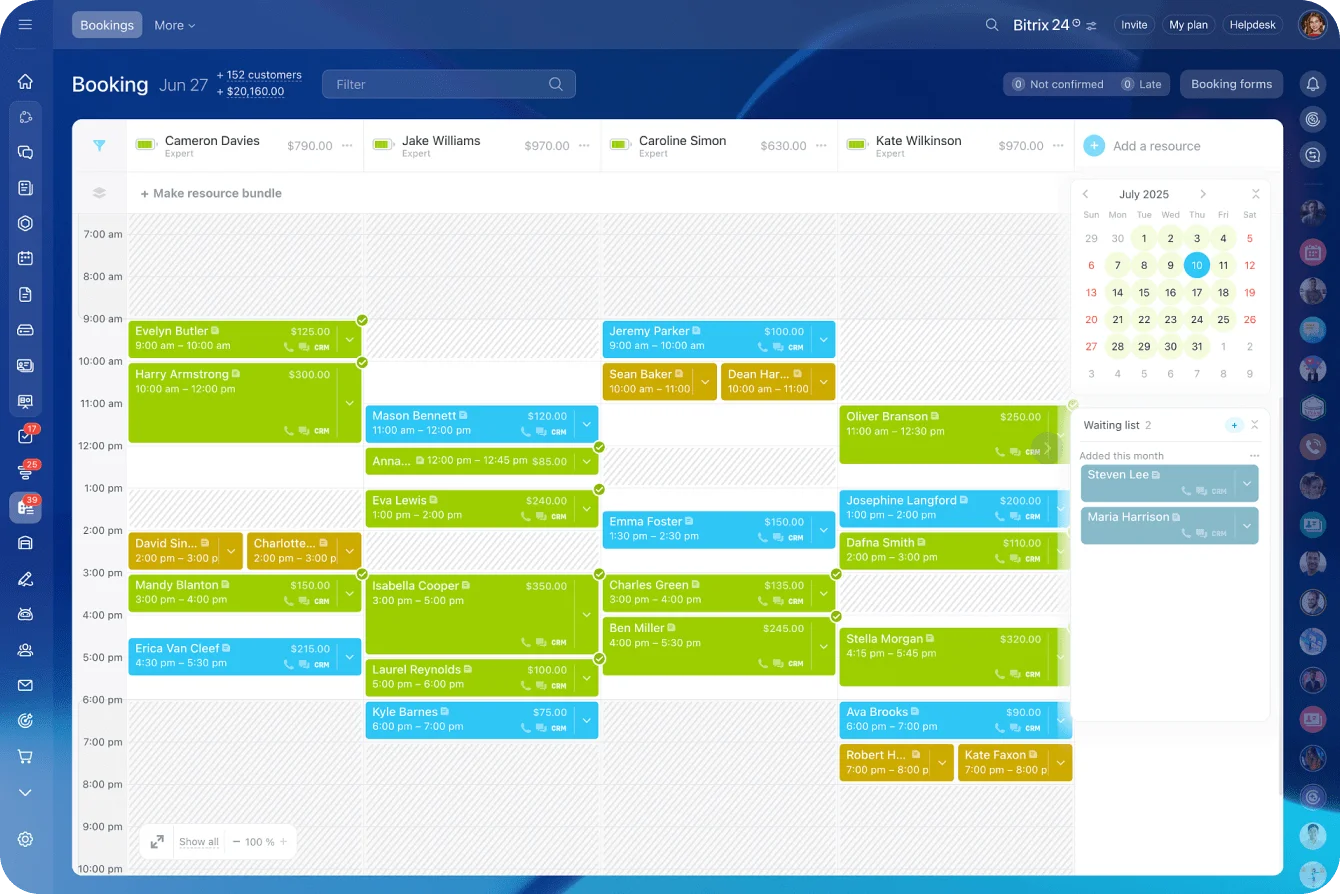
Booking in Bitrix24 lets you turn each barber into a bookable resource. This means that when a potential customer calls or writes, you can book their appointment, tie with a particular resource (barber) and link this appointment to a CRM deal/contact.
Step-by-Step Configuration: Barber as a Resource
- Go to Booking, add a new resource, and complete the required fields
- Assign:
- Resource name and type
- Add services to associate with this resource
- Customize working hours
- Configure customer messages and notifications (optional)
- Resource is created!
Now, your CRM instantly knows which barber can take which client at what time. Now, let's talk more about automated customer messages.
Automation Rule: Instant Confirmation Message
To automatically confirm bookings, you can set up an automation rule – the process is fully no-code and requires just a few simple actions:
- Go to CRM → Automation rules → Customer communication
- Choose “Send SMS to customer” or “Send WhatsApp message”
- Add conditions and message text (e.g., “Your appointment is confirmed! Here are your visit details…”)
- Personalize with variable fields: {Client Name}, {Date}, {Time}, {Barber}
This creates a professional, modern customer experience – instantly.
Conflict Handling Automation
In the rare case of overlapping bookings, add an automation rule that tracks if resource calendar is busy, and, if so, automatically creates a task with the following parameters:
- title: “CHECK BOOKING – Possible Conflict”
- assignee: administrator
This way, your admin sees conflicts immediately, instead of discovering them too late.
Outcome
Flawless scheduling. No more collisions. No more manual data entry. Your administrator becomes a supervisor – not a human booking machine.
Pain Point #3: The Empty Chair – Fighting No-Show Losses
The Pain
A no-show is the worst kind of loss: you reserve the slot, prepare tools, and turn down other clients… and then the chair stays empty. Calling clients manually for reminders is tiring and often ineffective.
The Solution: Automated Reminders + Overbooking + Waiting list
Option 1: 24-Hour Reminders
- Open your resource settings in Booking (Resource => edit)
- Go to Notifications page and scroll down to the “Request booking confirmation” section
- Pick a template and customize its text (e.g., “Hi {Name}! Looking forward to seeing you tomorrow at {Time}. Reply cancel if you need to reschedule.”)
- Configure send options (e.g., 24 hours before appointment)
- You can also send messages if a customer is running late or a simple reminder.
Clients appreciate gentle reminders – not pushy calls.
Option 2: Overbooking
Overbooking in Bitrix24 allows you to schedule two customers for the same time slot. If one cancels or reschedules, the other keeps the slot.
You can add two customers to one slot in two ways:
- Add a customer to the appointment. Click the arrow in the existing entry block and select Overbooking. Fill out the form by adding another customer and linking a deal.
- Reschedule the appointment. Drag an existing appointment to an occupied slot.
This prevents expensive last-minute no-shows.
Option 3: Waiting list
If all slots in the schedule are occupied, you can add the customer to a waiting list. This helps to:
- Keep client contacts and preferences
- Promptly offer available times when an appointment is canceled
- Fill the schedule and avoid losing customers due to occupied slots
All entries in the waitlist are sorted by the time of addition: today, this week, last week. You can track customers who have been waiting longer than others. This reduces the risk of losing them due to long waits.
Outcome
Fewer no-shows, reclaimed lost hours, cleaner scheduling, and less stress for staff.
Is your CRM ready? Check the guide
Enter your email to download a guide that will help you get started with any CRM system.
Pain Point #4: Blind Management and Reputation Risk
The Pain
Without feedback, you're blind. You don't know:
- Which barber is performing well
- Why clients stop returning
- Whether clients are unhappy
- When a negative review appears online
And happy clients rarely leave reviews unless encouraged.
The Solution: Automated Feedback Collection + Smart Routing
Step 1: Automatic Feedback Request
Using automation rules in Bitrix24, you can set up an automated text message or email that will be sent out to a customer after the appointment. In this message/email, you can include a link to a web form that contain a set of questions to be answered by the client.
Naturally, this form can be designed from scratch (or template) inside Bitrix24, which makes the feedback collection and processing even easier.
Step 2: Building the Feedback Survey
Here are a few fields you can use:
- Question 1: Rating (1–5)
- Question 2: What did you enjoy most?
- Question 3: What could be improved?
- Question 4: Would you visit again?
Structured feedback beats random comments.
Automated Feedback Processing
Positive Feedback (4–5 Stars)
Set another automation rule that will send out a thank-you message to anyone who's completed the survey. Include:
- Re-booking link
- Optional small promo
Once it's done, you can move the deal to “Happy Client” in your sales pipeline. This increases retention and gently promotes repeat visits.
Negative Feedback (1–3 Stars)
In case of receiving negative feedback, set an automation rule to:
- Immediately create an URGENT Task:
- Title: “URGENT: Client {Name} Needs Conflict Resolution”
- Assigned to: Manager
- Move the deal to stage “Requires Attention.”
- Notify the manager via Messenger/SMS internally.
Responding quickly turns a potential negative review into a positive recovery moment.
Outcome
You stop guessing and start managing with real data. Problems are addressed instantly. Satisfied clients return and bring friends.

Pain Point #5: The Leaky Bucket – Low Customer Lifetime Value (LTV)
The Pain
Barbershops often focus too much on new acquisitions. But research is clear:
- It costs 5x more to acquire a new customer than to keep an existing one.
- Most clients stop returning simply because they forget, not because they are unhappy.
- Without automation, nobody tracks which clients are “drifting away.”
The Solution: CRM Marketing + Dynamic Segmentation
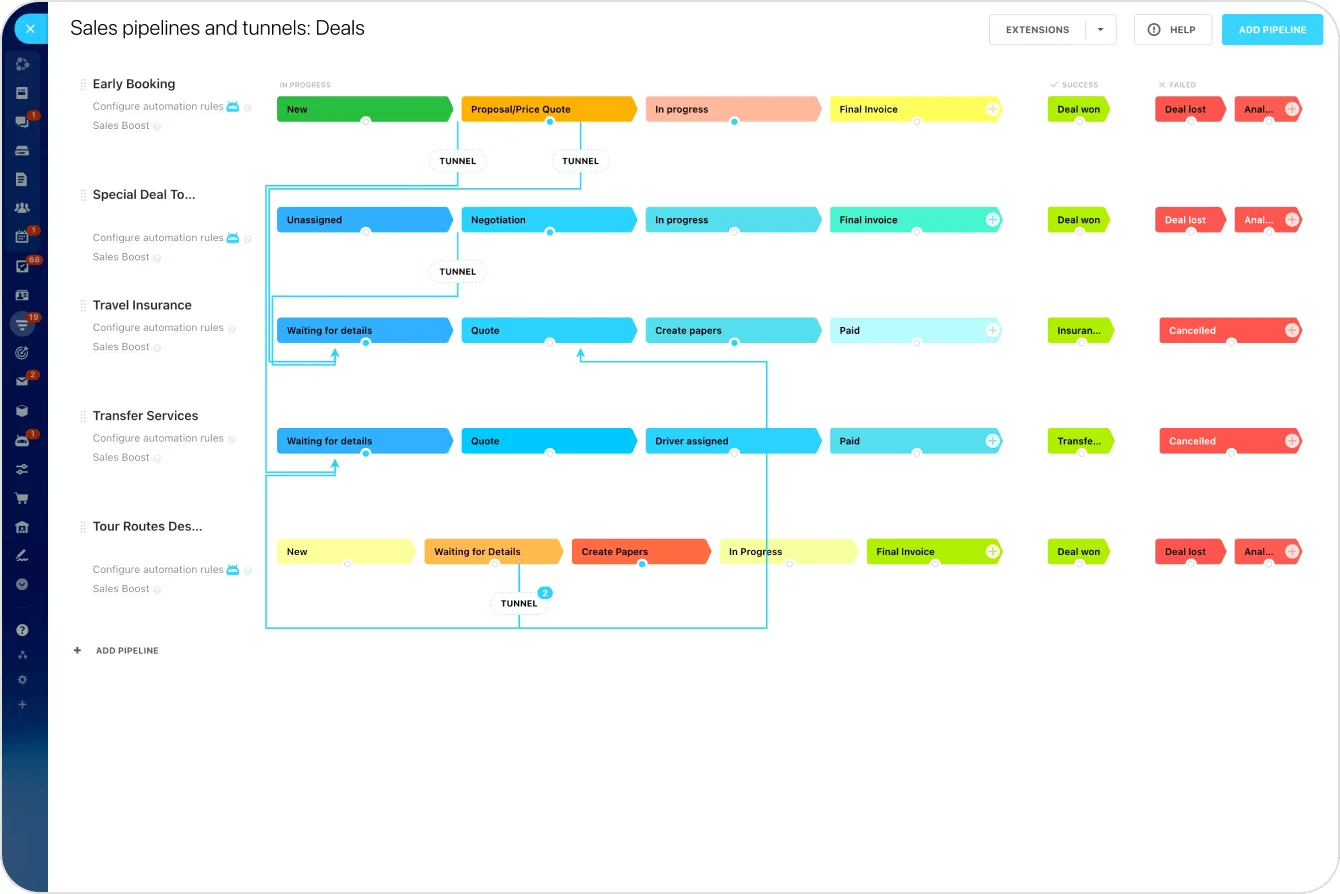
Bitrix24 features built-in email marketing, allowing you to send with up to 100,000 emails per month (see Plans). Not only that, but you can also create segments and automate campaigns.
Step 1: Create Smart Client Segments
Go to Marketing → Email campaign and create:
Segment 1: Dormant Clients
- Condition: No appointment in last 90 days
- Auto-updated daily
Segment 2: VIP Clients
- Condition: More than 5 visits OR high-value services
These segments update automatically – no manual sorting.
Step 2: Automated Campaigns
Campaign 1: “We Miss You” Offer
- Target: Dormant clients
- Message example:
“Hi {Name}, it's been a while! Your barber would love to see you again. Here's a personal renewal discount.”
Campaign 2: Birthday Greeting
- Target: VIP Clients
- Automatic send on birthday
- Include:
- Personalized greeting
- Discount for barber of choice
- Re-booking link
Automation makes your brand feel personal and caring.
Database Hygiene
Maximize marketing efficiency by keeping your CRM clean:
- Remove duplicates
- Update phone numbers
- Fix incorrect names
- Validate segments
A clean database dramatically increases SMS/open rates.
Outcome
Clients return more frequently. VIP clients feel appreciated. Marketing becomes predictable instead of random blasts.
Conclusion: Final Thoughts on Growth
The Bitrix24 auto-funnel is not an expensive technical project – it's a practical investment in predictable revenue.
When barbershops automate the customer journey, they stop losing clients to outdated processes and start building long-term loyalty, stable schedules, and a much higher customer lifetime value (LTV). Your team focuses more on delivering great service and less on administrative chaos
Stop the revenue leakage. Start implementing Bitrix24 – step by step – and build a barbershop that grows even while you sleep.
Happy customers – thriving business!
Improve retention and satisfaction with streamlined communication and automation tools in Bitrix24. Free forever, unlimited users.
GET STARTED FOR FREEFrequently Asked Questions (FAQ)
How can I make sure my online booking form automatically sends the client into the correct sales pipeline?
In the CRM Form settings, select “Create Item: Deal” and choose your pipeline (e.g., “Haircut Bookings”). Every form submission enters that exact pipeline stage.
Is there an easy way to link my barber's schedule in Bitrix24 Calendar to the online booking times shown?
Yes. Mark each barber as a Resource in Calendar. When clients open your CRM Form, Bitrix24 automatically shows only available time slots based on resource availability.
How do I set up an automation rule to send a reminder exactly 24 hours before the appointment?
In your pipeline automation, add a rule:
- Trigger: 24 hours before activity
- Action: Send SMS/WhatsApp
- Message: “See you tomorrow at {Time}!”
How can I automatically flag clients who've only visited once?
Create a dynamic segment:
- Condition: “Visits = 1”
Use this segment for onboarding campaigns or second-visit incentives.
Do I need extra software to send WhatsApp messages through Bitrix24?
No. Bitrix24 integrates with WhatsApp via official connectors (such as Edna). Once activated, you can send automated messages directly from CRM.
How can Bitrix24 help me get honest feedback without fake reviews?
Because surveys are sent directly to clients – and responses go only to you – you collect real, internal feedback instead of public reviews.
What is a customer's LTV, and can Bitrix24 calculate it?
LTV = total revenue you earn from a client over their lifetime. In Bitrix24, you can calculate LTV using:
- Total Deals per client
- Frequency of visits
- Average service value
Custom reports automate this fully.
If a client leaves a bad review, how quickly will the system create an administrator task?
Instantly. Use automation rules to create an URGENT task and notify your team the moment a low survey rating is submitted.
Which CRM Marketing tools are best to bring back long-lost clients?
The Dormant Clients segment + personalized SMS/email campaigns (“We Miss You”) consistently drive reactivations.
Should I use Leads or Deals for regular haircut bookings?
For barbershops, Deals are best. They allow you to manage stages like Booking → Confirmed → Completed → Feedback → Repeat Visit.