Customers Rarely Announce They Are Leaving: Reading the Signals Months Earlier


TL;DR (Quick Summary)
Customers decide to leave months before renewal, and the evidence sits in data you already collect: usage, reply times, and who still turns up to meetings. Churn is a trend you can read early or a surprise you get late.
- When does churn actually start? → Months before renewal, in fading usage and attention.
- What do the first warnings look like? → Quiet ones: thinner activity, slower replies, one contact left carrying the account.
- What does each signal tell you? → Usage shows dependence, communication shows attention, support shows friction.
- Do you need a customer-success platform? → No. Four fields on the account record and a review that actually happens.
- Which metric matters most? → None on its own. Read combinations and their direction.
- How should you step in? → With a diagnostic conversation about what you've seen, and pricing kept off the agenda.
- What changes day to day? → Four habits: interaction recency, stakeholder depth, usage direction, visible friction.
Takeaway: If you first hear that an account is at risk on the renewal call, your review process failed months before the customer did.
By the time a customer tells you they're not renewing, the decision is months old. You just weren't in the room for it.
It got made in small, visible ways: core usage thinning out, slower replies, a manager who stopped joining calls, a ticket that kept coming back. None of it looked like a complaint, so nobody treated it as one.
Every one of those signals sits in data you already have. Read them as a pattern and you get months of warning, which is enough time to fix the cause instead of discounting the renewal.
By the time churn shows up at renewal, the customer has been leaving for months
Renewal is where churn shows up on the invoice. The leaving happens earlier, through falling usage, thinner engagement, fewer stakeholders, and problems nobody fixed.
How surprise churn happens
Every team sees a slice of the pattern, and each slice looks fine. Sales hears no complaints and assumes the account is healthy. Customer success reads silence as stability. Support closes each ticket without spotting that the same problem keeps coming back. Finance sees invoices paid on time.
Each of them is right about their own data. Put together, they're wrong about the account.
What's missing is an owner for the combined view, and without one, every team's dashboard stays green.
Here's how it plays out. A customer keeps paying on time while usage across the wider team quietly thins out. The main contact still attends calls, so the account looks active. Then that contact changes roles, and nobody left on the customer side knows the product well enough to argue for the renewal.
The worst version of this is the renewal call answered by someone who's never heard of you. The champion moved on in the spring, the replacement inherited your product as a line item to cut, and nobody on your side noticed because the invoices kept clearing.
What to watch instead
Look earlier for signs that the customer is:
- becoming less dependent on the product;
- less connected to your team;
- losing internal sponsorship; or
- carrying unresolved frustration.
One weak indicator means very little. Several moving together mean something.
Customer Churn Early-Warning Scorecard + Intervention Playbook
Enter your email address to get a comprehensive, step-by-step guide

The earliest warning signs are quiet changes in engagement
Product usage falls. Check-ins get further apart. Emails that used to come back quickly sit unanswered. More and more of the relationship runs through one contact.
Any of these on its own has an innocent explanation. Usage dips in quiet seasons. Fewer support requests sometimes mean the product just works. A late reply is a late reply.
Look for signals moving together
Worry when several of these show up in the same account:
- Core product usage falls over several review periods.
- Fewer users or departments remain active.
- Meetings repeatedly get postponed.
- Replies take longer or become shorter.
- One contact carries nearly every interaction.
- An unresolved service issue keeps resurfacing.
- Previously involved decision-makers disappear from conversations.
Together they point to three problems: the customer depends on you less, its internal sponsorship is weakening, or frustration is building.
An illustrative case: a subscription software customer whose team used several core workflows every week. Over a few months, activity narrows to a smaller group. Then department managers stop joining calls, and the operations contact becomes the only regular attendee. An integration problem stays open the whole time.
Nobody complains. The account is just less embedded in daily work and less connected to you.
You usually piece this together afterward, scrolling back through the inbox once the cancellation notice lands. Every warning was there, dated and in order. Nobody had lined them up while it still mattered.
A shared CRM keeps those interactions, contacts, and account notes in one place, instead of scattered across inboxes and spreadsheets where nobody sees them side by side.
Pro Tip: Define warning signs before you need them
Agree on what counts as a meaningful decline before any account turns red. For example, any of these triggers a review:
- a sustained fall in core-feature usage;
- an important stakeholder going quiet;
- repeated meeting cancellations; or
- an unresolved issue passing an agreed deadline.
Without shared definitions, two account managers will read the same customer behavior in opposite ways. There's a less comfortable reason too. Account owners are slow to flag their own accounts when the flag hits their forecast or their commission. A rule written down before anyone's number is at stake takes that call out of the moment.

What each signal actually tells you about the account
Falling usage is the obvious signal, and the easiest to misread. It has several explanations: adoption never took hold, the original project ended, the customer's team shrank, or priorities moved. Or the product is drifting away from everyday work.
Usage tells you about dependence
A product gets vulnerable when customers stop using the workflows they bought it for. So look past login counts:
- Are customers still using the core features tied to their original goal?
- Are the same departments active?
- Has usage become concentrated among a few people?
- Has an important workflow moved somewhere else?
Logins keep ticking over while the important work moves to another system. The tell is often an export. Someone starts pulling data out every week "for reporting," and by renewal that spreadsheet is the system, and your product is the thing that feeds it.
Communication tells you about attention
Fewer inbound questions aren't a warning on their own. Experienced customers need less help. The warning comes when quieter communication arrives alongside slower replies, canceled meetings, fewer stakeholders, or falling usage.
Picture an account where the customer-success manager still trades friendly emails with one champion every month. On paper, it's active. But nobody from finance, operations, or management has joined a discussion in months.
The whole relationship now rests on one person, and that's a bigger exposure than it looks.
In January 2026, median tenure with a current employer among US wage and salary workers was 4.1 years, and about one in five (20.6%) had been with their employer for a year or less, according to the US Bureau of Labor Statistics. Those figures only count people who changed employers. Internal moves, promotions, and reorganizations come on top.
Over a multi-year contract, plan on your champion moving on at some point.
Support tells you about unresolved friction
One ticket means little. Repeated or long-running problems mean a lot more.
Separate two things: the issue being closed, and the customer believing it's resolved. A ticket marked complete still leaves frustration behind when the workaround is clumsy or the problem keeps coming back.
How hard the customer had to work to get the problem fixed matters as much as whether it was fixed.
In a study of more than 75,000 people dealing with contact centers and self-service channels, Dixon, Freeman and Toman (Harvard Business Review) found that a measure of customer effort predicted loyalty better than satisfaction scores or Net Promoter Score. That research comes from contact-center and self-service interactions rather than account-managed relationships, but the mechanism carries over. A customer who had to chase, re-explain, and escalate remembers it at renewal, even if every ticket is marked closed.
Keeping service conversations next to the account record through customer service tools lets account owners see friction piling up while there's still time to deal with it.
Single-threaded relationships and unresolved complaints are worst in combination. If the only active contact disengages, changes roles, or loses influence, nobody's left to absorb the service failure or make the internal case for staying.

You can track account health without a dedicated customer-success platform
What it takes is a consistent scorecard, clear definitions, and one person responsible for reviewing it. Most recurring-revenue businesses already have the inputs: usage reports, support logs, meeting notes, account records, and CRM activity.
Start with a small set of signals
For each account, track:
- Usage direction (rising, stable, or falling)
- Core feature adoption, meaning which important workflows are still in use
- Active contacts, the number of customer stakeholders still meaningfully involved
- Latest meaningful interaction, the date of the last substantive conversation
- Open friction across support, billing, implementation, or service
- Relationship direction (improving, stable, or weakening)
Put the essentials on the account record
If six is more than your team will keep current, four fields on the company record do most of the work, and anyone opening the account sees them:
- Last meaningful interaction date, with its type
- Active contacts count, measured over a fixed window (we'd suggest 60 days as a default, 30 for strategic accounts and 90 for low-touch ones; treat these as starting recommendations, not benchmarks)
- Open issues and how long each has been open
- Usage direction since the last review: up, flat, or down
Scorecards rarely die in a meeting. They die quietly. The person who set up the fields changes jobs, nobody inherits the review, and within a few months most of the "last meaningful interaction" dates predate their departure. Give the scorecard a named owner and a backup, or expect it to go stale without anyone noticing.
Review them inside the CRM and summarize them with CRM analytics and reporting where it helps.

In Bitrix24, these are custom fields on the company record, next to the contacts, deals, and activity history the CRM already keeps. Paid plans are priced flat rather than per seat, so account managers, support, and finance can all work from the same view without the bill climbing every time someone new needs access. The Free plan covers one or two users, and analytics and automation rules come with the commercial plans.
Be strict about "meaningful interaction"
This is where health systems start lying to you.
An invoice sent last week says nothing about the relationship. Neither does one user opening an automated marketing email. A one-word "thanks" doesn't reset concern about an otherwise silent account.
The worst offender is email sync. Once a CRM logs every sent and received email, "last activity" updates whenever a newsletter goes out or someone opens a billing reminder, and a fading account looks busy. Keep "last meaningful interaction" as its own field that a person sets. The system's timestamp doesn't count.
Meaningful activity has business relevance. It looks like:
- an adoption discussion;
- a problem-solving call;
- a stakeholder meeting;
- a roadmap conversation;
- a substantive reply about goals; or
- a discussion of a current blocker.
Record the date and type on the account record, and keep a current list of engaged contacts. At a glance, the account owner then knows how recently the relationship was really active and how many people are still carrying it.
Create a review rhythm
Our rule of thumb: a weekly health review for strategic accounts, monthly for the wider base. That's a recommendation to adjust, not an industry standard. The account owner, customer-success manager, or retention lead compares the current position with the last review and asks one question:
“What changed?”
With the fields current, a short review is enough. The version that fails is the status meeting where each owner explains why their red accounts are actually fine. Keep the question narrow: what changed, and what are we doing about it, by when.
Pro Tip: Keep the scorecard small
A health model with more fields than anyone updates is worse than having none, because people still trust it. Four or five signals your team keeps current beat an elaborate model full of stale data.
Patterns matter more than any single metric, so review accounts as trajectories
Stable usage with shrinking contact depth tells one story. A temporary dip in an account with several engaged stakeholders and active problem-solving tells another. A snapshot can't tell them apart; a trajectory can.
Compare combinations instead of thresholds
Both of those accounts might show yellow on a simple dashboard. The risks underneath are different.
A useful health model looks across adoption, business outcomes, relationships, sentiment, and support health, and never treats activity alone as proof the account is healthy. In practice, watch for combinations such as:
- Usage down + stakeholder count down
- Usage stable + unresolved complaints rising
- Meetings continuing + core feature adoption falling
- Strong champion engagement + no decision-maker involvement
- Support problems resolved + engagement recovering
What a combination looks like in practice
Here's an illustrative account, described in rough terms because the pattern matters more than any figure.
Over a couple of months, use of the core workflow drops noticeably. Replies that used to come back the same day now take several days. The group of contacts with any recent meaningful interaction shrinks to a single person.
Any one of these could be noise, right? A holiday, a busy quarter, a reorganization.
All three in the same window on the same account tell one story. The product is used less, by fewer people, who are slower to engage. That account gets a diagnostic conversation this month. Renewal is too late.
When one signal is enough
The rule about several signals has exceptions. Some single events justify a review on their own: the champion leaves, the customer is acquired, a new executive arrives with a mandate to consolidate tools, or a procurement contact you've never dealt with asks for your contract terms. Don't wait for a second signal on those.
Track direction after intervention
Some weak accounts recover after a useful conversation, a product fix, a training session, or a new stakeholder. Others keep fading whatever you do. After any intervention, check:
- Has usage recovered?
- Has another stakeholder become involved?
- Did the customer respond substantively?
- Has the underlying problem actually been fixed?
- Is the product becoming connected to important work again?
If several of these are still heading the wrong way, the account is heading for churn.
Don't leave accounts permanently "at risk"
The classic failure is when an account gets marked yellow or red, and the status sits untouched for months. Health has to move when customer behavior moves. Otherwise the score is just an administrative label.
Everyone who's run these reviews knows the account that's been red so long nobody sees the color anymore. It churns, and the post-mortem shows it was flagged long before, with no task, no owner, and no conversation attached to the flag.
Task automation fixes the remembering problem. When an account goes a set period without a meaningful interaction, or an issue passes its internal deadline, the system creates a follow-up task.
The intervention that works is a useful conversation; the one that speeds up churn is a renewal ambush
What helps is a specific conversation tied to the customer's goals, adoption blockers, open issues, and stakeholder map. A generic "just checking in" gives them no reason to reply.
Diagnose the reason first
Find out what actually weakened:
- Has rollout stalled?
- Has the original business problem changed?
- Is the main champion still influential?
- Are key users getting value from the product?
- Has a service failure damaged trust?
- Has another tool started replacing part of the workflow?
The answers decide what happens next.
A simple structure for the first call
- Open with what you've observed: one or two specific changes, not a health score.
- Ask what has changed on their side, whether team, priorities, tools, or leadership.
- Check the original goal. Is the problem they bought for still the problem?
- Agree one fix with an owner and a date on each side.
- Ask who else should join the next conversation.
Keep pricing off the agenda unless the customer raises it.
Match the action to the problem
Stalled adoption needs a focused plan around the workflows that matter most. A relationship hanging on one person needs more stakeholders in the room. An unresolved issue needs escalating, with a named owner and a next step the customer can see.
Sometimes the conversation tells you the customer's circumstances have changed and they're leaving regardless. That's still worth knowing early. The forecast gets more accurate and the renewal handoff gets cleaner.
Not every at-risk account deserves the same effort
Most retention programs aim at the accounts that look likeliest to leave. Eva Ascarza's research challenges that. In a study published in the Journal of Marketing Research, she found that aiming retention offers at the customers most likely to respond, rather than those most likely to leave, reduced churn by 4.1 to 8.7 percentage points, and that in some cases targeting the highest-risk customers actually increased churn.
Her field studies ran at a subscription membership organization and a wireless carrier rather than in account-managed B2B, so don't lift the numbers. The principle travels. A customer who's already decided won't be talked out of it with a discount, and a badly timed retention pitch prompts some customers to start shopping around.
Put your effort where the decline has a cause you can fix.
Avoid the renewal ambush
The worst time to discover account risk is a few weeks before the contract ends. A late conversation that jumps straight to pricing makes things worse, especially when the real problem is poor adoption, weak fit, or lost trust.
A discount buys time at best. It does nothing about the conditions that weakened the account.
Pro Tip: What step one sounds like
Here's the opening of that first call, written out:
"We've noticed fewer teams are using the reporting workflow, and we haven't spoken with the operations group recently. Has something changed in how the team is working?"
That gives the customer something concrete to answer, and it keeps the conversation diagnostic rather than defensive.
What teams should do differently after reading the signals earlier
A health check that only runs near renewal is an autopsy booked before the death. Move it into the months when the answer can still change something.
Build four habits into the workflow
- Track meaningful interaction recency, so you know when the last substantive conversation happened.
- Track stakeholder depth, so you know whether the relationship reaches past one champion.
- Watch usage direction, comparing adoption over time instead of reading only today’s activity.
- Keep unresolved friction visible. A ticket leaving the support queue doesn’t mean the customer’s problem has left the account.
None of this needs a major system rollout. It needs consistent definitions, clear ownership, and a review that actually happens.
Spot churn risks before renewal talks
Bitrix24 unites CRM, support, tasks, and automation so teams see fading engagement early and follow up before accounts leave.
Get Started NowRenewal should confirm what you already know
Every signal in this article shows up months before the contract date, in data your team already collects. Ignore it and the renewal conversation arrives after most of your options have gone, with price as the only lever left.
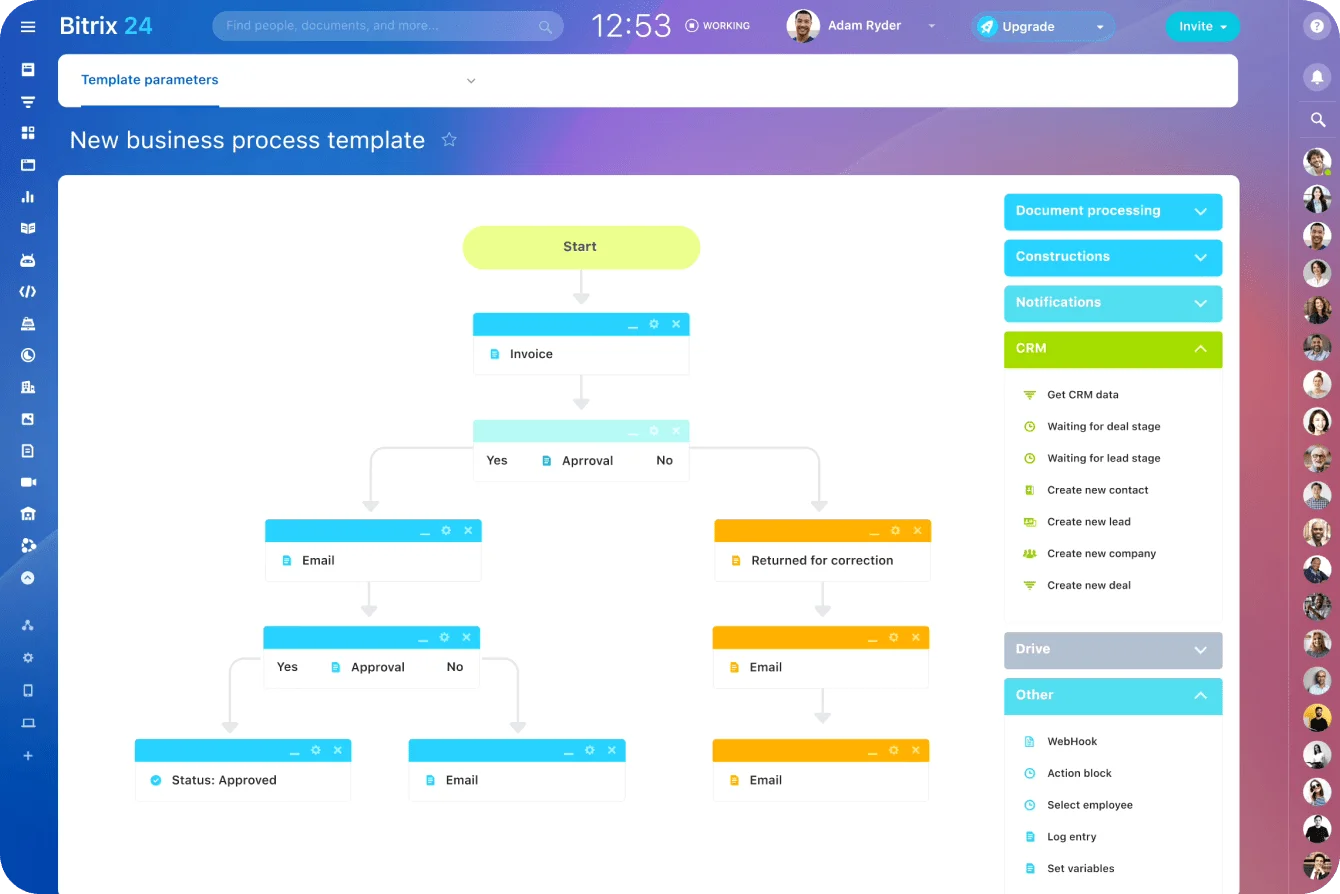
Bitrix24 keeps those signals where your team already works. The meaningful-interaction date and engaged contacts sit on the company record, support conversations land in the same account timeline, and automation rules create the follow-up task when a review falls due or an issue passes its deadline.
A renewal discount is the most expensive way to learn what a usage report told you in the spring.
Takeaway: When two of the four signals move the wrong way in the same review, call the customer that week. Waiting for a third signal is how accounts end up in a renewal ambush.