Financial Services and CRM: Comparing Bitrix24 with Other Market Leaders


In financial services, the CRM rarely breaks on sales. It breaks on the servicing after the deal closes — approvals, client files, the handoffs between advisors, compliance, and back-office.
So the usual buying criteria barely matter: pipeline visibility is table stakes, and what earns its keep is auditability, document control, approval steps, and access you can lock down by office, advisor, or product line.
The three big names sort out differently against that.
Salesforce leads for heavily governed, deeply customized operations. HubSpot adopts fastest. Bitrix24 earns a look when you want CRM plus collaboration and document workflows without enterprise cost.
Below, we take a look where each fits, where each falls down, and what teams get wrong when choosing between them.
What financial services organizations should evaluate before switching CRM platforms
Before comparing vendors, firms need a clear picture of what the CRM is expected to run. An independent advisory practice, a lending business, a multi-branch insurance operation, and a diversified financial services firm may all use a CRM, but the operating requirements are very different.
The more lines of business involved, the more important it becomes to map lifecycle stages, ownership transitions, approval requirements, and record visibility rules before a platform decision is made.
What the business actually needs to run
Role structure matters just as much as feature lists.
Financial services organizations often need segmented access by office, advisor, servicing team, or product line. Some teams require broad visibility for coordination; others need sharply limited record access.
If a firm handles large volumes of documents, disclosures, applications, or account servicing records, then document storage, version control, internal routing, and attachment to workflow stages should be treated as core requirements rather than secondary features.
Match the problem to the platform
The nature of the business problem should also drive evaluation.
If the main issue is weak pipeline visibility and poor marketing-to-sales coordination, HubSpot may solve it quickly.
If the real problem is missed servicing tasks, inconsistent approvals, and weak accountability across teams, the business needs a stronger operational layer.
If collaboration is spread across chat, tasks, documents, and CRM with no single working environment, Bitrix24's unified workspace approach may deserve more attention than it gets in standard CRM comparisons.
Key questions before platform selection
Teams should assess each of the following before shortlisting vendors:
- Internal admin capacity: who will manage fields, permissions, workflows, reports, and change requests?
- Implementation budget: is there room for consultants, integration work, data cleanup, and redesign of existing processes? (Implementation, customisation, and support typically run anywhere from 1.5x the software cost for simpler platforms to 3–5x for Salesforce-class deployments, so the licence fee is rarely the number that decides the budget).
- Customization appetite: does the organization want a mostly ready system or a configurable operating layer?
- Reporting maturity: are leaders asking for simple dashboards or branch-, product-, and process-level analysis?
- Integration demands: what must connect with finance systems, email, telephony, e-signature, document repositories, or internal communications?
Without that clarity, CRM selection tends to become a brand preference exercise rather than an operating model decision.
Common workflow and scaling problems with CRM in financial services
Most CRM friction in financial services comes from partial adoption. Teams use the system for contact records and deal tracking, but the actual work of onboarding, documentation, approvals, servicing, and follow-up happens somewhere else.
Example-in-action: Consider a mid-sized lending operation where loan processors track deals in the CRM but route approval documents through email chains: onboarding packets sit unreviewed, tasks aren't consistently assigned, client communications scatter across inboxes, duplicate records multiply, and exceptions get handled informally with no durable trail.
CRM failures consistently trace to people and process, not software defects — across the industry, low user adoption alone accounts for roughly 38% of projects that miss their objectives, with change management and data quality close behind. In financial services that pattern bites harder, because the work the system has to map to is more fragmented across roles.
How the problems compound at scale
As volume grows, partial adoption becomes structural. More advisors, branches, lenders, or service teams mean more handoffs and more chances for records to fragment. A process that works for one office often breaks when leadership needs common service levels, shared reporting, and standardized execution across teams. Managers start asking basic questions the CRM can't answer reliably:
- Which files are waiting on approval?
- Which branch is missing documentation most often?
- Where are servicing requests getting stuck?
Permissions pressure also increases with scale.
In a small team, broad access may be tolerable. In a larger firm, that becomes a governance problem. Different teams need access to different client segments, but leadership still needs oversight. A CRM configured for convenience can become hard to control without disrupting daily work.
The late realization most firms share
The industry-specific pattern is predictable: firms adopt CRM for revenue tracking first, then discover they actually need document-driven workflows, compliance checkpoints, and enforceable operational accountability. At that stage, the issue isn't whether the CRM has a pipeline board. It's whether the system can coordinate real financial services work consistently across roles and locations.
Financial CRM Vendor Scorecard for Fast, Confident Selection
Enter your email address to get a comprehensive, step-by-step guide

A practical comparison framework for Bitrix24 vs Salesforce vs HubSpot in financial services
A useful comparison starts with business criteria, not vendor messaging. Financial services teams should evaluate these platforms against seven practical areas: workflow automation depth, compliance support, permissions granularity, document management, reporting flexibility, implementation complexity, and total cost of ownership. Those categories reflect how the system behaves under operational load, not just whether it demos well.
Reading each platform correctly
Salesforce usually leads when the firm needs strict process control, layered permissions, and highly specific workflow logic. It's the most adaptable of the three, which matters when a business must model approvals, servicing exceptions, custom objects, branch-level operations, or product-specific lifecycle rules.
The Financial Services Cloud edition starts at around $325 per user per month, and that figure doesn't include the consulting and configuration spend that serious deployments typically require. But that flexibility, paired with real investment in design discipline and administration, can justify the cost for firms with genuinely complex servicing environments.

HubSpot is stronger when the organization wants faster time-to-value, easier user adoption, and less day-to-day complexity. It works well for firms whose client lifecycle is still relatively linear and whose reporting and governance needs are meaningful but not extreme.
The tradeoff is that what makes HubSpot easy to use can also limit it in more controlled operating environments.
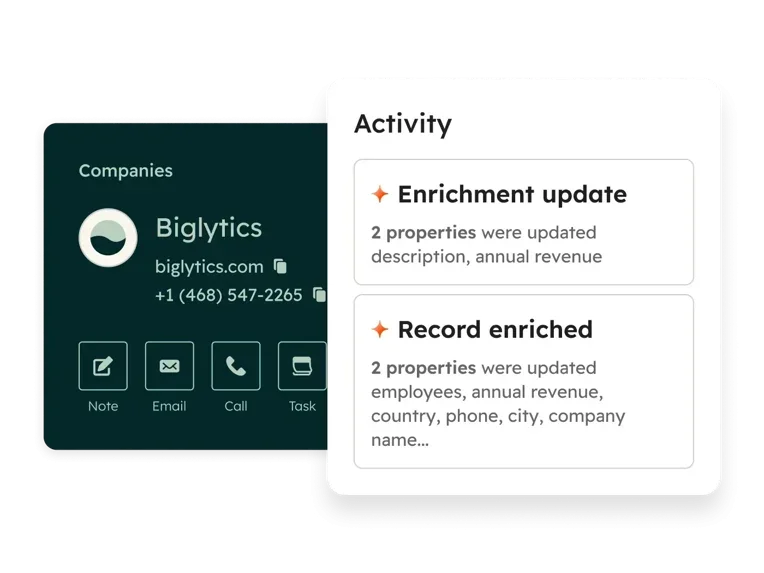
Bitrix24 isn't simply a lighter Salesforce or a cheaper HubSpot. Its value is broader operational coverage inside one environment: CRM, tasks, collaboration, communications, and document-centric work sitting closer together.
For firms trying to reduce tool sprawl and coordinate more internal execution without building an expensive custom stack, that's a practical advantage worth evaluating on its own terms.
The core tradeoff
It helps to separate must-have requirements from optimization goals.
If the firm can't function without strict access controls, auditable approvals, and complex workflow enforcement, usability alone shouldn't drive the choice.
If the business mostly needs better visibility, cleaner handoffs, and easier team adoption, a highly configurable platform may create more burden than benefit.
Bottom line: The most customizable platform isn't automatically the best fit. A system only creates value if the organization can implement it properly, govern it consistently, and adapt it as the business evolves.
Where Bitrix24, Salesforce, and HubSpot fit best
Each is strongest in a different operating model. Each entry below runs the same way: who it suits and why, then where it runs out.
Bitrix24
Suits firms that want the CRM and the work around it in one place: client records, tasks, internal chat, and document routing in a single environment rather than four tools stitched together. That's its real edge in financial services: when an approval, a compliance check, and a client file all live where the deal does, the front-office-to-back-office handoffs that usually leak stop leaking.
Where it runs out: it's most capable when the team commits to the unified model, and asks more process discipline than a point CRM.
Salesforce
Suits firms with complex, heavily governed workflows: multi-team orchestration, strict compliance, specialized servicing, custom lifecycle rules. It behaves like a configurable operating system rather than a sales platform, and rewards firms that can fund the architecture, admin ownership, and ongoing process work it demands.
Where it runs out: cost and complexity for any firm that doesn't actually need that depth.
HubSpot
Suits firms that want usability, fast adoption, and clear visibility across marketing, sales, and simpler client management. Growth-stage teams pick it when they need structure quickly without a long build.
Where it runs out: specialized servicing workflows, granular access governance, and complex internal controls.

Operational differences in automation, permissions, documents, and reporting
Workflow automation
Workflow automation is where the platforms separate most clearly in practice.
Salesforce is built for complex logic and cross-functional orchestration — multi-step approvals, branching conditions, custom record relationships, and sophisticated process design that maps well to regulated servicing and exception handling. For firms with several teams involved in a client lifecycle, the workflow can reflect real operational dependencies rather than simplified sales stages.
Bitrix24 is strong when the workflow is tightly connected to tasks, internal collaboration, and approval movement. A business can coordinate internal action directly inside the same environment where records, communications, and files are already active. Its automation tools sit within the same workspace as the CRM, which matters when adoption is the larger obstacle rather than data modeling sophistication.
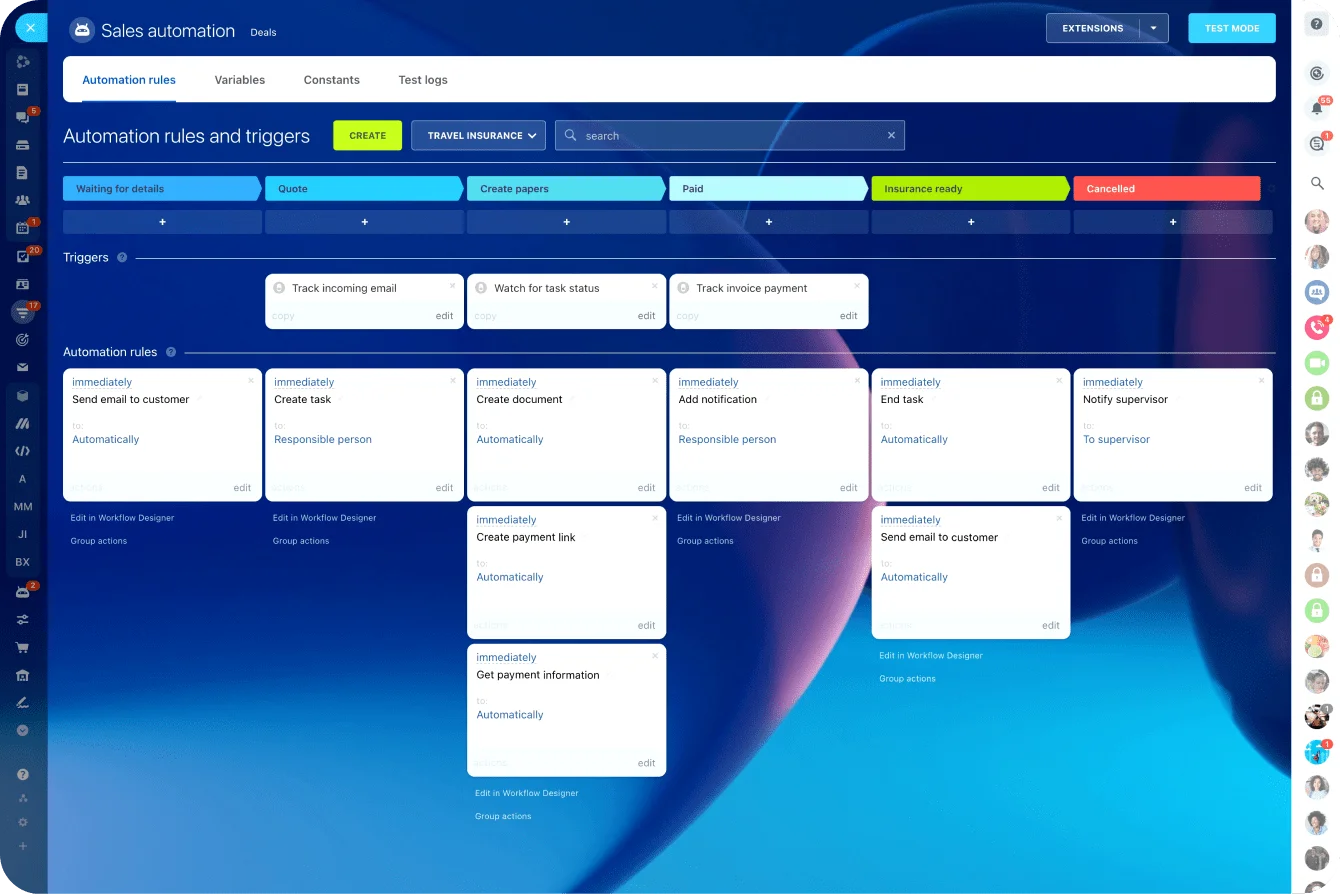
HubSpot's automation is more approachable and easier for general business users to maintain, but lighter for intricate operational control. It handles structured follow-up, routing, and lifecycle progression well enough for firms with simpler handoffs. The challenge comes when workflows need deeper conditional logic, cross-object complexity, or tighter process enforcement.
Permissions and governance
Salesforce offers the strongest model for granular access control, layered administration, approval structures, and segmentation across teams or business units — better suited to organizations where record visibility and controlled collaboration are non-negotiable.
Bitrix24 supports role-based control and internal accountability effectively, particularly in organizations that want work and communication closer together, but it's generally evaluated more as an integrated operating environment than as a pure governance engine.
HubSpot is easier to manage administratively, though less suited to highly segmented structures with strict control needs.
Document management
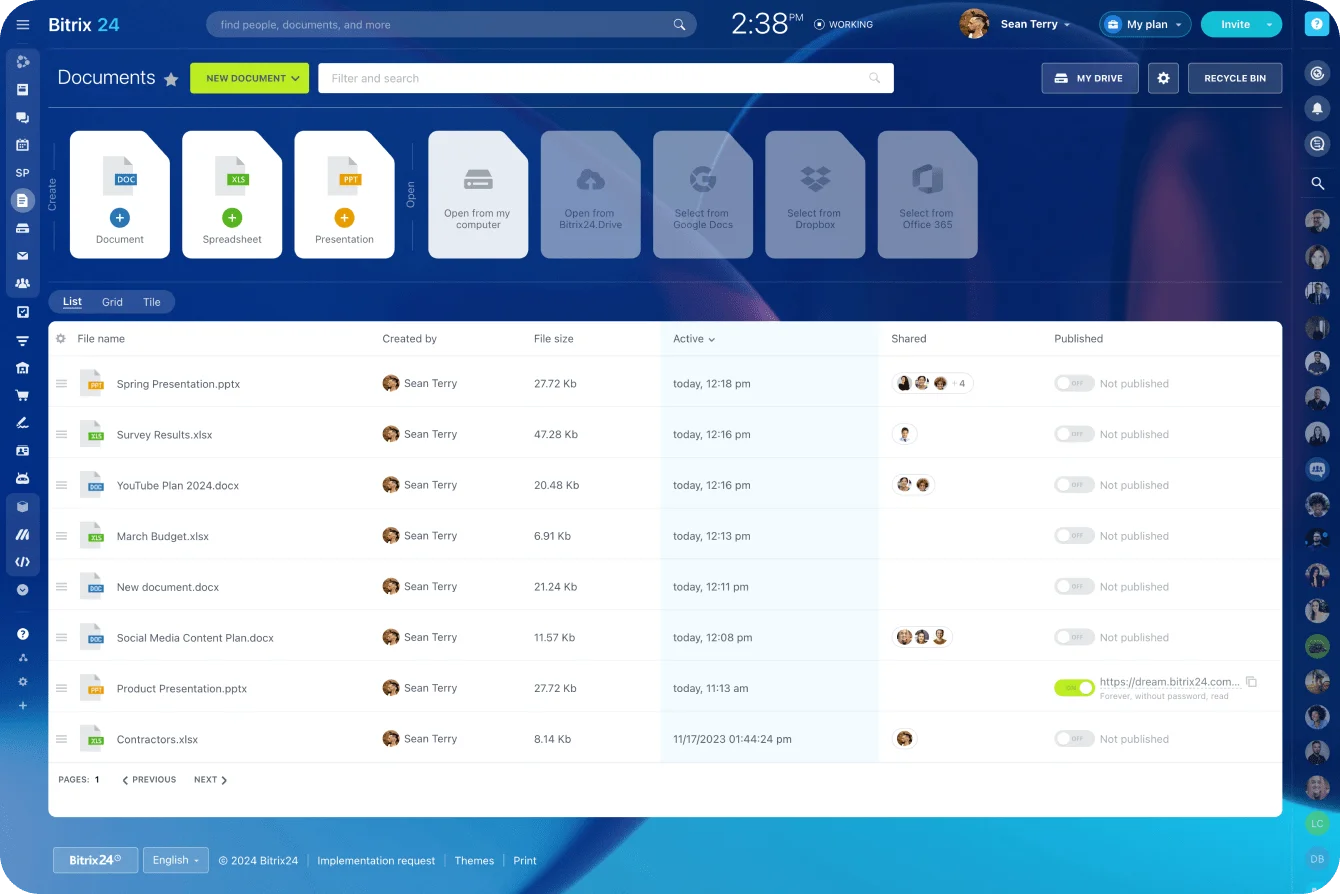
Bitrix24 has a practical advantage in day-to-day document coordination because files, tasks, discussions, and workflow movement remain closer together. Its document management tools don't require teams to context-switch between platforms to track what's been reviewed or approved — useful when teams are coordinating internal completion and review work around documents rather than simply storing them.
Salesforce can support document-related processes well when configured as part of a broader workflow architecture, but many firms will rely on additional ecosystem tools or implementation work to reach a tailored operating model.
HubSpot is more comfortable for lighter document attachment and straightforward process support than for heavily document-driven operations.
Reporting
Salesforce is the strongest option for flexible analytics across multiple teams, custom processes, and management layers.
Bitrix24 provides useful operational visibility, especially when reporting is connected to tasks and internal execution.

HubSpot offers the simplest reporting experience of the three and is often easier for revenue teams to use day to day, but less adaptable for organizations that need highly specific operational analysis across branches or product lines.
Implementation, migration, and administration tradeoffs
Implementation realities by platform
Salesforce usually requires the most planning. Teams need to define data structure, access design, automation logic, reporting architecture, and integration behavior up front — increasing project length, cost, and dependence on experienced administrators or consultants. That extra work is often justified in complex financial services environments, but it's rarely a short runway.
HubSpot is generally faster to launch. Firms can get cleaner pipeline visibility, lifecycle structure, and team adoption without a long architecture phase. That speed is valuable when the current problem is inconsistency rather than deep operational complexity. The risk is assuming a fast launch means the platform will scale cleanly into more demanding servicing and governance requirements later.
Bitrix24 can centralize more day-to-day functions in one environment, potentially reducing the need for multiple systems. But that only works well if the business is disciplined about process design. Without clear ownership and structure, a broad workspace can become cluttered, making adoption harder instead of easier.
Migration in financial services
Migration is rarely just a record import. Historical client data, documents, notes, activity logs, custom fields, permissions structures, and in-flight workflows all need attention. Firms should plan for:
- Field normalization and duplicate resolution
- Document repository mapping
- Preserving compliance-related records and audit trails
- Rebuilding workflows from scratch (often the most underestimated step, since legacy processes may be informal, inconsistent, or dependent on individuals rather than system logic)
Total cost of ownership
|
Platform |
Implementation profile |
Admin burden |
Cost pattern |
|---|---|---|---|
|
Bitrix24 |
Moderate setup with broader operational configuration |
Moderate, with emphasis on workspace discipline |
Lower software cost, potentially lower tool sprawl |
|
Salesforce |
High planning and architecture effort |
High, often requiring dedicated expertise |
Higher software, consulting, and customization spend |
|
HubSpot |
Faster deployment and simpler setup |
Lower to moderate for standard use |
Lower implementation cost, but may require added tools as needs grow |
The real question isn't which platform is cheapest at purchase. It's which one the organization can maintain and evolve without creating a permanent consulting dependency or an internal admin bottleneck.
Common CRM selection mistakes in financial services
Choosing on feel, not function
A common mistake is selecting based on brand familiarity or front-end appeal while ignoring the actual operating requirement. A platform may look intuitive in a demo and still fail if the firm needs controlled servicing workflows, enforced approvals, or segmented client access.
Financial services teams often discover too late that usability at the surface doesn't compensate for weak operational control underneath.
Underbuying vs. overbuying
These are the two sides of the same problem:
- Underbuying: firms select a simple CRM for fast adoption, then try to stretch it into onboarding management, exception tracking, compliance workflows, and document coordination. The result is usually more manual work outside the platform, not less.
- Overbuying: organizations adopt a highly customizable platform expecting future complexity, but don't have the admin team, governance discipline, or budget to configure and maintain it well. That leads to half-built processes, user resistance, and an expensive system that never becomes the operational backbone it was supposed to be.
Treating CRM as only a sales tool
In financial services, the platform often needs to support a shared operating model across onboarding, document collection, compliance checkpoints, internal coordination, and ongoing client service.
If the selection process ignores those responsibilities, the firm may solve a reporting problem for sales while leaving the core service workflow fragmented. Bitrix24's customer service tools and CRM are built with that fuller scope in mind, which is part of why it's worth evaluating alongside the more widely marketed alternatives.
FAQ: Bitrix24 vs Salesforce vs HubSpot for financial services teams
Which platform is best for heavily regulated workflows?
Salesforce, when the firm needs complex approvals, granular access control, and tailored process enforcement across many teams (and can fund the build to match).
Which is fastest to get running?
HubSpot for a clean sales-and-marketing motion; Bitrix24 if you need CRM, tasks, and document workflows live together quickly without a long architecture phase. Salesforce is the slowest of the three to stand up properly.
Which has the lowest realistic total cost of ownership?
Usually Bitrix24, because the collaboration, task, and document tooling is built in rather than added through other subscriptions or integration work. HubSpot stays cheap for simpler setups; Salesforce carries the highest long-term cost once configuration, admin, and consulting are counted.
We're paying for a CRM plus separate chat, task, and document tools. Can one platform replace that?
This is where Bitrix24 fits best. It covers CRM, collaboration, task management, communications, and document-centric workflow in one environment, which is what lets financial services teams cut the stack down rather than maintain four systems that don't talk to each other.
What fits an independent advisory team?
HubSpot if the need is mainly adoption speed and cleaner lifecycle tracking. Bitrix24 if the team also wants internal coordination, task management, and document collaboration in the same place (common once an advisory practice grows past informal process).
What fits a multi-branch firm?
Salesforce when branches need standardized workflows, layered permissions, and consolidated cross-unit reporting. Bitrix24 is workable when the priority is shared records and coordination across locations without enterprise cost.
What about lending operations?
Lending exposes workflow and document complexity fast. Salesforce suits central approval chains and heavy exception handling; Bitrix24 works when you want integrated task and document coordination without a large enterprise stack.
Can HubSpot handle document-heavy, compliance-oriented processes?
To a point. It manages lighter document and lifecycle needs well, but heavy document routing, strict compliance checkpoints, or specialised servicing usually push firms past its simpler model without added customisation or external tools.
Does Salesforce need a dedicated admin?
In most serious financial services deployments, yes — clear ownership and ongoing administration, even if not full-time at first. Worth factoring into the cost comparison.
Unify financial CRM, files, and workflows
Bitrix24 brings CRM, tasks, chat, approvals, and documents together so financial teams reduce tool sprawl and control handoffs.
Try It FreeFinal takeaway: choose the CRM that matches your operating model, not just your feature list
The honest split: Salesforce for complex, heavily governed operations that can fund the build; HubSpot for speed and usability over enforcement; Bitrix24 when the real problem is coordination — CRM, workflow, collaboration, and documents in one place, without an enterprise budget or a dedicated admin team.
So don't buy for the demo or the feature count. Buy for the bottleneck.
A firm drowning in complexity shouldn't optimize for ease of purchase; a firm short on admin capacity shouldn't assume enterprise configurability runs itself.
If consolidation is what's slowing you down, start free or compare the plans to see where Bitrix24 fits.