Help Desk Triage That Scales: 5 Rules for Intake, Ownership, and Resolution Reporting


Your help desk triage process worked fine when you were handling ten tickets a day. Someone read the email, figured out who should handle it, and things got done. But somewhere around fifty tickets a day, that informal system started to break down. Requests sit unassigned for hours, the same questions come in repeatedly, no one is sure who owns what, and reporting becomes little more than someone scrolling through a spreadsheet once a week.
A help desk triage process is a structured method for receiving, categorizing, assigning, and tracking support requests so that every ticket reaches the right person, gets resolved within a defined timeframe, and feeds data back into your reporting. It applies to IT support teams, customer service departments, and internal operations groups - any team that handles recurring inbound requests and needs to scale without adding headcount at the same rate as ticket volume.
When a triage process works well, three things happen: intake is standardized so nothing slips through, ownership is clear so tickets don't float in limbo, and resolution data tells you where the real bottlenecks are. When it breaks, you get the opposite - duplicate requests, finger-pointing, and metrics that show volume but not performance.
This article covers five rules for building a help desk triage process that holds up as ticket volume grows, along with the tools and reporting structures that keep it running.
Why Help Desk Triage Breaks at Scale
Small teams can run support ticket triage on instinct. The senior tech knows which tickets are urgent. The manager spots patterns. Everybody communicates through a shared inbox or a quick Slack message, and tickets rarely sit for long.
Scale changes everything. Once your queue reaches fifty or more tickets a day, the informal system fails in predictable ways.
- Routing becomes guesswork. Without categories or rules, every ticket requires someone to read it, interpret the problem, and decide who should handle it. That person becomes a bottleneck - and if they're out sick or in meetings, tickets pile up.
- Ownership gets fuzzy. When three people can see a ticket but nobody is explicitly assigned, you end up with either triple-handling or zero-handling. Both waste time. The classic scenario: everyone assumes someone else grabbed it.
- Repeat questions eat capacity. A significant chunk of most support queues consists of the same ten to fifteen questions asked in slightly different ways. Without a knowledge base or deflection strategy, your team answers each one from scratch.
- Reporting tells you nothing useful. Counting tickets closed per week is not the same as understanding cycle time, first-response speed, or which categories generate the most backlog. Without structured help desk reporting metrics, you're managing by gut feeling.
The breaking point is not a single event. It is a slow accumulation of missed SLAs, frustrated team members, and leadership asking, "Why does it take so long to answer a simple question?" That is the moment teams realize they need a real help desk triage process - not just people trying their best.
Help Desk Chaos Map: Where Requests Break and How to Fix the Flow
Enter your email address to get a comprehensive, step-by-step guide

5 Rules for a Help Desk Triage Process That Does Not Collapse
These five rules form a repeatable framework for IT help desk workflow design. They are not theoretical - they are the practical building blocks that separate teams drowning in tickets from teams that scale support without burning out.
Rule 1: Standardized Intake - Forms, Not Emails
The first point of failure in most support systems is intake. When requests arrive through email, chat, phone calls, and hallway conversations, you lose control before the ticket even exists.
A standardized intake form captures the information your team needs to triage correctly: the type of request, the urgency level, the affected system or service, and enough context to route without a follow-up. This is the foundation of support request prioritization - you cannot prioritize what you have not categorized.
Practical intake design follows a few principles. Keep required fields to a minimum - five to seven fields is the sweet spot. Use dropdowns instead of free text for category and priority. Add conditional logic so that a "billing question" shows different follow-up fields than a "technical issue." And connect the form to your ticketing system so that submitted requests automatically create tracked tickets.
Teams that skip this step spend a disproportionate amount of time just figuring out what each request is actually about. That is wasted triage labor.
Rule 2: Automatic Routing Based on Category
Once a ticket is categorized at intake, the next step is ticket routing automation - getting the ticket to the right team or person without manual intervention.
Routing rules can be simple or layered. A basic approach assigns all billing tickets to the finance support team, all technical tickets to tier-one IT, and all feature requests to the product team. More advanced routing adds conditions: high-priority tickets from enterprise accounts go directly to a senior agent, while standard-priority tickets enter a round-robin queue (a rotation system that distributes tickets evenly across available agents).
The goal is to remove the human dispatcher from the process for at least eighty percent of incoming tickets. That dispatcher role - someone who reads every ticket and decides where it goes - is one of the first things that breaks at scale. Automated routing handles the predictable work and lets your team focus on the exceptions.
A routing system also creates accountability. When a ticket automatically lands in someone's queue, there is no ambiguity about who should act on it. That clarity is what turns help desk ticket management from reactive chaos into a system.
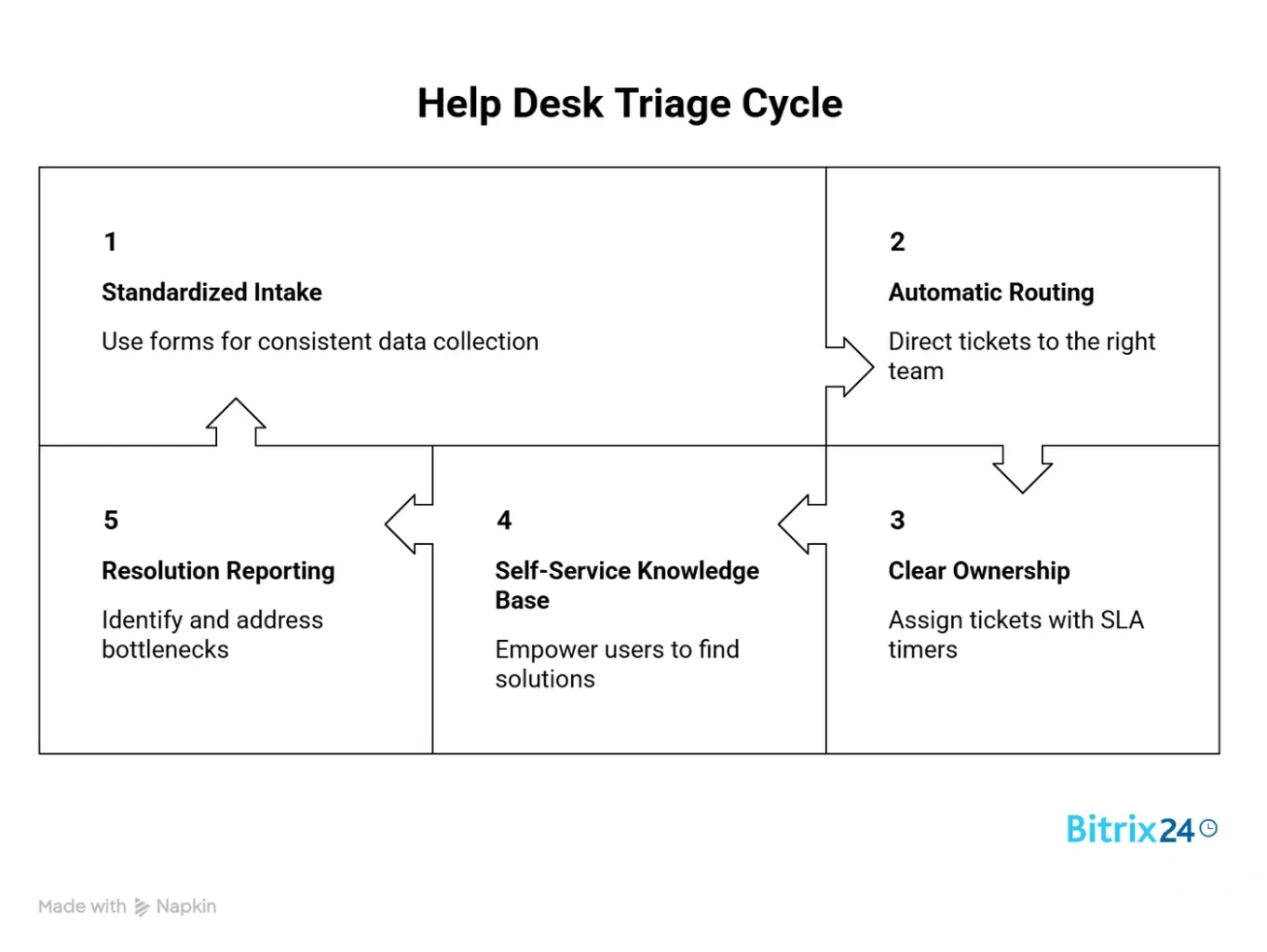
Rule 3: Clear Ownership with SLA Timers
Routing a ticket to a queue is not the same as assigning it to a person. The ticket escalation process starts the moment a ticket sits unassigned or unacknowledged past its target response time.
Help desk SLA tracking defines the response and resolution commitments your team makes for each ticket type. SLA stands for service level agreement, and a typical structure might look like this: critical issues receive a first response within one hour and are resolved within four hours. High-priority tickets receive a response within four hours and are resolved within one business day. Standard requests receive a response within eight hours and are resolved within three business days.
SLA timers do two things. They set expectations for the person who submitted the request, and they create automatic escalation triggers for your team. When a ticket approaches its SLA deadline, the system should notify the assigned agent. When it breaches the deadline, it should be escalated to a team lead or manager.
Ownership means one person is accountable for moving the ticket forward at any given time. That person might collaborate with others, but there is always a name attached. "The team is working on it" is not ownership - it is a recipe for nothing happening.
Rule 4: Self-Service Knowledge Base to Deflect Repeats
A substantial portion of support tickets in most organizations are repeat questions - password resets, how-to guides, policy clarifications, and status checks. Every one of these tickets that a human agent handles is time not spent on complex, high-value problems.
Knowledge base self-service is the practice of creating a searchable library of answers that customers or internal users can access before submitting a ticket. A well-maintained knowledge base reduces ticket volume without reducing service quality, because the answers are still available - they just do not require a human to deliver them.
Building an effective knowledge base starts with your ticket data. Pull the twenty most common request types from the last ninety days and write clear, step-by-step articles for each. Use the exact language your users use, not internal jargon. Include screenshots where they help. Then link the knowledge base from your intake form, your help desk portal, and your automated ticket confirmation emails.
The deflection rate - the percentage of users who find the answer without submitting a ticket - is one of the most meaningful help desk reporting metrics. Teams that invest in self-service typically see a noticeable drop in repeat questions within the first quarter. The exact reduction depends on the quality of the articles, how prominently the knowledge base is surfaced, and whether users are prompted to search for answers before submitting a request.
Rule 5: Resolution Reporting That Shows Bottlenecks
Closing tickets is not the same as understanding your support operation. The fifth rule is about building a reporting system that shows where your help desk triage process is working and where it is not.
Support backlog management depends on visibility. Your backlog is the total number of open, unresolved tickets at any given time - and a growing one means your team is falling behind. You should track these core metrics at a minimum: average first-response time, average resolution time, tickets by category and priority, backlog size over time, SLA compliance rate, and ticket reopening rate.
Each metric tells you something different. Long first-response times indicate a routing or staffing issue. High resolution times in a specific category suggest a training gap or a process issue. A growing backlog means your capacity does not match your volume. Frequent reopenings suggest that tickets are being closed prematurely.
The reporting cadence matters too. Daily or real-time dashboards help team leads manage the queue. Weekly summaries help managers spot trends. Monthly reviews help leadership make staffing and tooling decisions.
One common mistake is tracking only volume and speed. Those numbers can look good while customer satisfaction declines, because speed without quality is just fast failure. The best reporting frameworks pair operational metrics with outcome metrics such as satisfaction scores and repeat contact rates.

Help Desk Triage Tool Comparison
Choosing the right tooling matters, but the process should drive the tool selection - not the other way around. Here is how common approaches compare for teams building an IT help desk workflow.
|
Approach |
Best For |
Intake |
Routing |
SLA Tracking |
Knowledge Base |
Reporting |
|---|---|---|---|---|---|---|
|
Shared email inbox |
Under 10 tickets/day |
Manual |
Manual |
None |
None |
None |
|
Basic ticketing tool (e.g., Freshdesk, Zendesk) |
Small to mid-size teams with external support focus |
Web forms, email |
Rule-based |
Built-in |
Add-on or built-in |
Standard dashboards |
|
IT service management platform (e.g., Jira Service Management) |
IT teams with complex escalation needs |
Portal, email, chat |
Advanced rule-based |
Configurable |
Confluence integration |
Custom reporting |
|
All-in-one work platform (e.g., Bitrix24) |
Teams that need support ticket triage alongside CRM, tasks, and internal communications |
Automated workflows |
Task-based SLAs |
Built-in knowledge base |
||
|
Custom-built internal system |
Large enterprises with unique workflows |
Custom |
Custom |
Custom |
Custom |
Custom |
The trade-off is usually between specialization and integration. Dedicated help desk tools tend to have deeper support-specific features. All-in-one platforms like Bitrix24 provide fewer support-specific bells and whistles but connect your help desk workflow to tasks, projects, CRM data, and internal communication - which reduces the context-switching that slows teams down.
Common Help Desk Triage Challenges and Limitations
No triage framework works perfectly in every situation. Here is where these five rules need adjustment.
- Very small teams (under five tickets per day): Formal triage adds overhead that is not justified at low volumes. A shared inbox with clear ownership norms might be enough until volume grows.
- Highly technical or research-heavy tickets: Some requests cannot be categorized or routed automatically because the nature of the problem is not clear until someone investigates. These need a dedicated "investigation" status that pauses SLA timers while the team scopes the problem.
- Multi-department triage with competing priorities: When a single help desk serves IT, HR, facilities, and finance, routing logic quickly becomes complex. Each department may need its own SLA tiers and escalation paths, and cross-department tickets (a laptop that was never ordered for a new hire, for example) need clear rules for ownership.
- Seasonal or spike-driven volume: Triage processes tuned for steady-state volume can break during peak periods - product launches, end-of-quarter rushes, system outages. Build in surge protocols: simplified categorization, temporary routing overrides, and pre-written responses for predictable spikes.
- Legacy systems without API access: Automated routing and SLA tracking require integration between your intake channels and your ticketing system. If you are running a legacy help desk tool that does not support automation or webhooks, you may need to evaluate migration before the process improvements can take effect.
Bitrix24: The Solution for a Scalable Help Desk Triage Process
Bitrix24 combines the fundamental components required to run a complete support workflow within a single platform. Incoming requests from forms, email, and messenger channels can be routed into a shared workspace, where tickets are assigned through automated workflows and linked to tasks, projects, or CRM records when needed. Teams can track response times, workload distribution, and service performance through built-in analytics, while maintaining clear ownership at every stage of the process. A centralized knowledge base helps reduce repeat questions by allowing users to find answers before submitting a ticket.
Start using Bitrix24 to manage your help desk triage process.
Optimize Your Help Desk Triage
Harness Bitrix24 for a seamless help desk triage process. Automate assignment, prioritize requests, and streamline your workflow for better performance and efficiency.
Get Started NowFAQs
What is a help desk triage process?
A help desk triage process is a structured method for receiving, categorizing, assigning, and tracking support requests. The goal is to get each ticket to the right person within a defined timeframe while maintaining visibility into queue health and team performance. It is used by IT departments, customer service teams, and internal operations groups that handle recurring inbound requests.
Can Bitrix24 help centralize support requests?
Bitrix24 can help centralize support requests by routing them from multiple channels - including web forms, email, and chat or messenger connectors - into a shared workspace. From there, you can assign each request to the right owner or team using automated workflows, so nothing gets lost across disconnected inboxes.
Can I reduce tickets with self-service?
Reducing tickets with self-service is one of the most effective ways to scale support without adding staff. Bitrix24 includes a built-in knowledge base where you can publish answers to common questions and make them accessible during the request process. When customers or internal users find what they need before submitting a request, your team handles fewer repeat tickets and focuses on higher-value problems.
How do I track response time and workload?
Tracking response time and workload in a help desk requires structured ticket statuses, due dates, and ownership fields. Bitrix24 allows you to track backlog size, turnaround time, and team workload through task-based reporting and customizable dashboards. Response times and SLA targets can be monitored using deadlines, automation rules, and reporting views.
What is the difference between ticket routing and ticket escalation?
Ticket routing and ticket escalation serve different functions in the help desk triage process. Routing happens at intake - it determines which team or person receives a new ticket based on its category and priority. Escalation happens after assignment - it triggers when a ticket breaches an SLA deadline or requires higher-level intervention. Both are needed, but they solve different problems.
How many tickets per day justify a formal triage process?
The number of tickets that justifies a formal help desk triage process depends on team size and ticket complexity, but most teams start feeling the pain around twenty to thirty tickets per day. At that volume, manual sorting and routing become time-consuming and error-prone. With fifty tickets a day, the lack of structured triage usually causes visible delays, dropped requests, and inconsistent SLA performance.
What metrics should I track for help desk performance?
Metrics for help desk performance should cover both operational efficiency and service quality. Key operational metrics include average first-response time, average resolution time, SLA compliance rate, and backlog size. Quality metrics include ticket reopening rate, customer satisfaction scores, and first-contact resolution rate. Tracking only speed or volume without quality indicators gives an incomplete picture of how well your triage process is performing.
How do I handle tickets that do not fit standard categories?
Handling tickets that do not fit standard categories requires an "other" or "uncategorized" intake option with a manual review step. These tickets should be routed to a senior agent or team lead who can assess the request, assign it to the correct team, and, if the category comes up repeatedly, create a new intake category. Monitoring the volume of uncategorized tickets over time shows you where your triage logic has gaps.