Project Tracking That Answers One Question: Will We Hit the Date?


TL;DR (Quick Summary)
Project tracking has one job: tell you whether the committed date still holds, early enough to do something about it. A few schedule-risk signals, defined the same way every time and reviewed on a fixed rhythm, do that. Most dashboards measure activity instead, and activity keeps looking healthy right up until the date slips.
- Start with the forecast question → open every review by calling the date safe, at risk, or slipping, then back the call with evidence.
- Which signals predict a slip → four earn dashboard space: unstarted work near the deadline, ownership gaps, dependency waits, and rework.
- Read the signals together → no single one decides it; the combination, the trend, and the distance to the next milestone do.
- Define each signal the same way → pin down "started," "owner," "blocked," and "rework," or the same word means five things across five teams.
- Run a 10-minute review on exceptions → date call first, then only the exceptions, then decisions tied to names and dates.
- Stop tracking motion metrics → percent complete, tasks closed, hours, burndown, and velocity flatter you while the date slips.
- Match each warning to its fix → assign an owner, escalate a dependency, fix the source of rework, or change the plan, depending on which signal fired.
Takeaway: Good project tracking gives you enough warning to protect the date, or reset it before a late surprise creates bigger problems.
Most project reviews are full of updates and still can't answer the question leadership actually asked: will we hit the date?
A tracking system worth running answers that early. It says whether the date is safe, at risk, or slipping, shows why the forecast moved, and names what happens next. Instead of proving that work is happening, the team spends the meeting on the few issues that can still move the date.
Get that right and the review stops being a status ritual.
Use the four signals and the ten-minute review below, and you'll know the date is in trouble weeks before anyone else in the room, while resequencing still costs less than an apology.
Start with the forecast question
Activity doesn't equal schedule confidence
"Ten tasks completed" tells you nothing if the critical work hasn't started. A board that's nearly all closed still misleads when what's left is approvals, testing, dependencies, and the work most likely to reopen.
And the date is usually the thing at risk.
Across more than 16,000 large projects in Bent Flyvbjerg's Oxford database, only 8.5% hit both their cost and schedule targets. A McKinsey and Oxford review of 5,400 large IT projects found the average one ran 45% over budget and 7% over time, and that the longer a project was scheduled to run, the likelier it was to overrun. Those are heavy projects, but on any project the later you notice the drift, the less you can do about it.
Make the amber call
A project lead makes one of three calls. Safe: today's execution supports the date. At risk: the date holds, but only with intervention. Slipping: the current plan no longer supports the commitment.
The honest call rarely gets made, because "at risk" invites questions in front of a sponsor. So leads report green and hope. A tracking system earns its place by tying the amber call to observable conditions, which makes it cheap to state and hard to dodge.
CD Projekt shows what the dodge costs. Cyberpunk 2077 had already slipped three times when it launched on 10 December 2020, and this time the date held. The versions for older consoles didn't. Four days later, on an investor call, joint CEO Adam Kiciński admitted the board had ignored the signals about the need for additional time on those consoles. His co-founder explained that the team kept fixing the old-console build until the last minute, convinced it would make it, which is why reviewers got it a day before release.
The warning existed. Nothing in the process turned it into a call.
Example-in-action
Most of a marketing launch's creative work is done, but legal approval, landing-page QA, and CRM setup haven't started. The task-count dashboard looks healthy, since most items are closed. The forecast view says the opposite, because the work that's left sits directly in front of launch with no slack behind it. That second view is the one the lead needs.
Predictive Milestone Tracker Template With Early-Warning Thresholds
Enter your email address to get a comprehensive, step-by-step guide

Reduce the dashboard to the few signals that actually predict a slip
When the goal is forecasting, a crowded dashboard hides risk instead of showing it. More metrics don't buy more foresight. They give the one metric that matters more places to hide.
Four signals carry most of the warning:
- Unstarted work close to the deadline
- Ownership gaps
- Dependency waits
- Rework
Together they tell you whether work is still flowing toward done.
One term first, used throughout. Near-term means work due inside the next one or two review cycles: for a team reviewing weekly, roughly the next 10 to 14 days. That window is a recommended default, not a rule. Pick your own, then apply it the same way every review. Change it week to week and the signals stop being comparable.
1. Unstarted work close to the deadline
Unstarted work is timing compression you can see. When important tasks sit untouched late in the plan, there's less room to absorb the normal delays that always come. It matters most when a milestone or a downstream handoff is waiting on that task.
A task deliberately scheduled for the end isn't an alarm. Late unstarted work with three other items queued behind it is.
The real failure here is quieter than tasks sitting idle. It's tasks that get nudged (opened, assigned, dragged to "in progress") so the dashboard stops flagging them, while no actual work happens. Track status labels and you reward that move. Track evidence of real execution and you don't. (More on that in the definitions below).
2. Ownership gaps
Work without one accountable owner stalls the moment it hits friction. Nobody chases the approval, nobody follows up on the missing input, nobody decides the next move.
Picture a client implementation that touches engineering, customer success, and the client. Assign it to "Implementation Team" and the access request sits untouched for days: engineering assumes customer success is chasing it, customer success assumes the client is, the client assumes someone will tell them what's needed. Group assignment looks like coverage on the board and behaves like a gap on the ground. The longer the contributor list, the wider the gap.
3. Dependency waits
A dependency wait is any point where progress hangs on someone or something else: another person, a team, a vendor, an approval, a predecessor task. A short planned wait is routine. An aging blocker with no committed resolution path is a warning.
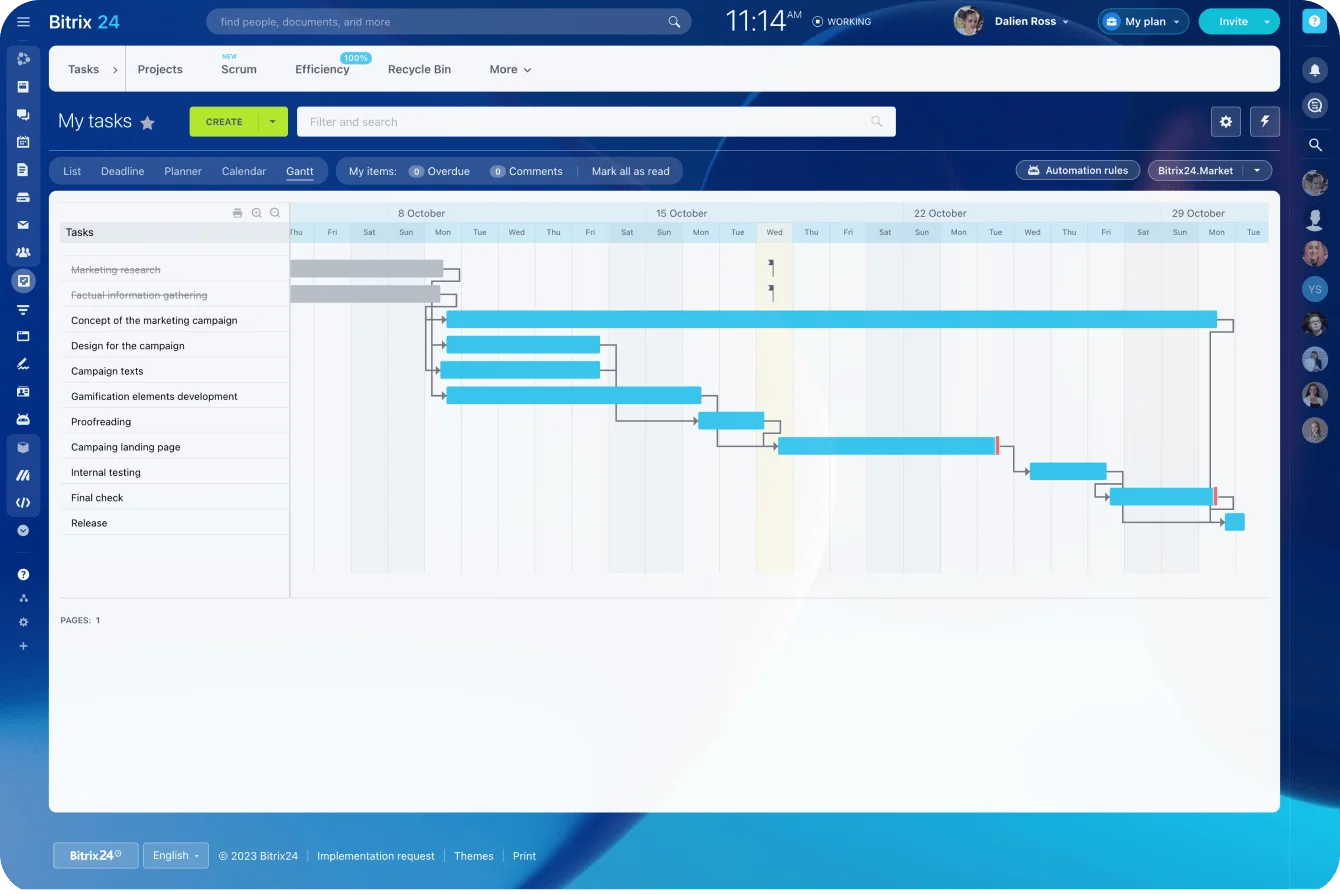
Teams on Bitrix24 task management keep owners, deadlines, status, and related work in one project workflow, which is what makes these signals observable rather than something you rebuild by hand every week. Where sequence matters, a Gantt chart with dependencies makes the dependent tasks easy to inspect.
Pro tip: track how long something has been blocked, not just that it's blocked. A block that appeared yesterday and one that's survived three reviews shouldn't look the same on the page.
4. Rework
Rework tells you whether finished work stays finished. When deliverables get reopened, corrected, rebuilt, or materially revised, you're spending capacity on work the plan already counted as done.
Late-stage rework hurts most, because it competes with the final testing, approvals, documentation, and launch prep that all land at once.
A software release looks nearly finished right up until acceptance testing keeps bouncing the same feature back. "Percent complete" barely moves while finishing capacity quietly drains away. The number that's actually moving, the count of times that deliverable has reopened, is the one nobody's watching.
Read the signals together
No single signal decides the forecast. A rule that trips on one signal alone trips constantly, and a signal that cries wolf every week gets muted inside a month. What decides it is the combination, the direction of travel, and how close the next milestone sits.
Unstarted work + little time remaining
This is the clearest warning of the set. Unstarted work on its own is survivable. A short window on its own is survivable. Put them together and you're betting the date on compressed execution with no room for a bad day. If downstream tasks depend on that work, progress everywhere else won't save you.
Blocked work + external dependency
You can claw back internal delays by resequencing or adding hands. External waits you can't: customer approval, vendor delivery, security access, legal review, a sign-off from another department. When blockers are aging and new blocked work keeps appearing, that's a flow problem, not one bad hold-up.
Late rework + milestone-critical deliverables
Early revision is just development. Late revision is a different animal. When changes pile up near completion, the cause sits upstream: fuzzy acceptance criteria, unresolved requirements, stakeholder feedback arriving late, thin quality checks earlier on. If the reopened work clusters on milestone deliverables, the project reads as nearly done while losing ground exactly where it counts.
Turn the pattern into a date call
Three questions turn the pattern into a call. Are risks clearing or piling up? Are they concentrating around the next milestone? Are new ones opening faster than old ones close?
The rules that follow are example defaults, not universal thresholds. Calibrate them to your rhythm and your risk, then hold them steady so the call means the same thing every week.
- Safe: nothing on the critical path is unstarted inside the near-term window, and blockers clear at least as fast as they appear.
- At risk: a milestone-critical item is still unstarted inside the window, or a blocker has aged past a review cycle with no resolution path.
- Slipping: critical-path work no longer fits the time left, an external blocker on a milestone deliverable has no resolution date, or the same final deliverable keeps reopening.
Don't treat the rules as an oracle. One unstarted item two weeks out is no crisis if it has an owner and a start date. The same item, ownerless, with three things queued behind it, is. The rules narrow the judgment; they don't make it for you.

Define each forecasting signal so teams measure it consistently
Signals lose their value the moment two teams read them differently. "On track" from one team and "on track" from another can describe completely different realities, and leadership has no way to tell which is which.
The data you need is small: due date or milestone, start state, named owner, dependency status, and whether the work was reopened after it was called done. Set those rules once, check the data before each review, and treat the measures below as lightweight defaults.
The exact formula matters less than everyone computing the same thing the same way.
Define "started"
Count milestone-linked work as started only when real execution has begun. A usable default: the share of milestone-scoped items still not in an active state as the near-term window opens. The share climbs, the compression climbs with it.
Opening a task, sitting in a kickoff, or skimming a doc isn't progress if the production work hasn't started.
This is the definition worth fighting for, because it's the one people route around. Let "started" mean "the status says in progress" and anyone clears the flag without doing the work. Tie it to something visible instead (a draft, a branch, a booked slot with the approver) and the gaming stops, because now there's an artifact to point at.
Define "owner"
An owner is one person accountable for driving the item to done. Measure ownership gaps as the count of milestone-scoped items with no single name against them. A team is a gap, not an owner.
A department, a workgroup, a list of contributors: none of them carry the same accountability. Plenty of people contribute, but one person owns the follow-up, the coordination, the next step, and the close. If nobody can answer "who makes sure this finishes?", the item is ownerless.
Define "blocked"
Mark an item blocked when it can't move without an input, a decision, an approval, an access change, or a predecessor finishing. Track two numbers: how many items are blocked, and their average age in days. A short list of fresh blocks is normal. A flat count hiding a rising average age is a project aging in place.
Don't confuse sequencing with blocking. A task scheduled for next week isn't blocked. A task ready today and waiting on security access is.
This gets easier when everyone works from the same project management workspace instead of holding private interpretations in separate spreadsheets and meeting notes.
Define "rework"
Count rework when something that had reached an agreed done has to be reopened, materially corrected, rebuilt, or resubmitted. A simple rate: items reopened in the last review window over items marked done in the same window. Watch the trend and where the reopens land, not the raw count. Normal drafting and planned review cycles don't count.
Pro tip: log a one-word reason when an item reopens, such as requirements, quality, approval, dependency, or customer change. After a few reviews, the reasons show you where the process itself needs work.
Build a 10-minute review around exceptions
A ten-minute status meeting is realistic the moment the review runs on exceptions rather than narration. Everything else waits outside the room until someone needs to open it.
Cadence follows the pace of change rather than the calendar. Fast-moving delivery runs weekly. A slow, stable program runs fortnightly or monthly. Too long and issues sit; too short and you're reporting the same thing with nothing new to say. Whatever you pick, run it on the same rhythm every time, because the value is in the comparison from one review to the next.
A one-page review, illustrated
Here's an illustrative layout with sample data, not a real project, to show how little space the whole review needs:
PROJECT: Spring product launch Review date: 14 May
────────────────────────────────────────────────────────────
DATE CONFIDENCE: AT RISK
Reason: Legal sign-off unstarted, 9 days to launch-critical milestone
AT-RISK ITEMS (milestone-linked) Owner Due
Legal review of launch claims A. Okafor 20 May
Landing-page QA pass R. Silva 21 May
CRM list segmentation (unassigned) 22 May
AGING BLOCKERS Age Next escalation
Security access for CRM import 6 days Escalate to IT lead
today
Vendor asset delivery 11 days Sponsor to call vendor
OWNERLESS ITEMS
CRM list segmentation → needs an owner before end of review
REWORK (last 14 days)
Reopens: 4 ▁▂▄▆ trend rising, clustered on launch page copy
────────────────────────────────────────────────────────────
A sponsor reads the date call, the three things driving it, and the one place a decision is needed, in under a minute, before anyone narrates a single task. That's the entire job of the page.
Put five things on the review page
Each line on that page earns its spot.
Date confidence is the headline the meeting exists to produce. The at-risk items are the few milestone-linked tasks carrying the exposure. Aging blockers are the dependencies that won't clear on their own. Ownerless work is the set of tasks one step away from becoming a silent delay. The rework trend tells you whether reopened work is steady, climbing, or bunching up near final delivery, which is the difference between noise and a real problem.
Give the 10 minutes a job
Run it in three moves:
- First two minutes: the lead makes the date call, safe, at risk, or slipping, and gives the evidence behind it.
- Next five minutes: owners speak only to blockers, ownership gaps, late unstarted work, and material rework. Nothing else.
- Last three minutes: sponsors and cross-functional leads decide. They assign owners, approve tradeoffs, escalate dependencies, move resources, and agree scope or date changes.
The meeting ends with decisions pinned to people and dates.
These reviews balloon back toward the full hour for a structural reason rather than a discipline one. Open with a round of updates and everyone narrates to prove they've been busy, so the date call lands last, after it can shape anything. Open with the date call instead. Once the lead says "at risk, legal's unstarted with nine days left," the only updates worth hearing are the ones that change that sentence. The rest is narration the page already carried.
The bottleneck that quietly costs the most is the decision that evaporates after the meeting: a resource shift agreed out loud, an escalation promised in a corridor, none of it written against the task. When workgroups and collaboration tools keep the discussion attached to the work, the decision lives where the work does, instead of being pieced back together from three chat threads a week later.
Stop tracking metrics that create motion but don't move the date
Plenty of familiar metrics are easy to collect and nearly useless as proof the date is safe.
Percent complete
Percent complete falls apart without hard completion rules. Teams estimate it differently, round it up under pressure, and average tasks that carry wildly different schedule weight. A project can read nearly done while the last slice of work holds the single approval that gates launch. The tell is the reading that sits unchanged for three reviews running: work has stopped, but the metric keeps looking like progress.
Total tasks closed
Total tasks closed rewards teams for clearing the easy work while the critical tasks stay blocked. Forty closed tickets and one untouched sign-off still add up to a late project. The count is useful operational color, and it turns misleading the moment a leader reads volume as falling schedule risk.
Hours logged
Hours logged measures effort spent, not path cleared. Effort climbs during deterioration too, when people burn time coordinating around blockers, chasing approvals, fixing errors, and redoing failed work.
Burndown without scope control
A burndown chart is reassuring while remaining work drops in a clean line. It means nothing the second scope shifts under it. Add new work as fast as old work closes and the line flattens while the forecast goes silently wrong; quietly trim scope to keep the line falling and it looks best exactly as the deliverable shrinks. Read burndown only next to what's happening to the total.
Velocity without plan stability
Velocity, the work finished per sprint or per week, forecasts a date only if the plan it's measured against holds still. Churn the requirements, keep reopening "done" work, or re-estimate the backlog every cycle, and a steady velocity points at a finish line that keeps moving. High velocity against an unstable plan tells you the team is busy. It doesn't tell you the date is closer.
RAG status without evidence
Red, amber, green works as shorthand when the color comes from observable conditions. Without rules, it's just mood, and mood trends optimistic: one lead flips to amber at the first external blocker, another holds green until the deadline's already lost.
That second kind has a name: the watermelon - green on the surface and red all the way through the moment someone cuts in. Define what changes the color, or you'll keep meeting watermelons the week before launch.
Narrative updates that bury blockers
A well-written update breeds false confidence when the one real problem shows up halfway down the third paragraph. Good status notes surface the blockers, the ownership gaps, the reopened work, and the decisions needed, up top where they can't be missed.
A metric earns dashboard space if it predicts a schedule problem or triggers a decision. If it does neither, it's stealing attention the four signals need.

Match each warning to the right intervention
Warning time is only worth having if you spend it on the right move. Different patterns call for different responses, so "work harder" can't be the answer to all of them. Push a team to grind around a problem they don't own and you've added a morale problem on top of the schedule one.
Ownership gaps → assign accountability
Give the item a name and a next action. Then check the name means something: the person knows the deadline, holds the authority to move the work, and knows which follow-up is theirs. A name without authority is just the same gap wearing a nameplate.
Dependency waits → escalate
When another department, an approver, a customer, or a vendor holds the next step, raise it to someone who can extract a commitment or authorize a workaround. The team can't grind its way past a dependency it doesn't control.
Where the same escalation repeats, Bitrix24 task automation routes the reminders and follow-ups so they don't ride on someone remembering, which matters because the blockers that hurt most are the ones everyone assumed someone else was chasing.
High rework → fix the source
Repeated rework points upstream: unclear requirements, weak acceptance criteria, late stakeholder input, or reviews that were too thin earlier on. Demand more output without fixing the source and you just manufacture more work that comes back. Track why items reopen, and fix it there.
Too much unstarted work → change the plan
A pile of critical work near the deadline is a structural problem, and telling the team to hurry won't touch it. Cut lower-priority scope, resequence around the critical milestone, move resources onto the constraint, split delivery into phases, or reset the date.
The earlier the warning, the more of those doors are still open. Two weeks out you can resequence. Two days out your only honest option is to reset the date, and it costs far more by then.
Example-in-action
A few weeks out from a client go-live, the page shows the API integration unstarted, a security-access blocker that's been open longer than a week, and two ownerless config tasks queued behind the integration. Read together, that's not a "push harder" situation. Escalate the blocker to whoever can grant access. Give the config tasks owners in the meeting. And since the integration won't fit the window at full scope, split the launch into a core release now and a later phase. Three signals, three different moves, all of them still on the table because the warning showed up with time to spend.
FAQs
Who makes the date call, the project lead or the sponsor?
The lead makes it, because the lead sees the signals first. The sponsor's job is to challenge the evidence behind the color. If sponsors can repaint amber to green in the meeting, leads learn to pre-paint it, and the call stops carrying any information.
A task is scheduled to start late on purpose. Is that a red flag?
Not on its own. A task deliberately placed near the end of the plan is fine. It earns scrutiny when it sits on the critical path with other work queued behind it, or when it has no owner and no start date. The signal is late unstarted work that others depend on. Lateness by itself isn't.
Is percent complete worth reporting at all?
As operational color, sure. As proof the date is safe, no. Percent complete treats every remaining unit of work as equal, and the last stretch almost never is: it's where the approvals, the integrations, and the reopens hide. Report it if you like, but don't let it stand in for a date call.
What if the call is "slipping" and nobody will move the date?
Put the call in writing with the signal behind it, then set two costed options beside it: the scope you'd cut to hold the date, or the date that holds at full scope. Leaders refuse a reset far more easily than they refuse a choice. Keep making the call every review. A project reported as slipping for three weeks is a decision someone owns. A project reported green for those same three weeks is a surprise.
Spot schedule risks before dates slip
Bitrix24 keeps tasks, owners, dependencies, and decisions in one workspace so teams see blockers early and protect deadlines.
Get Started NowThe bottom line
Every signal here exists to do one thing: buy you time. A slip you catch three weeks out is a planning problem you solve by resequencing or trimming scope. The same slip found two days before launch is an emergency, and the only honest move left is to tell everyone the date was wrong.
The distance between those two endings is warning time, and warning time is the whole return on tracking.
That return shows up only when the signals live where the work does. Keep owners, dependencies, status, and the decisions made about them in one place instead of spread across a spreadsheet, a chat thread, and somebody's memory, and a warning becomes a forecast, an owner, and a next action inside the same review.
Running the work and its tracking in one Bitrix24 workspace is what makes that chain close before the date does.
Takeaway: The whole return on tracking is warning time, so catch the slip while there's still room to resequence, reassign, or reset.