SMB CRM, Simplified: What to Keep, What to Cut

Every craft has its tools. The best ones fit your hand, move with your rhythm, and make the work feel lighter.
Somewhere along the way, well, software seemed to forget that. Small businesses began collecting tools instead of mastering them. Each new feature promised to save time, yet somehow the day filled up with updates, tabs, and reports. The craft of selling became a cycle of clicks.
This guide is about getting that craft back.
It shows you how to strip away what slows your team down and focus on the parts of your CRM that actually move sales forward. You’ll learn what to keep, what to cut, and how Bitrix24 helps you find that balance — powerful, intuitive, and built to move as fast as you do.
The hidden costs of CRM complexity
A few extra features, another plug-in, a new dashboard — and suddenly your CRM feels heavier than your workload. What looks like progress ends up slowing your team down.
Here’s where that cost really shows.
The productivity drain
A complicated CRM steals time from your team. Reps spend hours logging calls, updating records, and jumping between tabs instead of following up with leads. Even simple actions like checking a deal’s progress can take too many clicks. When selling starts feeling like admin work, momentum disappears.
The cost of low adoption
You can’t get value from a CRM your team doesn’t use. If your salespeople find the system confusing or tedious, they’ll fall back to spreadsheets and sticky notes. This creates data gaps, lost visibility, and missed opportunities. Every unlogged call or forgotten follow-up is potential revenue working its way down the drain.
Subscription and integration overload
Many SMBs try to “fix” CRM problems by adding more tools: an email tracker here, an analytics add-on there. Before long, you’re managing multiple subscriptions that barely talk to each other. Not only does this inflate costs, but it also fragments your data and workflows.
Decision fatigue
Too many dashboards, metrics, and reports can cloud judgment. When you’re flooded with data, it’s easy to lose sight of what actually drives sales. Instead of focusing on actionable insights, teams waste time sorting through irrelevant numbers.
Bitrix24 takes the opposite approach. It combines everything you need — CRM, communication, analytics, and automation — in one clean, connected workspace. No add-ons, no hidden costs, no clutter.
All-in-one intuitive platform, empowers SMBs to sell smarter and grow confidently without CRM overload.
Bitrix24 eliminates unnecessary tools and complexities, helping small businesses streamline workflows, improve team adoption, and close more deals.
Start Bitrix24 TodayWhat to keep: CRM essentials that strengthen your sales process
Simplifying your CRM isn’t about removing everything. It’s about keeping the tools that truly help you sell smarter, faster, and more effectively. These are the features that build structure around your sales process — not slow it down.
Below are the essentials every SMB should keep (and optimize) to strengthen daily performance.
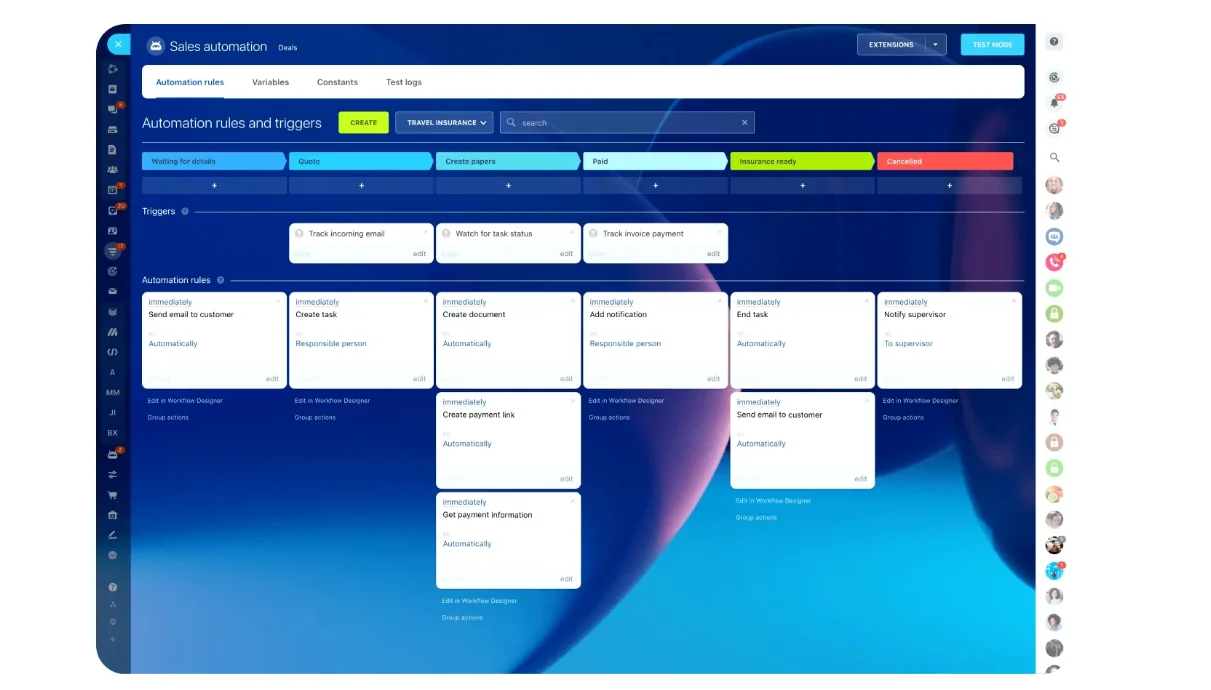
1. Automation that works for you
A great CRM takes repetitive tasks off your plate. You shouldn’t need to manually enter every lead or remember to send every follow-up.
Automation helps you move deals forward without losing focus. With Bitrix24’s CoPilot in CRM, routine work like data entry, lead assignment, and follow-up scheduling happens automatically. You can set rules that fit your exact sales process — no coding required.
Why it matters:
- Saves time and prevents manual errors.
- Keeps leads engaged with timely communication.
- Ensures nothing gets forgotten.
With AI-driven automation, your CRM becomes your assistant, not another task to manage.
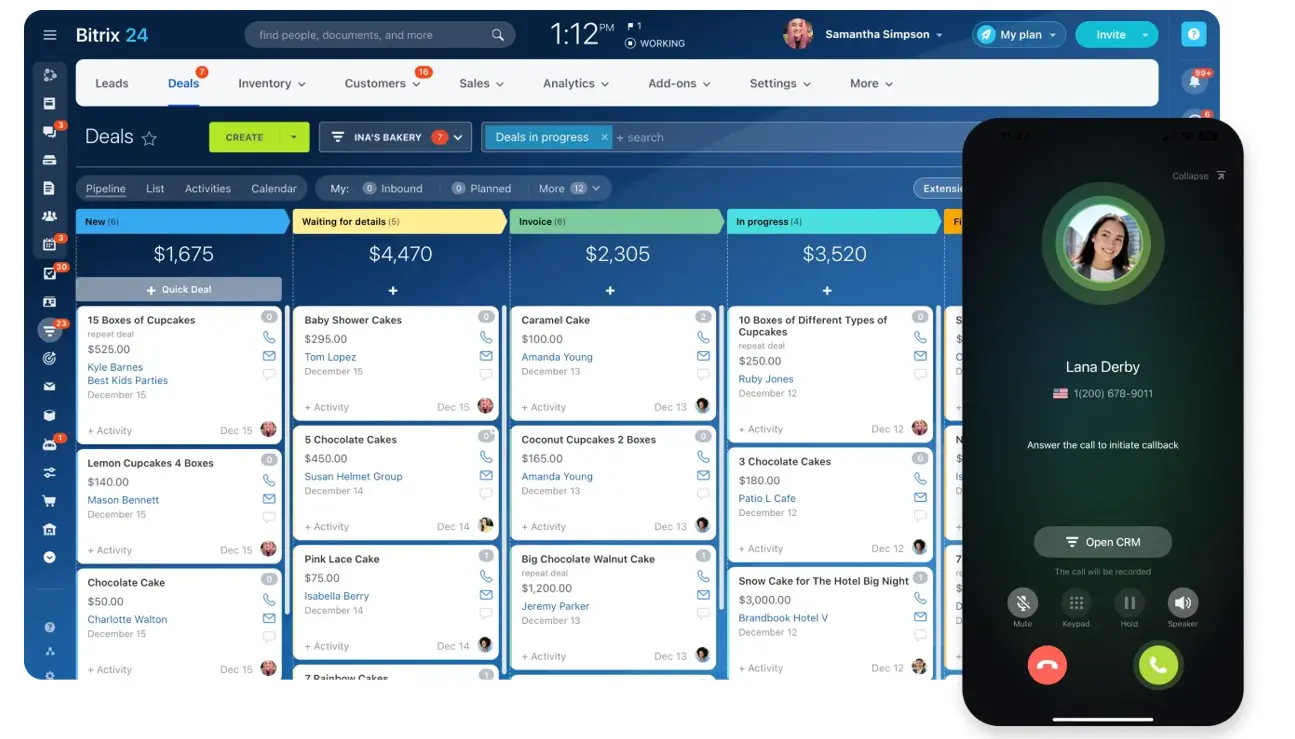
2. A unified customer view
Scattered data leads to scattered sales. You need one place where every interaction, message, and note lives — so you can see the full story behind every customer.
Bitrix24’s CRM dashboard pulls everything together: emails, chats, calls, and deal histories. You don’t have to dig through inboxes or switch tabs to find context.
Why it matters:
- Keeps your entire team aligned on every customer interaction.
- Reduces confusion and duplicate work.
- Makes onboarding new reps faster and smoother.
When your CRM shows the whole picture, your team can act with confidence and consistency.
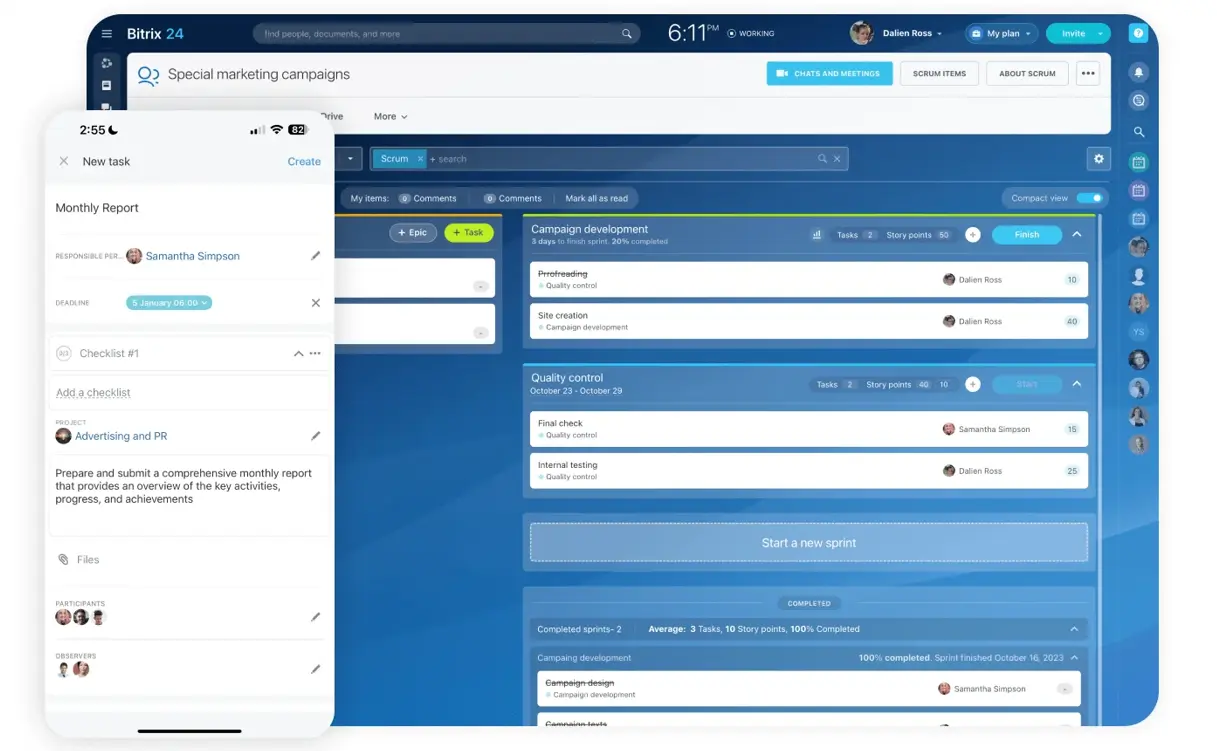
3. On-the-Go sales enablement
Sales don’t always happen behind a desk. Whether you’re visiting clients or managing a distributed team, you need access to your CRM wherever you go.
Bitrix24’s Mobile CRM gives you that flexibility. You can update deals, make calls, check analytics, or respond to leads directly from your phone without losing functionality.
Why it matters:
- Keeps your team productive and connected, even outside the office.
- Allows real-time updates so nothing gets missed.
- Helps you respond to leads faster, improving conversion rates.
Mobility ensures your sales process keeps moving — no matter where business takes you.
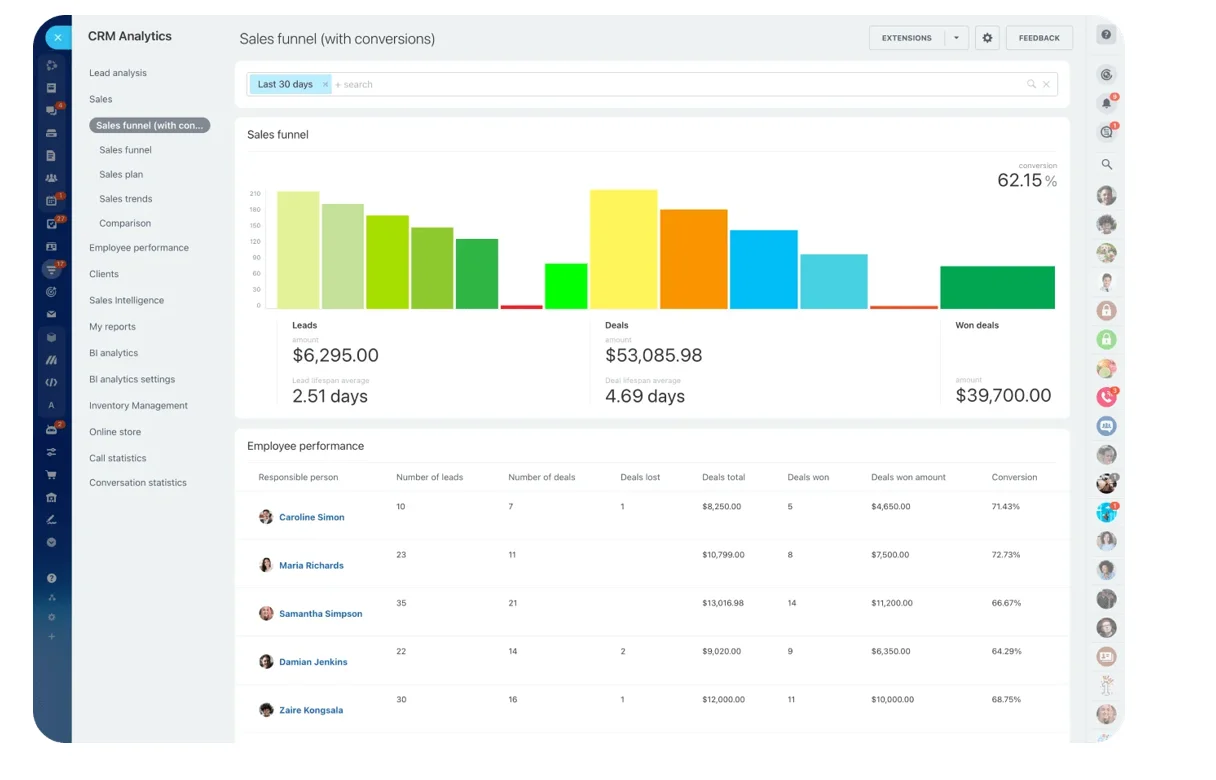
4. Clear performance insights
You can’t improve what you can’t measure. The right analytics give you visibility into how your sales process is performing — and where it can get better.
Bitrix24’s analytics and reporting tools provide instant insights into your sales funnel, team performance, and deal progress. You can customize dashboards to highlight what truly matters, from conversion rates to average deal value.
Why it matters:
- Enables data-driven decision-making.
- Identifies bottlenecks in your pipeline.
- Helps you forecast growth accurately.
When analytics are simple, actionable, and visual, they help your team make smarter moves — not just generate more reports.
Keeping these essentials — automation, clarity, mobility, and insights — transforms your CRM into a growth engine. Bitrix24 makes this balance easy by combining everything in one streamlined platform that grows with your business.
What to cut: Features that create friction, not value
A powerful CRM doesn’t need to be packed with hundreds of features. In fact, the more unnecessary tools you keep, the harder it becomes to actually use your system effectively. Simplification means knowing what to let go — the clutter, the confusion, and the “nice-to-haves” that don’t drive sales.
Here’s what you can safely cut to make your CRM leaner and more productive.
1. Over-Customization
Customization can be useful. Right up until it isn’t. Many SMBs spend weeks building complex fields, workflows, and reports that nobody ends up using. The result? Slower processes, frustrated users, and higher maintenance costs.
If you need a developer to change your CRM, it’s too complicated. Simplify your setup by focusing only on what supports your actual sales goals.
Bitrix24 gives you powerful flexibility without the headache. You can customize pipelines, fields, and automation in just a few clicks — no IT team required.
2. Isolated add-ons and third-party chaos
When you rely on multiple disconnected apps, your CRM stops being a single source of truth. Data gets scattered across tools, integrations break, and your team wastes time switching between systems.
Every extra plug-in or add-on adds complexity — and more room for error.
With everything under one roof (CRM, communications, project management, and-analytics), Bitrix24 eliminates integration fatigue. You get a fully connected system that just works, right out of the box.
SMB CRM Simplification Guide: What To Keep What To Cut And Why
Enter your email address to get a comprehensive, step-by-step guide

3. Unnecessary dashboards and vanity metrics
More data isn’t always better. Many CRMs overload users with graphs and numbers that look impressive but offer little value. If a report doesn’t guide decisions or track a sales outcome, it’s just noise.
Trim your dashboards to the essentials — conversion rates, pipeline stages, revenue trends, and activity tracking.
Bitrix24’s analytics and reporting tools let you create custom dashboards that focus on what truly matters. No clutter, no confusion — just the insights that move your business forward.
4. Manual reporting and redundant approvals
If your team still builds reports manually or waits for multiple sign-offs to act, you’re losing precious time. Automation can handle both faster and more accurately.
Simplify approvals, automate data collection, and let your team focus on selling instead of paperwork.
With CoPilot in CRM and built-in automation rules, repetitive admin work becomes effortless. Your team gets real-time data, automated reports, and smarter workflows — no delays or bottlenecks.
Simplify with purpose
Every tool you cut should make room for something better — efficiency, collaboration, or speed. Simplification isn’t about shrinking your CRM; it’s about removing friction so your team can perform at its best.
Simplify to sell smarter
A simplified CRM keeps your focus where it belongs: building relationships, closing deals, and growing your business. You don’t need more features; you need the right ones — automation that saves time, insights that guide action, and mobility that keeps your team connected anywhere.
That’s the power of Bitrix24. It’s built for SMBs that want enterprise-grade performance without the complexity. With CoPilot in CRM, Mobile CRM, and advanced analytics, Bitrix24 gives you the clarity and control to run your sales process with confidence.
Simplify your CRM. Strengthen your sales.
And let Bitrix24 help you do both — smarter, faster, and easier.
Supercharge your sales with Bitrix24 CRM!
Bitrix24 CRM helps you track leads, automate follow-ups, and increase conversions effortlessly. Free forever, unlimited users.
GET BITRIX24 CRMFAQs
1. What’s the easiest way to simplify an existing CRM setup?
Start with an audit. Identify which features or integrations your team actually uses. Then, move those core workflows into Bitrix24, where CRM, automation, and communication already coexist. You’ll instantly see what can be retired and what’s worth keeping.
2. How do I migrate customer data into Bitrix24 without losing information?
Bitrix24’s import wizard lets you upload data from spreadsheets or other CRMs using CSV files. You can map standard and custom fields, ensuring every contact, deal, and note transfers correctly — no manual re-entry required.
3. Which CRM metrics should SMBs track to measure success?
Focus on clarity, not volume. Track conversion rates, deal velocity, customer lifetime value, and activity completion. These metrics reveal how efficiently your pipeline moves, not just how much data you collect.
4. How can automation save my team time without removing the personal touch?
Use Bitrix24’s CoPilot in CRM to handle repetitive tasks like lead assignment, reminders, and updates. Then, spend that saved time on calls, follow-ups, and relationships — the parts of sales that AI can’t replace.
5. What’s the best way to keep CRM data clean and current?
Schedule automatic updates for deal stages and assign ownership for regular data reviews. Bitrix24 also allows rule-based workflows that flag duplicates, missing fields, or inactive leads before they clutter your pipeline.
6. How does Mobile CRM improve team performance?
Mobile CRM gives your sales team freedom to update deals, check analytics, and respond to leads on the go. Every change syncs instantly, ensuring no opportunities fall through the cracks — even outside the office.
7. When should an SMB consider upgrading its CRM setup?
When your team starts spending more time maintaining tools than managing customers. That’s the sign it’s time for an all-in-one system like Bitrix24, where simplicity, automation, and analytics scale naturally as you grow.