6 Tech Solutions That Medium-Sized Businesses Can't Live Without


TL;DR (Quick Summary)
- Mid-market companies rarely stall for lack of software. They stall because growth piles on customers, approvals, data, and handoffs faster than a patchwork of tools can carry.
- The fix is six categories that shoulder the load: ERP/accounting, CRM, HRIS/payroll, collaboration/project management, cybersecurity/identity, and BI/integration/automation.
- Buy for the workflow that's already breaking, not the headcount milestone.
Takeaway: Buy for the workflow that's already breaking, not the headcount milestone — the six categories that close the mid-market coordination gap are ERP/accounting, CRM, HRIS/payroll, collaboration/project management, cybersecurity/identity, and BI/integration/automation.
Mid-market companies don't usually stall for lack of software. They stall because the software they have doesn't hold together. Sales works one system, finance works another, operations works a third, and the shared record (the one that lets a manager answer a basic question without calling three people!) lives nowhere.
Growth makes it worse. More revenue means more customers, approvals, handoffs, and reporting requirements. For a while, people absorb the gap by hand. Then the workarounds become the job.
The six categories here — ERP, CRM, HRIS, collaboration, cybersecurity, and BI — are the ones that close that gap at the mid-market stage. What follows is what each fixes, where rollouts go wrong, and how to know when you actually need one.
Why these six technology categories matter more at the mid-market stage
At the mid-market stage, complexity compounds. More customers create more exceptions. More employees create more handoffs and permissions. More departments create more reporting requirements. More applications create duplicate data.
Where coordination costs start appearing
The symptoms show up in everyday work long before they show up in a financial report:
- Employees keep asking one another for status updates
- Managers become approval bottlenecks
- Finance spends days reconciling different versions of the same number
- Customer-facing teams search email and chat for missing context
- New hires need several people to manually set up accounts and access
- Reporting depends on one person maintaining a complex spreadsheet
When friction becomes a business problem
Watch for consequences, not minor inconvenience.
If sales follow-up is inconsistent, coordination has become a revenue problem. If month-end keeps needing emergency spreadsheet reconciliation, finance has become a decision bottleneck. If nobody can confidently list which applications a former employee can still reach, account administration has become a security problem.
Pro Tip
Don't use employee count as your main buying trigger. Ten people reconciling the same information every week is a stronger signal than crossing some headcount threshold.
Mid-Market Tech Stack Audit Scorecard + Prioritization Matrix
Enter your email address to get a comprehensive, step-by-step guide

The 6 tech solutions medium-sized businesses can't live without
1. ERP or modern accounting and finance systems
ERP or a stronger accounting system becomes necessary when finance can't close efficiently, cash visibility is unreliable, or the business has picked up inventory, entities, subscriptions, projects, locations, or messier billing.
What it solves
A basic accounting package still processes transactions correctly while the workflow around it falls apart. Finance ends up:
- Exporting reports from several systems
- Reconciling inventory separately
- Maintaining revenue schedules by hand
- Combining entity-level numbers in spreadsheets
- Rechecking figures before every management meeting
The right system takes that reconstruction off their plate. Transactions follow agreed categories, approval rules stay consistent, and finance works exceptions instead of rebuilding the underlying data every cycle.
Where ERP implementations go wrong
Companies jump from basic accounting straight into an oversized ERP rollout. The usual mistakes:
- Buying modules for processes that were never standardized
- Migrating years of poor-quality master data
- Redesigning finance, procurement, inventory, and reporting at once
- Underestimating training
Start with the problems actually slowing finance down. Don't buy the largest system the budget allows.
2. CRM Systems
CRM becomes essential when customer relationships can't keep living in individual memory, inboxes, personal spreadsheets, and informal updates.
What a CRM should make visible
The system should answer basic commercial questions without another meeting:
- Which deals are active?
- Who owns them?
- What happened last?
- What needs to happen next?
- Which customers are approaching renewal?
- Where do deals consistently stall?
A rep updates deal information during normal selling, not as a separate chore. Managers then spend the weekly review on exceptions and stalled deals instead of reconstructing the pipeline.
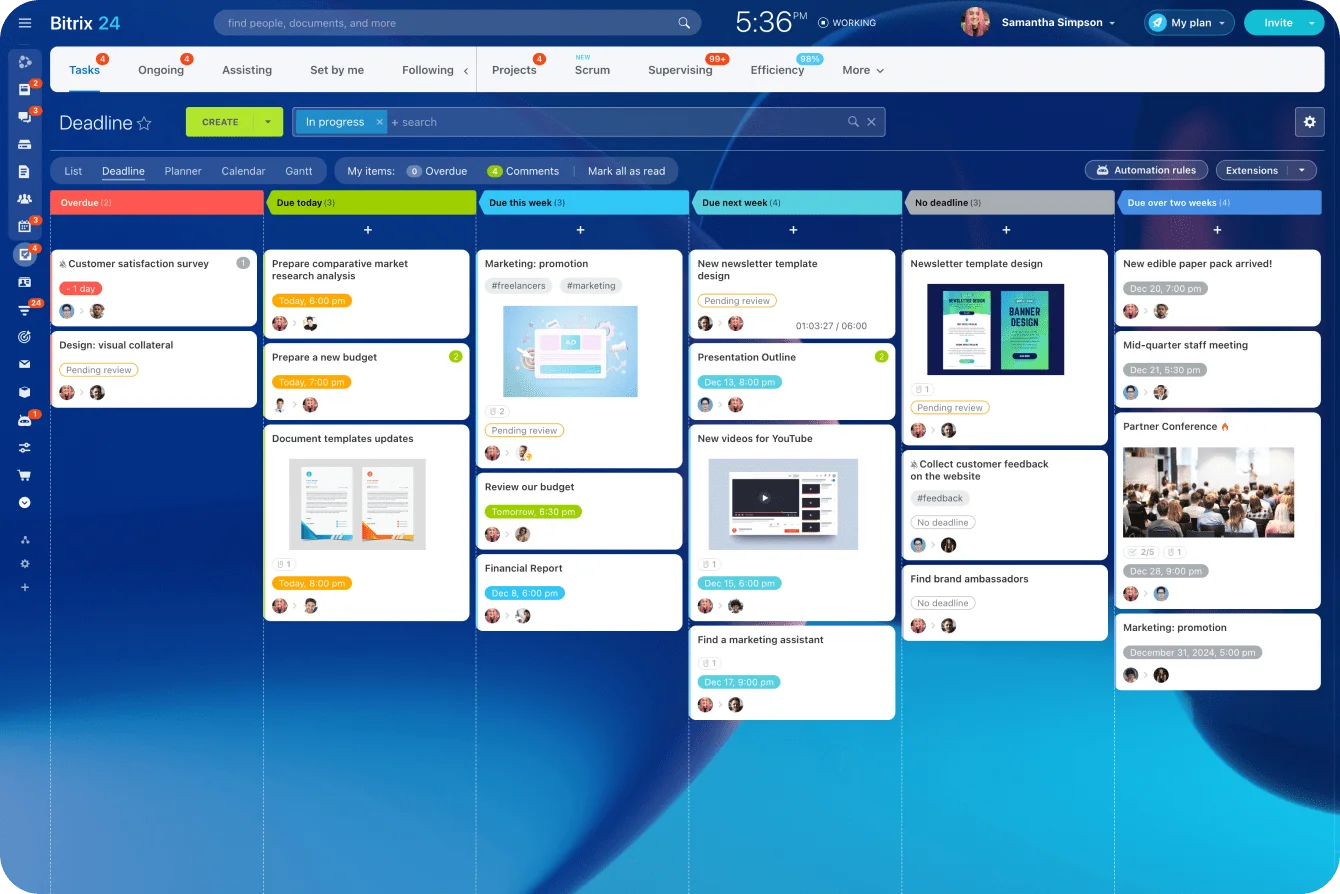
For companies that want customer records and sales activity sitting alongside the rest of their operational work, Bitrix24 CRM supports leads, deals, contacts, sales processes, and reporting. Tasks connect to CRM records too, which keeps internal delivery work tied to the customer or deal that created it.
Where CRM projects go wrong
CRM implementations fail when management treats data entry as a compliance exercise. Ask reps to fill in dozens of fields nobody uses, and they'll enter the bare minimum every time.
Pro Tip
Every mandatory CRM field should have a consumer. If nothing uses it for routing, forecasting, reporting, customer communication, or a downstream workflow, ask why salespeople are maintaining it.
3. HRIS and payroll platforms
HRIS and payroll become essential when employee information is scattered across spreadsheets, email, benefits portals, shared drives, and payroll workarounds.
The operational trigger
The warning sign is administrative repetition. Someone joins, and HR sends the same details separately to:
- Payroll
- IT
- The hiring manager
- Facilities
- Benefits administrators
A role changes, but one system still shows the old department. Someone leaves, and different teams find out at different times. A controlled employee record gives every one of those processes a reliable starting point.
What better HR operations look like
Hiring, onboarding, leave, role changes, compensation, and offboarding run on defined workflows with clear owners. Payroll needs particular discipline, because mistakes are visible to employees the moment they land and create tax or compliance problems on top of that.
Where HR technology goes wrong
Automate HR administration before cleaning the records, and you spread inconsistent names, job titles, departments, and manager relationships across every connected system. Clean the underlying records first, then connect more tools to them.
4. Collaboration and project management platforms
Collaboration and project management become necessary when important work crosses departmental lines and needs dependable ownership, deadlines, approvals, dependencies, and status tracking.
What this looks like in practice
Picture a customer project moving through sales, implementation, design, finance, and customer service. If each handoff happens over email or chat, every department sees only its slice. A delay stays invisible until the customer asks why nothing has arrived.
A project system should answer:
- Who owns the next action?
- When is it due?
- What's blocking it?
- Which tasks depend on it?
- Does the delay hit the customer deadline?
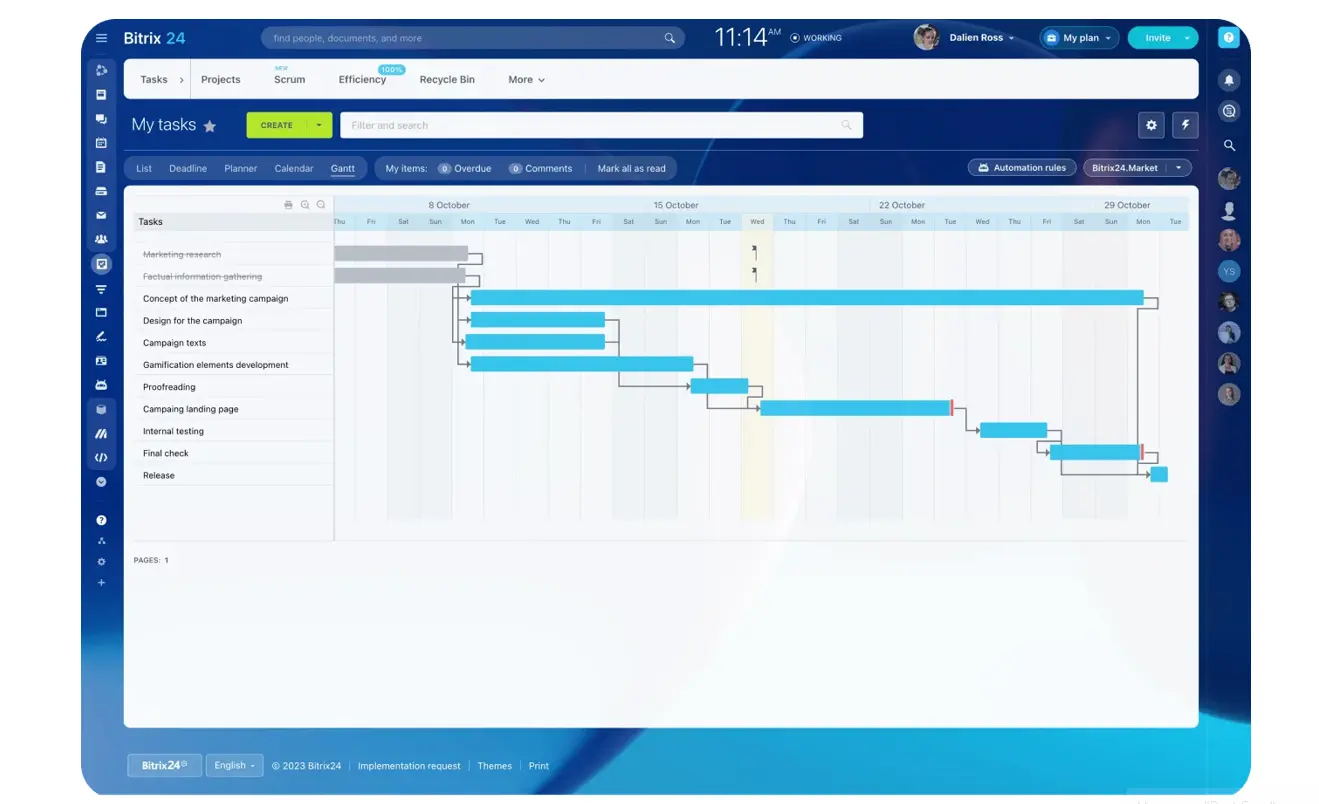
Teams using Bitrix24 can connect task management and project management tools with projects, deadlines, Kanban boards, Gantt charts, recurring tasks, and automation. Routine actions like assigning work, changing task status, and sending notifications automate cleanly where the process is predictable.
Don't turn every conversation into a task
Quick questions still belong in chat. The rule is simple: decisions, owners, deadlines, and anything affecting delivery make it back into the system of record.
The opposite mistake is creating a task for everything, until people spend more time maintaining the project tool than doing the work. Use detailed tracking where dependencies, deadlines, customers, or compliance justify it. Keep low-risk individual work light.
5. Cybersecurity and identity management tools
Cybersecurity and identity management stop being optional once you have enough employees, contractors, applications, devices, and remote access points that no one can manage access by hand.
Three questions identity management should answer
A sound access process makes it easy to tell:
- Who has access?
- What can they reach?
- Should they still have it?
This gets loudest during onboarding and offboarding. A new hire might need email, CRM, project software, finance tools, internal files, and industry-specific apps. When that person changes roles or leaves, all of it has to change with them.
Why the risk extends beyond passwords
Verizon's 2026 Data Breach Investigations Report found that exploitation of software vulnerabilities became the leading breach entry point at 31%. Third-party involvement was associated with 48% of breaches, which puts vendor and contractor access squarely on the list of things a mid-market business needs to control.
CISA recommends requiring multifactor authentication wherever possible, starting with administrative accounts, employees handling sensitive information, and remote or privileged access. It also recommends phishing-resistant MFA where you can get it.
Where access management goes wrong
The biggest problem is accumulation:
- Contractors get temporary access that never gets pulled
- Employees switch departments but keep old permissions
- Shared admin accounts survive because replacing them feels like a hassle
- Departed employees stay active in smaller SaaS apps
Provisioning needs a matching offboarding and access-review process, run with the same discipline.
6. BI, integration, and automation tools
BI, integration, and automation become necessary when employees spend too much time moving information between apps, reconciling competing reports, or waiting for someone to assemble numbers by hand.
Three different problems
They get grouped together, but they do different jobs. BI turns operational data into reporting and analysis. Integration moves or syncs data between systems. Automation runs repeatable actions when set conditions are met. Confusing the three is how businesses buy the wrong fix.
Fix the data before the dashboard
Reporting is where the failure usually starts. Sales has one revenue number, finance has another, operations has a third, because each team uses different dates, filters, definitions, or source systems. A prettier dashboard won't settle that argument.
Before spending on BI, define:
- What each key metric means
- Which system owns the source record
- Who can change that definition
- How often the data needs to update
Bitrix24's CRM analytics and reporting tools can report on funnels, leads, conversion rates, and sales activity. Businesses running several systems can use Bitrix24 integrations to connect other applications and cut repeated data entry between them.
Automate only stable workflows
Automation comes after you understand the workflow. Automate a process with useless approvals or unclear ownership, and you've just reproduced those weaknesses at higher speed.
Pro Tip
Run a repetitive process manually, start to finish, before automating it. Mark every decision, exception, handoff, and data source. Automate the stable steps and leave judgment-heavy exceptions with people.
What companies get wrong when evaluating essential business technology
Buying feature lists instead of solving workflow problems
A long feature checklist makes a buying process look rigorous without proving the software fits the actual work. Start from real workflows instead. Ask vendors to show how the system would:
- Route a new sales lead
- Onboard an employee
- Approve a purchase
- Hand a customer from sales to delivery
- Produce a weekly management report
Specific workflows expose friction far faster than a generic demo.
Waiting until the workaround breaks
Employees are remarkably good at covering for weak systems. They add spreadsheet tabs, keep private checklists, forward messages to themselves, and rely on the one manager who knows how to fix things. That hides the cost for months.
Then the symptoms surface:
- Delayed financial closes
- Inconsistent customer follow-up
- Payroll corrections
- Missed deadlines
- Repeated firefighting
- Employee burnout
(A workaround becoming familiar doesn't make it efficient!)
Treating categories as interchangeable
Adjacent systems share features, which doesn't mean they solve the same primary problem.
|
Comparison |
Common weak assumption |
Why it fails |
|---|---|---|
|
ERP vs. accounting software |
Both handle finance, so either is enough |
ERP can support wider operational processes, controls, and entity complexity |
|
CRM vs. help desk |
Both store customer interactions |
CRM manages pipeline and revenue processes, while help desks center on service cases |
|
BI vs. dashboarding |
Charts equal decision support |
Useful BI depends on trusted source data, consistent metric definitions, and controlled reporting |
Ignoring adoption and ownership
Every implementation needs a named business owner alongside technical support:
- Sales Operations may own CRM rules
- Finance owns the chart of accounts and close process
- HR owns employee data standards
- IT or Security owns identity policy
- Operations may own cross-functional project workflows
Without an owner, software slowly fills with outdated fields, duplicate workflows, stale permissions, and exceptions nobody remembers creating.

Real-world business use cases: When each technology category becomes necessary
The trigger depends on the business model. Headcount isn't the useful question. Ask what your people keep compensating for.
|
Technology category |
Concrete operational trigger |
|---|---|
|
CRM |
Forecast meetings depend on what sales representatives remember, while different people keep pipeline information in inboxes, notes, or separate spreadsheets. |
|
HRIS/payroll |
Regular hiring, role changes, leave, benefits, and payroll exceptions force HR to update the same employee information across several places. |
|
Collaboration/project management |
Customer work crosses several departments, but approvals, ownership, deadlines, and blockers are fragmented across chat, email, and meetings. |
|
ERP/accounting |
Inventory, locations, entities, purchasing, billing complexity, or reporting requirements make month-end reconciliation a recurring manual exercise. |
|
Cybersecurity/identity management |
Employees and contractors accumulate access across growing numbers of SaaS applications, and offboarding requires someone to remember every account individually. |
|
BI/integration/automation |
Different departments produce different versions of the same metric or repeatedly move information between CRM, finance, HR, operations, and reporting systems by hand. |
The sequence differs by business. Product and inventory-heavy companies tend to feel finance-system pressure first. Service businesses hit CRM and project coordination problems earlier.
The consistent signal is operational consequence: missing visibility, control, or consistency is now interfering with business outcomes.
FAQs
Which of these six systems usually becomes necessary first?
It depends on the business model. Service businesses tend to feel CRM and collaboration problems first, because growth adds leads, accounts, handoffs, projects, and customer communication. Product, wholesale, manufacturing, and inventory-heavy companies hit finance-system limits earlier, as purchasing, inventory valuation, fulfillment, locations, and entity-level reporting outgrow what basic accounting was built for. There's no universal sequence. Start where manual work is already creating measurable business consequences — and if the complexity is still contained within one department, it's usually worth waiting until a workaround starts affecting the rest of the business before committing to a major rollout.
What if the company owns the right systems but still relies heavily on spreadsheets?
That points to an implementation or process problem, not a missing software category. Common causes:
- Systems that aren't properly connected
- Employees who don't trust the data
- Required fields that don't reflect the real workflow
- Managers still approving work over email
- Poor training
- Reports that don't answer the questions teams actually have
Look at where people leave the official system to get the job done. Those exits show where configuration, integration, ownership, or process design needs attention.
Should a medium-sized business consolidate these functions into one platform?
Consolidation reduces duplicate records, integrations, training, and vendor administration, but only when the platform handles the required workflows well enough. Some categories combine more naturally than others. CRM, sales automation, tasks, projects, communication, and certain reporting workflows work well together. Payroll, advanced ERP, cybersecurity, and industry-specific systems tend to need specialist products. Evaluate consolidation at the workflow level. Reducing five applications to three helps only if employees aren't rebuilding the missing functionality in spreadsheets.
Unify sales, projects, and workflows
Bitrix24 combines CRM, tasks, collaboration, automation, and reporting so growing teams cut handoffs and keep work visible.
Get Started NowBuild the stack around the workflow that's breaking
Most mid-market software problems aren't solved by the next purchase. They're solved when the systems already in place start holding a shared record, enforcing consistent ownership, and moving information without someone doing it by hand.
That's a harder problem than a buying decision. It means choosing fewer, better-integrated tools and giving each one a clear job — which is also why it tends to keep getting deferred in favour of adding another application.
Bitrix24 is worth a look if several of those problems converge on the same work: customer records, task ownership, sales pipelines, collaboration, and reporting in one place, with room for specialist finance, payroll, and security tools alongside it.
Start free and build from the workflow that's already costing you the most.