Which Project Management Features Matter in an All-in-One Business Suite?


TL;DR (Quick Summary)
- A long feature list won't tell you whether work survives the handoff from sales to delivery to reporting.
- Instead of comparing checklists, run one real workflow through the software end to end and watch every point where someone has to copy data, chase an update, or open a side spreadsheet.
- The features that matter are the ones that keep context connected as work changes hands.
Takeaway: The features that matter are the ones that keep context connected as work changes hands, so judge a suite by whether one real workflow survives every handoff intact.
A deal closes. Sales celebrates. Three weeks later the delivery team is rebuilding the brief from a forwarded email chain, because nobody wrote down what was actually promised, and the client is already asking why the timeline slipped.
That failure has nothing to do with how many features the software has. The suite might list task management, Gantt charts, automations, dashboards, and file storage across its comparison page.
What breaks is the seam between them: the moment work changes hands and context doesn't come along.
So judge project management features by how work moves, not by the length of the checklist. The useful question isn't whether a product has time tracking; it's whether the effort someone records on Tuesday shows up in the report a manager reads on Friday.
What follows: what the core features should actually do, where they fail in practice, and how to test whether a suite fits the way your business runs.
Why feature lists mislead buyers in all-in-one suites
Feature lists are easy to compare. That's exactly why they distort buying decisions. A suite advertises task management, Gantt charts, automations, dashboards, file storage. Every box ticked. None of that tells you whether the pieces work together.
The same label covers wildly different things. One product's "time tracking" is a stopwatch stuck to a task. Another's runs approvals, billing categories, and reporting off the same entry. "Automation" might fire a recurring task on schedule, then fall over the moment a process branches by customer type, deal size, or an approval decision.
Test a workflow, not an isolated feature
Follow one piece of work from start to finish instead. A sales rep closes a client implementation. Now ask:
- Can the delivery team see what was promised without asking sales to rewrite the brief?
- Can the project owner turn that context into assigned work?
- Do files and customer information stay attached?
- Can managers later tell whether deadlines slipped or effort ran over?
- Does completed work feed the reporting the business already runs on?
If those steps mean copying data into a spreadsheet, firing off a separate briefing message, and keeping a second reporting tool alive, the suite hasn't solved the coordination problem. It's just hosting part of it.
Most teams buy a suite to stop switching tools and to build a cleaner path between customer-facing and internal work. That makes the quality of the connections between features matter more than the count of features.
Pro tip: Pick one workflow your team already runs, a client onboarding, a campaign launch, a monthly reporting cycle, and rebuild it in the software during evaluation. Test every handoff instead of watching separate feature demos.
All-in-One Suite PM Feature Scorecard and Selection Worksheet
Enter your email address to get a comprehensive, step-by-step guide

What these features mean inside an all-in-one suite
Inside a broader suite, project management features let teams plan, assign, track, communicate, and report on work while the surrounding business context stays close.
That's a different thing from evaluating a standalone project app. A specialist tool goes deeper on portfolio planning or hews closer to one methodology. In a suite, what carries the weight is the connection to CRM records, communication, documents, calendars, automation, and reporting.
The goal is plain: keep tasks, owners, deadlines, files, decisions, approvals, and customer information reachable as work changes hands. When those stay connected, each team wastes less time rebuilding context before it can start.
What connected project work looks like
A services company gathers requirements during the sales process. Once the deal moves into delivery:
- The project manager needs to see what was sold
- The delivery team needs clear assignments and deadlines
- The account manager needs visibility into progress
- Managers need to spot delays or capacity problems
- Finance eventually needs effort or delivery data
Re-key that information at every stage and you multiply the chances for something to fall out.
Platforms like Bitrix24 project management sit project work next to the other business functions. The evaluation question is how much context stays attached as work crosses between them.

Why these features matter more than checklists
Project work goes wrong in a handful of familiar ways. Ownership blurs. Handoffs land late. Information scatters across three places. A manager notices the problem only after the deadline has already moved.
A board helps only when the information behind it is current and people know what they own.
Take a campaign team heading into a launch. Marketing owns the plan, design builds the assets, legal reviews the claims, sales needs final messaging before go-live. A timeline shows all the dates. It still falls apart if legal doesn't know something's sitting in its queue, or sales is quoting from a document that's two versions old.
Common breakdowns:
- Tasks assigned without a clear owner
- Important decisions buried in chat
- Files stored separately from the work they support
- Deadlines changed without updating dependent tasks
- Capacity problems discovered after commitments are made
- Project status reported by hand because system data can't answer management questions
That last one is the norm, not the exception. Wellingtone's 2026 State of Project Management survey found 72% of people still spend half a day or more each month manually collating project reports, and half of organisations have no access to real-time KPIs.
The data exists. The system just can't assemble it into an answer.
What connected features change
Connected features cut that admin work. People see who owns the next action, what changed, which file is current, whether the thing they're waiting on is blocked.
Managers get a real basis for capacity calls too. Rather than pinging everyone to ask if they're slammed, a team lead reviews active work before the weekly planning meeting and spots where deadlines and assigned capacity don't line up.
No system saves a team that doesn't update its work or a manager who ignores the warning lights.
What good software does is make routine coordination easy enough that people stop reaching for parallel spreadsheets, status decks, and buried chat threads.

How project management works in an all-in-one suite: from coordination to execution
A strong suite runs project management as one connected process. Work comes in, gets structured, moves through delivery, and leaves behind information managers can actually use.
1. Intake brings context into the workflow
Work starts somewhere: a closed deal, a customer request, an internal ask, a support ticket, a renewal, a recurring operational process.
Intake should answer the basics on the spot:
- What needs to be done?
- Who requested it?
- Who owns the next action?
- What information or files came with the request?
- Is there a target date, service commitment, or approval requirement?
The classic failure: intake lives in one system, planning in another. Now someone owns the tedious job of hand-carrying the brief, the attachments, the dates, and the customer record from one to the other.
A connected CRM closes that gap by keeping customer information and the work it feeds sitting together. A stage change in the CRM becomes the trigger that assigns the delivery task, instead of depending on a salesperson to remember a kickoff message.
2. Planning turns requests into owned work
Planning builds the structure: phases, tasks, subtasks, owners, deadlines, dependencies, and the documents each stage needs.
Match the detail to the work. A two-day internal request doesn't need a 40-task plan. A six-month implementation shouldn't hide inside a single task named "Client implementation."
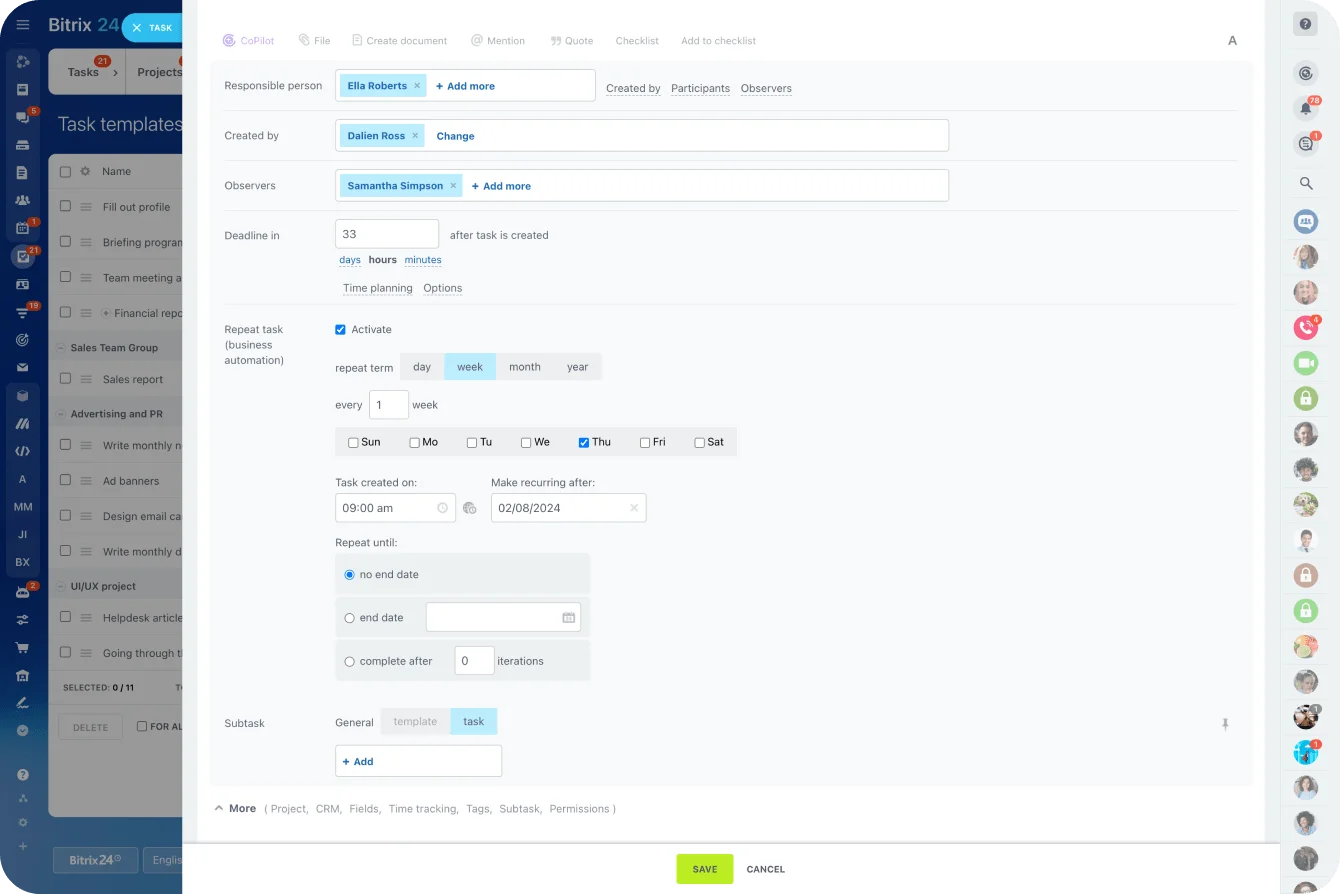
Reusable templates earn their keep on work that follows the same rough sequence every time:
- Client onboarding
- Employee onboarding
- Campaign launches
- Recurring reporting
- Implementations
- Monthly account management processes
Templates need upkeep. Change the approval process but keep cloning last year's template, and the system faithfully standardizes the wrong workflow. Give the important templates an owner who reviews them every few months, and any time the underlying process changes for real.
3. Execution exposes delays while there's still time to act
Once work starts, teams need status, task discussion, files, dependencies, and deadlines in one usable flow.
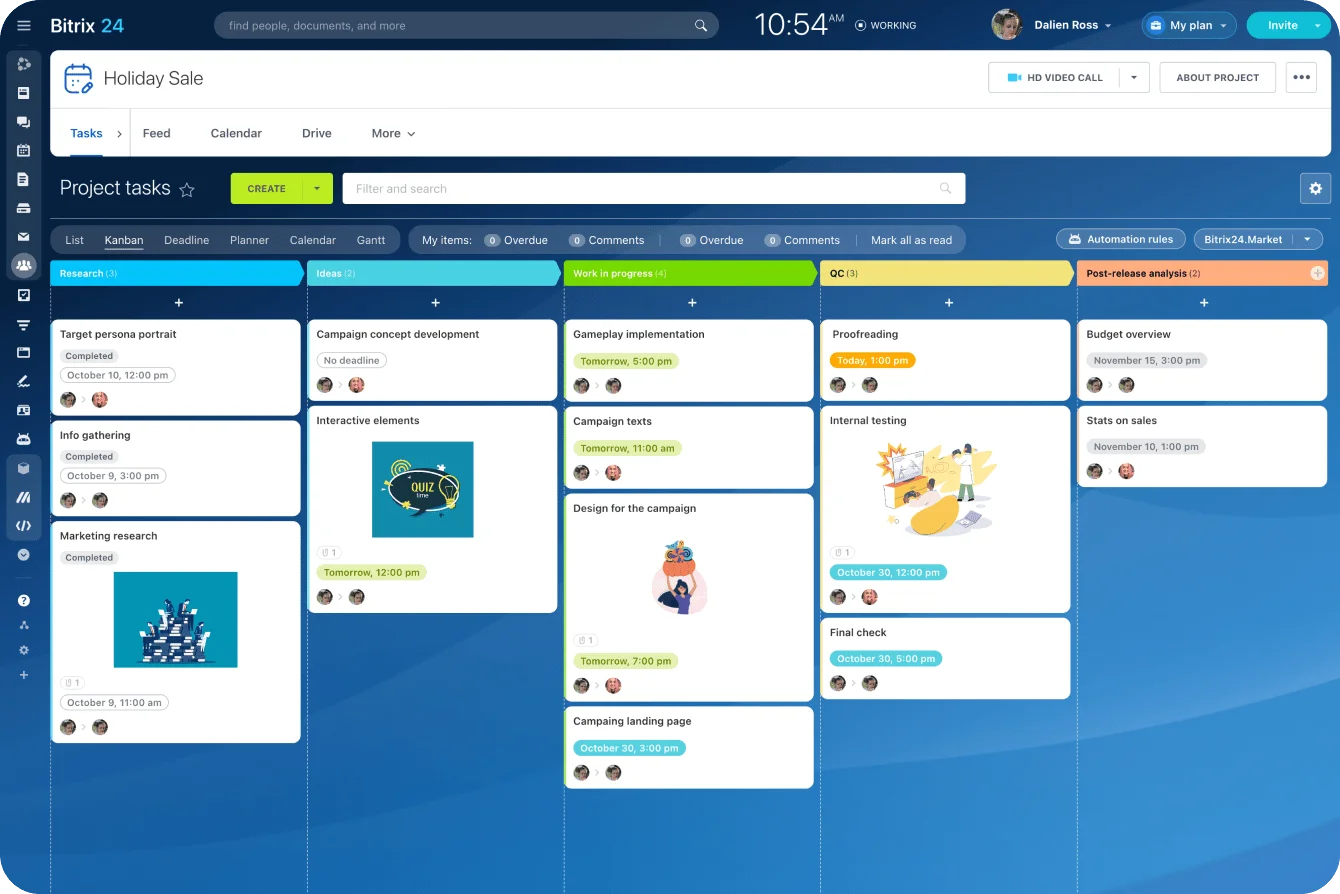
Bitrix24 Tasks and Projects offers several task and project views next to Gantt charts, time tracking, templates, automation, workload management, and collaboration. The buyer's real question is narrower: which of these will the team actually keep updated during a normal week?
Dependencies deserve a hard look. If the designer can't start until copy is approved, the system needs to surface that link before the design deadline blows past, not after.
Workload's the same story. A project can look perfectly scheduled while three critical tasks all land on the same specialist in the same week. Check workload before committing to dates. Treating capacity as a problem to fix after tasks go overdue is how you get overdue tasks.
4. Communication keeps the project record usable
Communication is where a lot of project systems lose credibility.
Decisions get made in chat, files show up over email, approvals happen out loud on a call, and the task just gets ticked complete afterward. What's left in the system is a record with holes in it.
Capture the conversations and decisions that touch:
- Scope
- Timing
- Responsibility
- Deliverables
- Client approval
- Changes to agreed work
One rule covers most of it: if someone might need it later to understand why the project changed, it belongs with the work.
Calendars matter for the same reason. Tying deadlines to team schedules through a shared Bitrix24 calendar shows when project dates collide with meetings, time off, launches, or anything else already on the books.
5. Automation and reporting close the loop
Automation exists to remove predictable coordination work. Useful examples:
- Creating or assigning recurring tasks
- Notifying someone when a deadline approaches
- Assigning follow-up work when a status changes
- Escalating an overdue approval
- Starting a standard workflow after a CRM event
Bitrix24 task automation covers recurring tasks, task templates, rules, triggers, and other workflow options.
Automation works best on a process that's already clear. Automate a confusing workflow and all you get is confusion, faster.
Reporting tells you whether the process worked. A team should be able to answer questions like:
- Which projects are late?
- Where are tasks repeatedly blocked?
- Which roles are overloaded?
- How much time is being recorded?
- Which recurring workflows keep missing the same step?
The core features that matter most, and what each should do
Most teams cover their day-to-day project needs with a small, dependable set of coordination features that work together.
|
**Feature category** |
**What it should actually do** |
**Daily coordination need it supports** |
|
Tasks and dependencies |
Show ownership, status, deadlines, and blockers between related tasks |
Reduce follow-up and missed handoffs |
|
Reusable templates |
Standardize recurring project structures, steps, roles, and documents |
Start recurring work consistently |
|
Timelines and workload |
Show sequencing, milestones, conflicts, and capacity |
Keep delivery dates realistic |
|
Time tracking |
Capture effort against specific work |
Support analysis, capacity planning, and billing workflows |
|
Client communication |
Keep relevant messages, approvals, updates, and customer context accessible |
Make external delivery traceable |
|
Automation and reporting |
Trigger routine actions and connect progress with operational results |
Reduce manual coordination and expose recurring problems |
Tasks and dependencies
A task needs four things to be worth anything: a clear owner, an expected outcome, a deadline where one exists, and enough context for the assignee to act.
Dependencies pull their weight when sequencing matters, flagging what can't start until something else finishes.
Watch one common failure. Because the software makes task creation frictionless, teams spawn hundreds of tiny tasks. All that splitting buries people in notifications and turns the board into a maintenance chore.
Reusable templates
Templates lock in a repeatable process and cut the setup for teams running similar projects week after week.
A client onboarding template might carry kickoff prep, access collection, initial configuration, customer review, and handover. It hands the project owner a starting point without forcing every engagement into the same mold.
The best templates leave room for exceptions. When people spend more time deleting irrelevant template tasks than adding project-specific ones, the template's gotten too rigid.
Timelines, calendars, and workload
A timeline shows sequencing. A workload view tests whether that sequence is remotely realistic.
Both matter, because delivery dates look fine at the project level while individual people are double-booked across four of them.
A workable weekly routine has project leads scan:
- Upcoming deadlines
- Blocked dependencies
- Workload conflicts
- New commitments
- Tasks without clear owners
That's how you catch an unrealistic schedule before it becomes overdue work.
Time tracking
Time tracking earns its place when the organization has a clear reason to collect the data.
Client service teams use it to size billable effort. Internal teams use it to see how much capacity recurring work eats. Managers compare estimated against actual to plan better next time.
The real risk is bad data. When people forget to start timers, rebuild the week from memory every Friday, or file the same work under different categories, the report looks precise and means nothing.
Client communication
Client-facing work needs a record of the requests, approvals, changes, and commitments that matter.
An agency gets a client request to change an approved campaign asset two days before launch. If that request lives and dies in one account manager's inbox, the project plan still shows the original scope and the original deadline.
The software's job is to make it easy to pull consequential client information back into the working record, without forcing every client conversation to happen inside the project tool.
Automation and reporting
Use automation for predictable, repetitive actions where the rule almost never changes.
Good starting points: recurring tasks, deadline reminders, routine assignments, predictable status changes. Processes riddled with exceptions need human judgment or a carefully built fallback path.
Reporting should answer operational questions, not tally activity. Fifty completed tasks sounds great until you notice the one launch approval that matters is still blocked…
Pro tip: During a trial, write down five management questions you regularly ask, then try to answer them from the platform without exporting data. If reporting can't answer the questions your managers actually ask, the dashboard count doesn't matter.
Common mistakes when evaluating these features
Overvaluing visual planning
Gantt charts, polished boards, and timeline views demo beautifully, because their value is easy to see.
They still ride on good ownership, current data, and workable process. A gorgeous timeline built from stale tasks is just a crisp picture of wrong information.
Treating feature presence as feature sufficiency
A checkmark next to "time tracking," "automation," or "reporting" says nothing about whether the capability fits your process. Test the details:
- Can employees correct time entries?
- Who can approve or edit records?
- What happens when an automation hits an exception?
- Can reports filter by the dimensions managers actually use?
- Can permissions separate internal information from client-facing information?
- Does changing a deadline update dependent work in a useful way?
These questions surface the limits a generic feature list hides.
Buying for rare edge cases
Teams sometimes build the entire evaluation around a process that runs twice a year.
That pushes them toward far more configuration than everyday work needs. Start with what happens daily, weekly, monthly. Then check that the rare cases can be handled without breaking the core.
Ignoring adoption effort
Project management software works only when people maintain it.
Make updating a task take six fields, three status changes, and a duplicated note, and people will invent shortcuts. And when managers never use the data in a meeting or a decision, everyone quickly learns that keeping the system current buys them nothing.
Testing features separately instead of testing handoffs
The task demo looks strong. The CRM demo looks strong. Reporting looks strong.
The test that matters is whether one piece of work moves across all three without losing context or making someone rebuild the record by hand.
Quick check:
Create a sample customer request, assign related work, attach a file, move the task through delivery, change a deadline, record time, and find the result in reporting. That short exercise reveals more than a long checklist.
Which features matter for different operating models
The same feature categories carry different weight depending on how a business makes money and how work moves between people.
|
**Operating model** |
**Features that usually matter most** |
**Main business goal** |
|
Agencies and consultancies |
Tasks, templates, time tracking, approvals, client context |
Control delivery quality and margin |
|
Internal operations teams |
Recurring workflows, workload visibility, automation, cross-team coordination |
Reduce administrative work |
|
Launch and campaign teams |
Timelines, calendars, dependencies, approvals |
Hit dates across contributors |
|
Mixed service organizations |
Reporting, time tracking, tasks, client context |
Balance delivery and profitability |
Agencies and consultancies
Client service teams cycle constantly between selling work, delivering it, logging effort, handling feedback, and reporting results.
The recurring pattern: sales promises a date or a deliverable that delivery doesn't lay eyes on until kickoff. Tying project work to the customer record makes that handoff something you can inspect instead of guess at.
Templates matter here because so much of the work repeats, even though client quirks block full standardization. Let the template set the baseline and have project managers adjust scope and ownership from there.
Internal operations teams
Operations teams field requests from several departments at once. For them, prioritization beats advanced project planning.
A finance request, an HR process update, an IT change, and a leadership project all compete for the same handful of people.
Recurring workflows, clean request intake, workload visibility, and automation let the team see what's already committed before agreeing to one more deadline.
Launch and campaign teams
Launch teams live and die on sequencing.
Copy needs approval before design locks. Design has to finish before localization starts. Sales enablement waits on final messaging. One late approval ripples through everything downstream.
Dependencies and calendar tools pull real weight here, because the team needs to see timing across every contributor, not a column of independent due dates.
Mixed service organizations
Companies that mix client delivery, account management, and internal projects need stronger reporting than they expect.
One person spends part of the week on billable implementation, part on internal process work, and the rest propping up an existing account. Managers need enough classification to see where capacity goes, without turning time entry into a chore.
Bitrix24 analytics and reporting tools get far more useful once the reporting model is agreed up front. Before anyone builds a dashboard, define the terms:
- Active
- Delayed
- At risk
- Billable
- Completed
- Blocked
Skip that, and two departments read the same report two different ways.
Scaling, trade-offs, and the limits of a suite
As teams grow, the number of handoffs grows with them.
A small team papers over bad systems with conversation. As headcount and specialization climb, the salesperson who knows the original context may never once speak to the person actually doing the work. That's when standard ownership, shared project records, templates, permissions, and reporting start to matter.
Why connections matter more at scale
Complexity climbs as delivery leans on more teams, more approvals, more specialist roles, and more customer touchpoints. A single project might involve:
- Sales
- Account management
- Finance
- Operations
- Customer service
- External clients
- Specialists shared across several projects
The Project Management Institute's 2026 Pulse of the Profession reports that 31% of complex projects fail to achieve the full scope of their originally intended benefits.
Software won't stop projects from failing on its own. You still need clear ownership, sound decisions, and people who keep the information current. What a connected system does is make dependencies, stakeholder context, and execution problems visible earlier, before they snowball into more delay.
Where suites have an advantage
A suite fits well when the work regularly touches:
- Sales and customer records
- Account management
- Internal communication
- Documents
- Recurring operational workflows
- Time records
- Cross-department approvals
- Management reporting
The fewer manual transfers between those activities, the less busywork the team carries.
Where specialist tools can still win
There are real limits.
Some organizations need a dedicated platform for advanced portfolio planning, detailed resource forecasting, engineering workflows, construction scheduling, or specialist financial controls, cases where project management depth is the core of the business.
The suite can stay the primary operating system while a specialist platform handles the one narrow process. That split adds its own integration and data-governance work to keep the two aligned.
Watch for parallel systems
Parallel tracking is the clearest sign that the official system and the real workflow have split apart.
When the official system says a project's on track but the project manager keeps a private spreadsheet with the "real" dates, the software isn't carrying enough of the load. The same problem shows up when teams use:
- Separate spreadsheets for workload planning
- Private chat channels for approvals
- Personal notes for client changes
- Manual slide decks for status reporting
- Separate documents because the main system can't produce useful reports
Pro tip: Once a quarter, ask project leads which spreadsheets, documents, or side tools they still maintain to compensate for the main platform. Those workarounds usually mark where the next process or configuration fix belongs.
FAQs
Which project management features matter most for small teams that are growing quickly but don't yet need enterprise-grade complexity?
Start with clear task ownership, reusable templates, basic timelines, workload visibility, simple automation, shared documents, and reporting that shows current project status. Avoid adding process just because the tool supports it. A growing team needs enough structure to make recurring work dependable, and updates fast enough that people will actually keep the system current.
When does it make sense to choose an all-in-one business suite over a standalone project management platform with deeper niche functionality?
An all-in-one suite makes sense when project work frequently interacts with customer records, communication, recurring business processes, approvals, documents, or reporting. A specialist platform makes more sense when one advanced project discipline sits at the center of how the business operates and its requirements outrun what the suite can reasonably provide. Decide it by testing end-to-end workflows, not by comparing feature totals.
How should businesses evaluate time tracking, client communication, and reporting features when projects involve both internal work and external billable delivery?
Start with the decisions each type of data has to support.
- For time tracking, work out whether managers need billing information, capacity data, cost analysis, or just a record of effort, then test how people enter time, fix mistakes, and categorize work.
- For client communication, check that important requests, approvals, and scope changes can stay attached to the customer or project record.
- For reporting, write several realistic management questions before the trial and see whether you can answer them, overdue work, overloaded staff, recurring bottlenecks, relevant customer context, without rebuilding the report somewhere else.
If the team still needs several parallel systems to understand what's happening, the suite isn't carrying enough of the day-to-day.
Keep project handoffs clear in Bitrix24
Manage tasks, CRM context, files, time tracking, automation, and reports in one workspace so teams deliver without side spreadsheets.
Get Started NowTest the work, not the feature list
The most useful feature is rarely the one with the slickest demo. It's the one that strips friction out of work your team does every day, and it only shows itself when real work moves through the software and you watch each handoff.
Every point where someone copies information, chases an update, rebuilds a brief, or opens a side tracker is a seam the suite was supposed to close and didn't. Let enough of them pile up and someone's private spreadsheet becomes the real system of record.
Bitrix24 keeps context attached as work changes hands. The seams it removes are the ones you'd otherwise be counting.