From Proposal to Signature: Where the Contract Cycle Loses Its Days


TL;DR (Quick Summary)
One average cycle time hides where contracts stall between proposal and signature. Timestamp every decision stage, keep ownership on one deal record, and fix the stage holding the most avoidable waiting time.
- Where is the delay happening? → Split the cycle into stages, and let actions create the timestamps.
- Why put the contract path on one deal record? → Because a delay you can't tie to an owner never gets fixed.
- Where do the days disappear? → Approvals, legal, revisions, handoffs, and signing, each measured by time and frequency.
- How do you read the metrics? → In combination, with the median and the outliers next to the average.
- Scope friction or approval friction? → Versions piling up before approval mean scope; a document that waits without changing means routing.
- Which fix goes with which delay? → Each one, paired with a metric that proves it worked and one that catches the side effects.
- Did the cycle really get shorter? → Only if it holds up by segment and win rate, discounts, and change orders don't pay for it.
Takeaway: The slow stage is rarely the one people complain about, so let the timestamps pick the target.
Average contract cycle time is the least useful number in your sales process. It tells you deals are slow. It says nothing about why.
A proposal that sat with the buyer and a proposal that sat in your own approval queue post the same number of days, and they need completely different fixes.
The spread between teams that get this right and teams that don't is wide: WorldCC’s 2025 contract-management research found that the best-performing organizations complete contract cycles almost four times faster than the worst performers. Those days leak out in several places at once: at the buyer, in internal approval, in legal, and in the quiet stretch after everyone has agreed and nobody has sent the signature request.
This guide shows you which stage is costing you days, how to fix it, and how to prove the fix worked.
Start with the decision: is the delay happening before review, during negotiation, or at the point of signature?
Break the cycle into decision stages before you analyze anything. A long total cycle has very different causes: a customer who hasn't responded, a budget approval queue, rounds of legal redlines, or a final agreement nobody has signed.
Capture the timestamps that explain the delay
At minimum, record:
- Proposal sent
- First customer response
- Internal approval requested
- Internal approval completed
- Legal review opened
- Legal review closed
- Final version sent
- Signature requested
- Signature completed
That's your map from commercial discussion through legal completion.
A timestamp is only as good as the event that creates it. When reps move deals between stages by hand, "legal review opened" records the day somebody updated the CRM, which can be days after legal received the draft.
Let the action create the timestamp wherever you can: the approval request, the task assigned to legal, the signature send. Manual stage moves work as a fallback. Just expect them to shrink the stages people forget to update and inflate the ones they update in a batch on Friday afternoon.
The customer's side is the other blind spot. "Waiting for customer" covers the buyer's own procurement, budget, and legal steps, and you can't timestamp any of them. So ask at proposal stage who on their side has to approve, and in what order. You won't get dates. You will know whether a quiet week means the deal is stuck or sitting in their legal queue exactly as expected.
Ask three questions before changing the process
With those timestamps in place, a sales leader, RevOps manager, or commercial ops team can ask:
- Is the deal waiting for the customer to engage?
- Once negotiation starts, is time going to internal routing or document changes?
- After terms are agreed, is the agreement just waiting for execution?
Then resist the urge to fix everything at once. Teams measure every stage and launch improvements on all of them, and most of that effort lands on stages that weren't slow. If proposal-to-first-response is already short, chasing buyers harder won't move total cycle time. If legal review is predictable but internal approval swings wildly from deal to deal, start with approval.
Stage medians also need volume. A team closing a handful of large contracts a quarter won't get stable medians. At that volume, review each stalled deal on its own and use its timestamps to diagnose that deal.
Pro tip: Review stage medians and stalled deals weekly instead of waiting for the monthly pipeline review. Our recommendation is a short slot, around fifteen minutes, on deals with no stage change; adjust it to your volume. It exposes ownership gaps while there's still time to act, which is a lot cheaper than learning about them from a buyer asking whether you still want the deal.
7-Minute Contract Cycle Bottleneck Audit Scorecard Template
Enter your email address to get a comprehensive, step-by-step guide

Map the contract path on one deal record so time loss can be assigned to an owner
Elapsed time is only useful when it's attached to a specific deal. If quote versions live in email, approvals in chat threads, and signature status somewhere else, you can calculate total cycle time and still have no idea why a particular agreement stopped moving.
This fragmentation is common. WorldCC reports that contract-related data is spread across an average of 24 systems, making timely tracking and decision-making harder.
Keep the commercial history together
The quote, approval history, legal comments, next owner, and signing status belong on one deal record. With Bitrix24 CRM deal tracking, the team sees the active version, current stage, pending action, and owner without rebuilding the deal from email and chat.
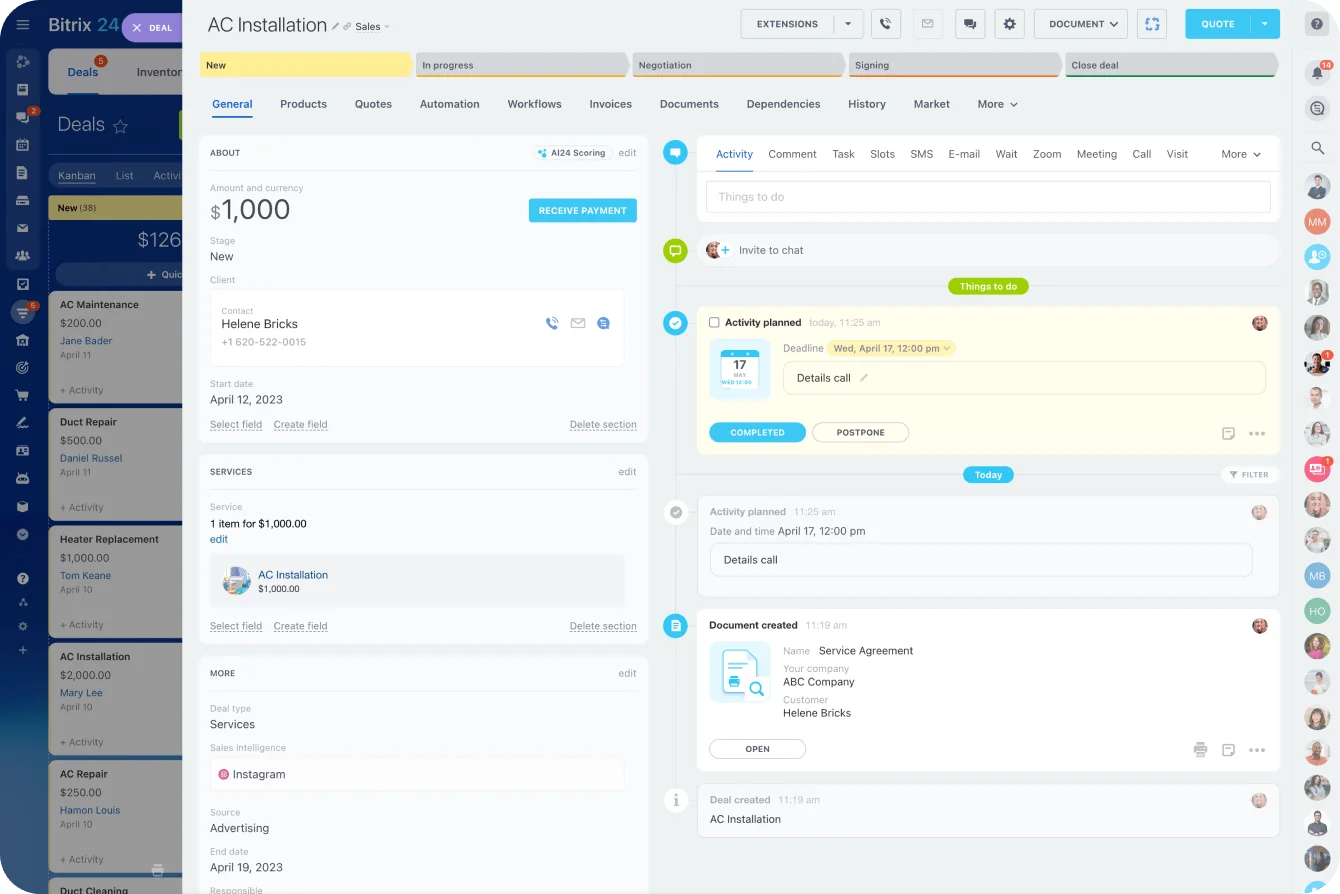
That matters most when responsibility changes hands, which in a contract cycle is constantly. A seller writes the proposal. A sales manager approves the discount. Finance checks commercial terms, legal handles redlines, and the account executive comes back to request the signature.
Seat count matters more than it looks here. When CRM access is priced per user, finance and legal reviewers get left out to save licenses, and their part of the cycle drifts back into email. Bitrix24's paid plans are priced flat rather than per seat, so adding finance and legal reviewers doesn't add to the bill, and everyone who touches the contract works on the same record instead of around it.
Record the handoff along with the status
Here's a failure pattern that shows up again and again (the details are illustrative; the shape isn't). Legal finishes its review midweek, drops the document back in chat, and assumes sales will forward it. Sales assumes legal already sent it to the customer. Nothing happens until someone checks the deal days later.
Every time the document changes hands, record two fields:
- Who owns the next action?
- What is the agreement waiting for?
Make the statuses specific. "Waiting for customer review" and "waiting for approver assignment" are different problems. So are "legal reviewing" and "legal complete, seller must resend." Once they're separate, a vague delay becomes something a named person can fix.
Pro tip: Make "next owner" and "next action" required fields before a deal can leave an approval or review stage. A completed stage with nobody responsible for what comes next is an unfinished handoff.
Use stage-level metrics to find the five places days disappear
Contract delays cluster around five sources: internal approvals, legal review, revision loops, owner handoffs, and signing. Give each one an elapsed-time metric and a volume metric. Time tells you how long the friction lasts. Volume tells you how often it happens.
1. Internal approval time
Internal approval time runs from approval requested to approval completed.
Pair it with:
- Percentage approved in one round
- Deals requiring additional approvers
- Approvals reopened after signoff (the reopen rate: the share of approved deals sent back for another approval because terms changed after signoff)
- Time waiting for an approver to be assigned
A long approval stage points to unclear discount limits, fuzzy decision rights, a queue, or senior people getting pulled into routine deals. Take a sales team with no documented discount threshold. Almost every exception goes to the VP of Sales, and the VP turns into a queue, even though a manager could have signed off on most of those requests.
2. Legal review time
Legal review time runs from review opened to review closed.
Track it alongside:
- Contracts containing non-standard terms (the exception rate: the share of contracts that depart from your standard template or pre-approved fallback clauses)
- Number of redline rounds
- Agreements reopened after legal approval
- Time waiting before legal begins review
Split queue time from working time. A contract that spends days waiting for legal and a couple of hours under active review (an illustrative split) needs a different fix from one that's in real negotiation for several days.
Check where the first draft comes from, too. Sellers love to start from the last signed contract instead of the current template. Every concession negotiated for the previous client then lands in legal's inbox as a fresh deviation, and legal re-reviews terms nobody meant to offer.
3. Revision loop count
Revision loop count is the number of proposal or contract versions before the final one goes out. Read it with average time per revision and any rework after a document was labeled final. A high count points to weak scope definition, a pricing disagreement, unclear assumptions, or uncontrolled editing.
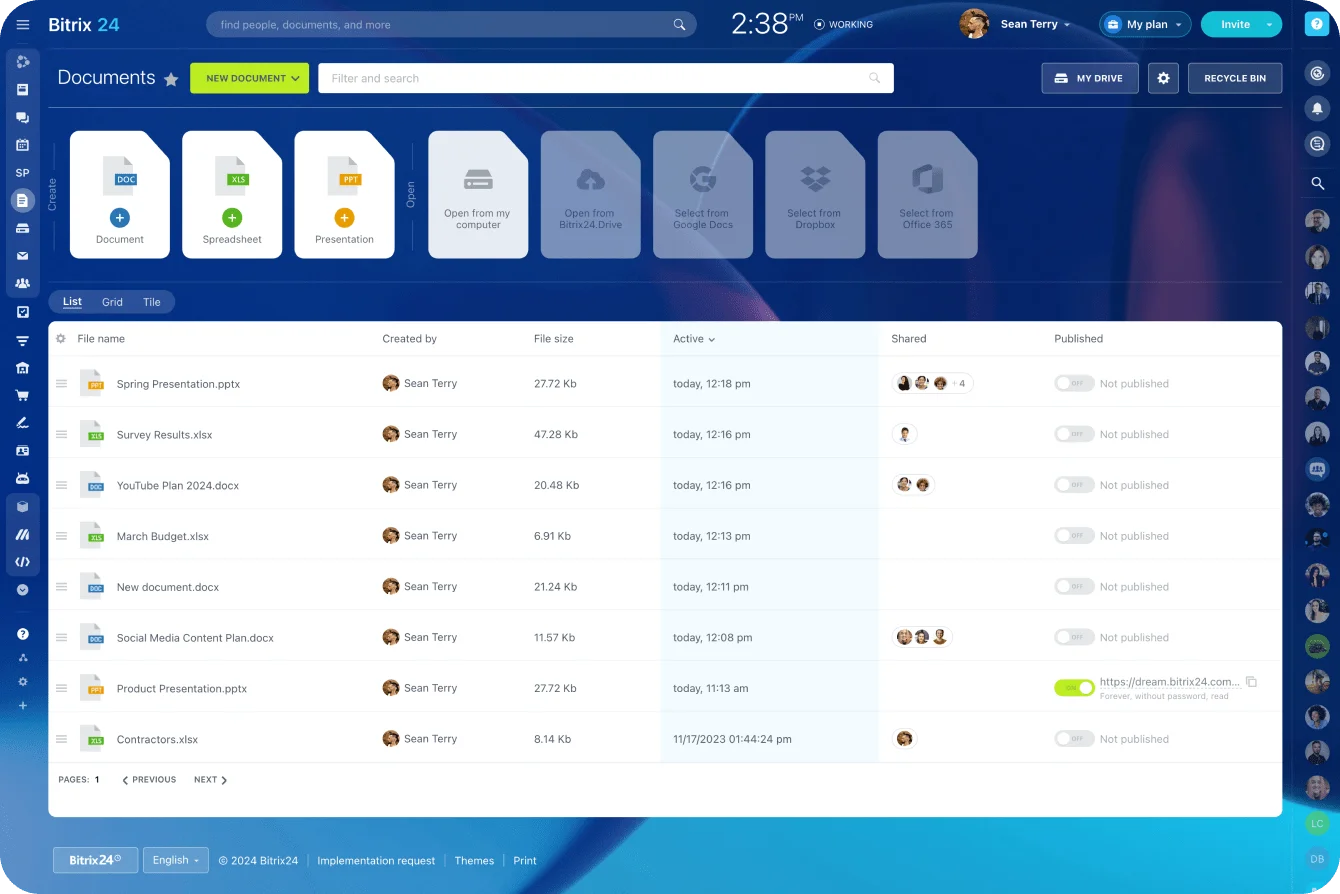
That last one is mundane and constant. People download the attachment, edit it locally, and send a new file, and suddenly there are three "final" versions. Shared Bitrix24 document management cuts this down by keeping the working material in one controlled location.
4. Owner handoff delay
Owner handoff delay is the idle time between one stage closing and the next owner doing something.
Add:
- Owner changes per deal
- Deals without a named next owner
- Time between handoff and first action
- Reassignments caused by absence or workload
This metric catches contracts sitting between owners while nobody is reviewing or negotiating anything.
The reassignment line is the one teams skip, and it's the one that bites. An approver starts two weeks of leave, requests keep routing to their queue, and the out-of-office reply goes to a system address nobody reads.
Nobody finds out until the customer emails to ask why the contract never arrived.
5. Manual signing lag
Manual signing lag runs from signature requested to signature completed. Track unsigned sends, reminder activity, incorrect signer details, and the gap between final approval and the actual signature request.
Signing technology helps here mostly by showing where the remaining delay sits. In its FY2025 annual report, DocuSign said 76% of transactions using eSignature were completed in less than 24 hours. Once an agreement is in an e-signature tool, the act of signing is rarely where a week goes. If your signing stage runs to days, look at the gap before the request goes out and at whether it reached the right person.
DocuSign’s own numbers make the point. The same filing puts its sales cycle with enterprise and commercial customers at generally three to nine months from initial evaluation to payment. The company whose signatures mostly land inside a day still spends months getting its own customers to the signature.
Bitrix24.Sign keeps that step on the deal record. You send the agreement for signature from the deal itself, signer details come from the CRM, and signing has its own stages on the pipeline.
The gap between "final approved" and "signature requested" shows up where the rest of the deal history lives. Counterparties don't need a Bitrix24 account to sign. It's built for standard electronic signatures, which cover most commercial agreements; where a jurisdiction or contract type requires a qualified or notarized signature, confirm the requirement with counsel before you pick the signing route.
|
Delay source |
Elapsed-time metric |
Volume metric |
What it often reveals |
|---|---|---|---|
|
Internal approval |
Approval requested to approved |
Deals with multiple approver rounds |
Routing friction or unclear thresholds |
|
Legal review |
Review opened to closed |
Redlined or exception contracts |
Queueing or unresolved clause issues |
|
Revision loops |
Time per revision cycle |
Version count per deal |
Scope or pricing clarity problems |
|
Owner handoffs |
Stage complete to next action |
Deals without named next owner |
Responsibility gaps |
|
Manual signing |
Signature requested to completed |
Unsigned sends without reminders |
Execution friction after agreement |

Interpret the patterns together instead of blaming the wrong step
A single stage metric misleads. Read them in combination.
Look at what happens before and after the delay
A long gap between proposal and first response is an early-stage problem: the proposal is hard to evaluate, the buyer has no internal urgency, or follow-up is patchy.
If the customer answers fast but legal eats most of the cycle, look downstream. If revisions pile up before anyone requests approval, fix discovery, scope, and pricing before you touch the approval process.
Two deals with the same total cycle can have nothing in common. One clears legal immediately and then sits waiting for budget approval. The other gets executive signoff fast and then goes through version after version because nobody pinned down the deliverables. Average them together and you'll send the approval team to a training session they didn't need.
Use medians, distributions, and outliers together
Report the median next to the average, then look at the stage distributions and the outliers. A few complex agreements drag the mean up. The median shows the typical path, and the outliers show which contracts need separate handling.
Illustrative example (the numbers only demonstrate the calculation): ten contracts close in a quarter. Nine take 14 days each. One custom agreement with a liability dispute takes 90. The mean is 21.6 days ((9 × 14 + 90) ÷ 10), while the median is 14. Report the mean alone and the team goes hunting for a week of delay that nine out of ten deals never had. The useful finding is the one outlier and why it took 90 days.
Watch for signs of ownership gaps
Ownership gaps leave recognizable signals:
- Long gaps between stage completion and the next timestamp
- Repeated status checks without a stage change
- Documents left in "sent" with no follow-up action
- Finished approvals followed by no assigned owner
- Multiple people asking who has the latest version
Call it ‘process silence’. The agreement is waiting for somebody to notice it's now their job, and the person who notices first is usually the buyer, whose patience you've just spent.
Use a consulting engagement example to separate scope friction from approval friction
The scenario below is illustrative, a composite of common patterns rather than a specific client case.
Take a consulting deal for a multi-phase transformation project. The proposal covers diagnostic work, implementation support, and executive workshops, and the scope boundaries are broad.
The client responds quickly. Their first questions are about what each phase includes, which team has to supply data, what counts as an additional request, and whether travel sits inside the quoted price. The proposal goes through several revisions before the buyer can route it to finance or legal.
When the problem starts with scope
Here the delay comes from scope definition. Formal approval has barely started. Better discovery, clearer assumptions, explicit deliverables, and cleaner pricing options go straight at the source.
Skip that work to hit a signing date and the bill arrives later. The travel question nobody settled comes back as a disputed invoice partway through delivery, and the delivery lead who wasn't on a single sales call is the one explaining it to the client.
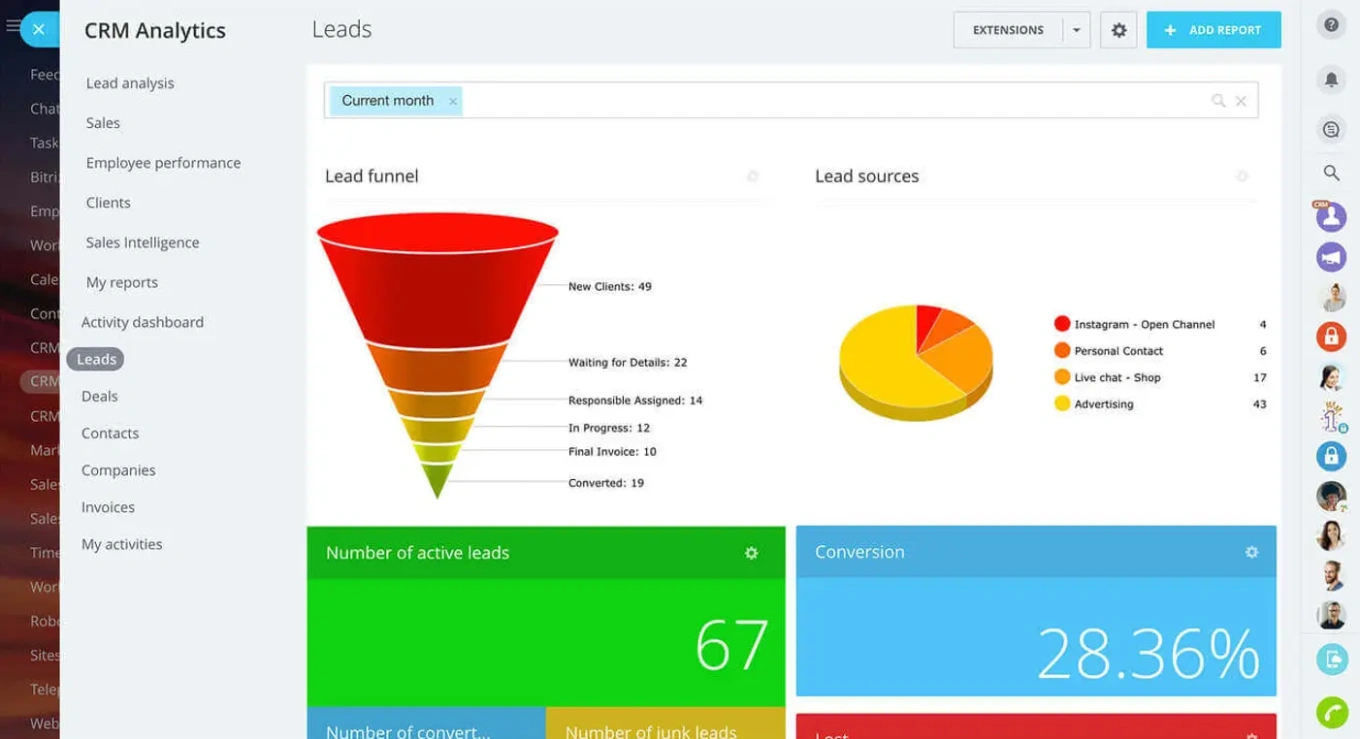
Keeping those discussions on the deal in a Bitrix24 sales pipeline gives the seller and manager a record of what changed and why, so nobody has to reconstruct earlier decisions from memory.
When the problem moves into approval
Now say the scope is agreed and the customer is ready to go. The contract waits for an internal budget approver, moves to legal for liability comments, then comes back to sales so somebody can send the corrected version. The friction has moved into approval and routing.
The quickest way to tell the two apart is where versions accumulate. In the scope case, they pile up before anyone requests approval. In the approval case, the document barely changes. It just moves between people and waits at each stop.
Lump both cases into one cycle-time number and you'd never see that they need different fixes.
Match each delay source to a fix and the metric that proves it worked
Every process change needs a proving metric and a safety metric. Without them, teams spend months redesigning workflows and never learn whether they touched the actual bottleneck. If a change is meant to cut waiting, its elapsed-time measure has to move. If it stays flat, you fixed a secondary step and the dominant constraint is still in place.
Internal approval delays
Route approvals with a matrix based on deal type, pricing exception, risk level, or contract value. Pre-approved pricing and discount boundaries keep routine deals out of senior queues, and deadline alerts plus Bitrix24 task automation prompt the owner when an approval sits untouched.
Setting the thresholds is the hard part. Set them too low and every routine discount still lands with the VP. Set them too high and finance stops seeing the deals that set pricing precedent for next year's renewals. Last quarter's approval history is the practical starting point: if almost every request at a given discount level went through unchanged, that level doesn't need senior signoff.
Prove it with the approval metrics from earlier: turnaround time, the share approved in one round, time waiting for approver assignment, and reopened approvals.
One trap catches a lot of teams: automating an approval process nobody understands. If no one agrees on which deals need CFO approval, automatically sending more deals to the CFO just builds a faster road into the same queue.
Legal review and version confusion
Cut the avoidable variation before documents reach counsel. The controls that work:
- Standard contract templates
- Pre-approved fallback clauses
- Clear redline ownership
- One controlled working document
- Defined rules for reopening an approved clause
Write the fallbacks down. In a lot of teams they live in one senior lawyer's head, which works until she's on vacation and every deviation queues behind her return.
Track legal cycle time, version count, exception rate, and post-approval rework. If version counts stay high after templates go live, check whether drafts are still being built from old signed contracts.
Unclear next owner
No stage closes without a named person and a next action. In practice:
- Finance approves pricing.
- The workflow assigns the deal back to the account executive.
- The account executive receives a task to send the approved document.
- The deal records when that action occurs.
- An overdue task triggers follow-up or escalation.
Track idle handoff time and the percentage of active deals without a next owner.
Manual signing logistics
Run a defined electronic signing process with signer sequencing, reminders, and visible status. The failures are predictable:
- Sending the agreement to the wrong legal entity
- Sending it to the person who negotiated rather than the person with signing authority, who then has to receive and review it from scratch
- Missing a second required signer
- Sending an outdated attachment
- Leaving the agreement in "sent" indefinitely
- Failing to follow up because everybody assumes somebody else will
Confirm the authorized signatory, and the legal entity they sign for, when terms are agreed. By the time the final version goes out, it's too late to find out.
Track signature completion time, time from final approval to signature request, reminder activity, and sent-to-signed rate.
Decide what to fix
To pick the target:
- Find the stage contributing a large share of total elapsed time.
- Separate active work from idle waiting.
- Confirm the delay is avoidable or reducible.
- Change that process.
- Check that both the stage time and the total cycle improved.
Expect step one to surprise you. Legal gets blamed because its queue is visible and its people push back. The days a finished contract spent waiting for the seller to resend it don't show up in anyone's complaints, only in the timestamps.

Track whether the cycle actually got shorter without creating hidden downstream costs
A before-and-after headline cycle time proves very little on its own.
Keep the measurement consistent
Use the same stage definitions and timestamps in both periods. Change what "legal review started" means halfway through and the comparison is worthless. It happens quietly: someone in ops tidies up the pipeline stages mid-quarter, nobody tells the person running the analysis, and the improvement everyone celebrates turns out to be a renamed column.
Segment results by:
- Deal type
- Contract value
- Complexity
- New business versus renewal
- Standard versus custom paper
Mix shifts fool people all the time. If simple renewals make up more of the pipeline this quarter and custom statements of work fewer, overall cycle time drops while the process stays exactly as slow as it was.
Check for costs that appear later
Watch balancing metrics such as:
- Win rate
- Average discount
- Contract exceptions
- Post-signature change orders
- Reopened agreements
- Customer disputes linked to scope
- Implementation delays caused by incomplete contract information
Speed before signature is worth little if rushed scoping dumps the work on delivery the week after the deal closes. Bitrix24 CRM analytics and reporting connects stage timing to deal outcomes, so RevOps or commercial ops can read cycle time by stage next to win rate, value, source, owner, and other deal characteristics. Contract speed stops being an isolated KPI.
FAQ
What's the minimum I need to track to find a contract bottleneck?
Nine timestamps: proposal sent, first customer response, internal approval requested and completed, legal review opened and closed, final version sent, signature requested, and signature completed. Add a named next owner and a "waiting for" status at every handoff, and you can see where each deal is stuck and whose move it is.
Should I report average or median cycle time?
Both, plus the outliers. A few complex agreements inflate the average. The median shows the typical deal, and the outliers show which contracts need their own treatment.
How do I tell a scope problem from an approval problem?
Look at where the versions pile up. Many revisions before anyone requests approval means scope or pricing is unclear. A document that barely changes but waits at every stop means routing and approvals are the problem.
Will e-signature fix a slow signing stage?
It fixes the signing itself. The days that remain sit before the request goes out, or with the wrong signer or legal entity. Track the gap between final approval and signature request, and confirm the authorized signatory when terms are agreed.
Shorten contract cycles with clear ownership
Bitrix24 connects CRM, approvals, documents, and e-signature so every contract stage has an owner, a status, and faster follow-through.
Get Started NowDays go missing between owners
Most contract delays come with someone to blame: legal, the buyer, a slow approver. The gap between one stage finishing and the next owner acting has nobody, so it never gets raised, and that’s often where the days go.
Bitrix24 puts a name on that gap. Automation rules timestamp each stage as the work happens, a required next-owner field stops a deal leaving approval unowned, and Bitrix24.Sign sends the final version from the same record. “Legal complete” to “signature requested” becomes a number you can see.
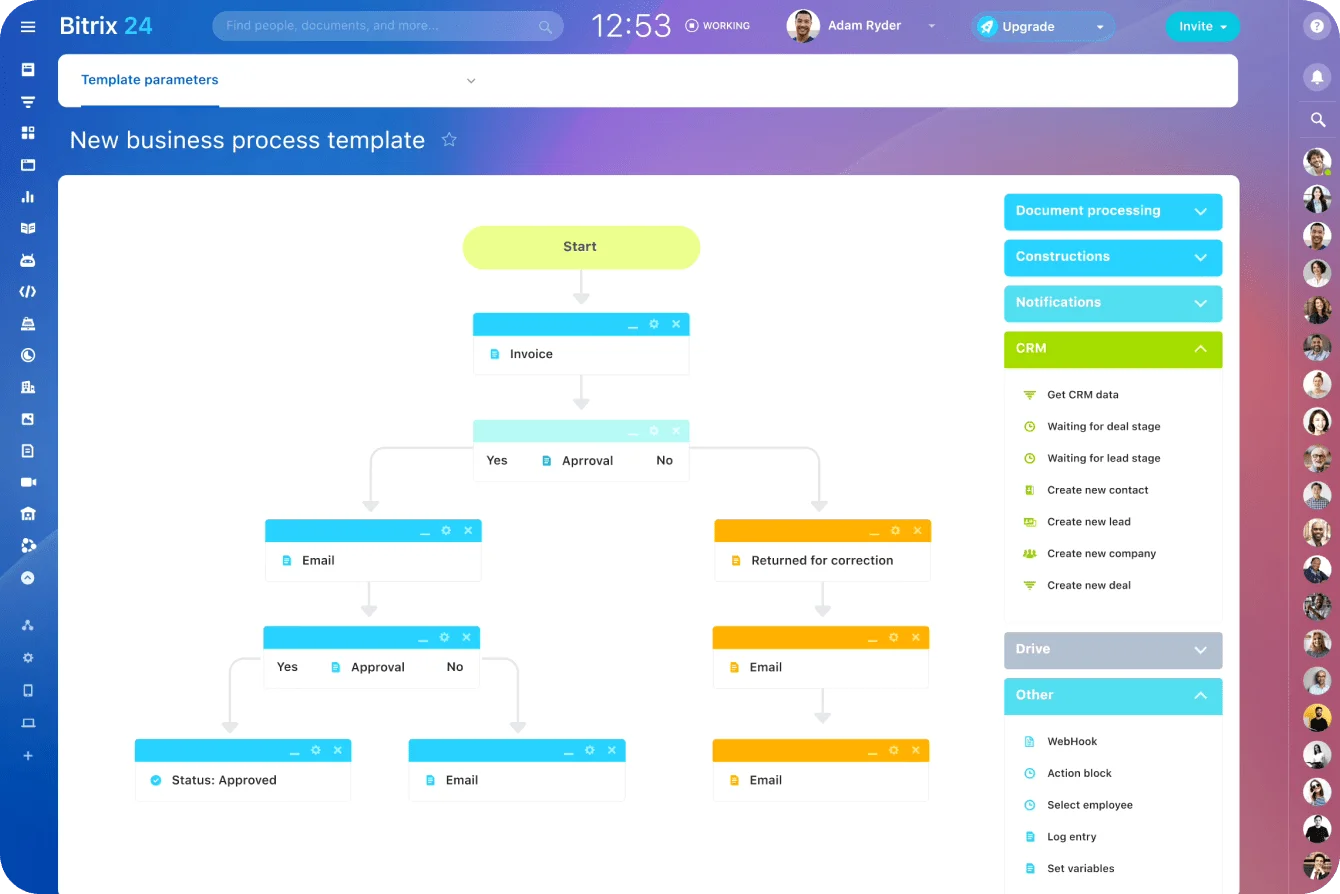
Every day a signed-off contract sits unsent is another day for the buyer’s budget, champion, or priorities to change.
Takeaway: Every stage needs a timestamp, and every handoff needs a name. Get those two right and the bottleneck identifies itself.