CRM for Construction: Choose the Right CRM for Your Business


Construction deals are often lost in scattered estimates, site notes, and slow follow-up long before the work begins. A CRM for construction is a customer and project record system that pulls bids, documents, contractor contacts, and field updates into one place so general contractors, specialty trades, and home builders can move estimates to signed contracts without losing context. It fits companies that quote regularly, juggle multiple active jobs, and need bid history, change orders, and site updates tied to the same client record - and it pays off when the team stops digging through email threads to figure out which version of an estimate was sent and when.
A site superintendent calls in at 7:14 a.m. with a punch list that affects the next draw request. The estimator has the latest scope sheet on a USB drive at home. The PM remembers the GC asked for a revised number on Tuesday, but cannot find the email. By the time the office reconstructs the thread, the GC has already called a competitor. That is the gap a construction CRM software stack closes - not by adding features, but by attaching every conversation, file, and field update to the deal record where the next person to pick it up can actually find it.
What a CRM for Construction Does Differently from Generic Sales CRM
A construction business CRM comparison usually starts with the same generic feature lists: pipelines, contacts, automation, and reports. The differences that matter to a contractor sit underneath those features.
Most generic CRM tools assume a deal closes in a 30 to 90-day window with one decision-maker. Construction deals do not behave that way. Bids sit dormant for weeks while the GC waits on permits or owner financing, then reactivate suddenly with a "can you still hit that number?" call. A contractor CRM has to handle that pause without quietly aging the deal into the discard pile.
The second difference is who touches the record. In generic sales, it is the rep and maybe a sales engineer. In construction, the project manager, estimator, field super, accounts receivable clerk, and the GC's office all leave fingerprints on the same opportunity. A real CRM for construction lets each of them attach the right artifact - a takeoff, a signed change order, a photo of a site condition - to the customer record without anyone needing to forward an email.
Third, the document load is heavier, and the version risk is higher. Sending the wrong revision of a quote is not a typo; it is a margin-impacting event. Estimate management in a CRM means the latest signed version is what shows up to the field crew, the AR clerk, and the GC, and older versions remain visible for audit but do not get sent by accident.

Why Construction Companies Lose Deals Before the Job Starts
The deals you lose are rarely the ones you bid badly. They are the ones where the follow-up went cold, the document never landed in the right inbox, or the field walk-through report sat in someone's truck for four days.
Three patterns show up over and over in construction pipelines:
- Bid black holes. A number gets sent, the GC says "we'll get back to you," and the estimator moves on to the next bid. No nudge goes out at day 10, day 21, or day 45. When the GC finally awards the job, your number is no longer the freshest.
- Document chaos at handoff. Sales sells the job. Operations gets a Dropbox link, a forwarded email chain, and a verbal summary of what was promised. By week two, the field is running on a scope that does not match what the client signed.
- Field updates that never make it back to the office. A superintendent flags a soil condition that will eat two days of schedule. The change order does not get billed because no one wrote it down inside the deal.
Bid tracking in a CRM addresses the first. Construction document management addresses the second. Mobile CRM for construction addresses the third. A platform that handles all three on one record is what most contractors are actually shopping for, even when the RFP says "we need a CRM."
Construction CRM Requirements Scorecard + Vendor Comparison Template
Enter your email address to get a comprehensive, step-by-step guide

The Functions That Actually Matter in a Construction CRM
Below is the short list of capabilities that separate a useful tool from a glorified contact database. Each is a non-negotiable for a small to mid-sized contractor running 20 to 200 active opportunities.
1. Bid Tracking with Stalled-Deal Logic
Bid tracking in a CRM (sometimes called bid pipeline management) has to do two things that generic pipelines do not: hold deals in a "submitted - awaiting decision" state for an indefinite stretch, and trigger a follow-up sequence based on bid age rather than just deal age. A bid sitting at day 35 with no GC response is not a cold deal; it is a normal one - but it still needs a touch.
2. Estimate and Document Versioning
Estimate management in a CRM means every revision lives on the deal, the latest one is flagged, and the file you send to a GC is the one anyone in the company would have sent. PDFs in shared drives do not solve this. The CRM does, when it stores estimates as deal-level documents with version history.
3. Field-to-Office Sync via Mobile
Mobile CRM for construction is not only a feature, but the reason the system is used by anyone outside the office. A field sales CRM for construction lets the rep walking a job site log a meeting, photograph a condition, and update the deal stage from a phone before they get back in the truck. If the field cannot use it on a phone with one bar of signal, the office will not get the data.
4. Project Handoff Without Re-Keying
Construction project management in a CRM picks up where the sales pipeline ends. When a deal moves to "won," the contract, scope, change orders, key contacts, and timeline should populate the project record without anyone copying fields. A CRM that requires re-entering customer data at handoff will get bypassed within a quarter.
5. Pipeline Reporting That Reflects Reality
Construction pipeline management has to show weighted forecast by stage, but also age in stage, win rate by GC, and bids out by estimator. A flat pipeline view with deal counts is not enough to tell a partner whether the next quarter is going to be tight.
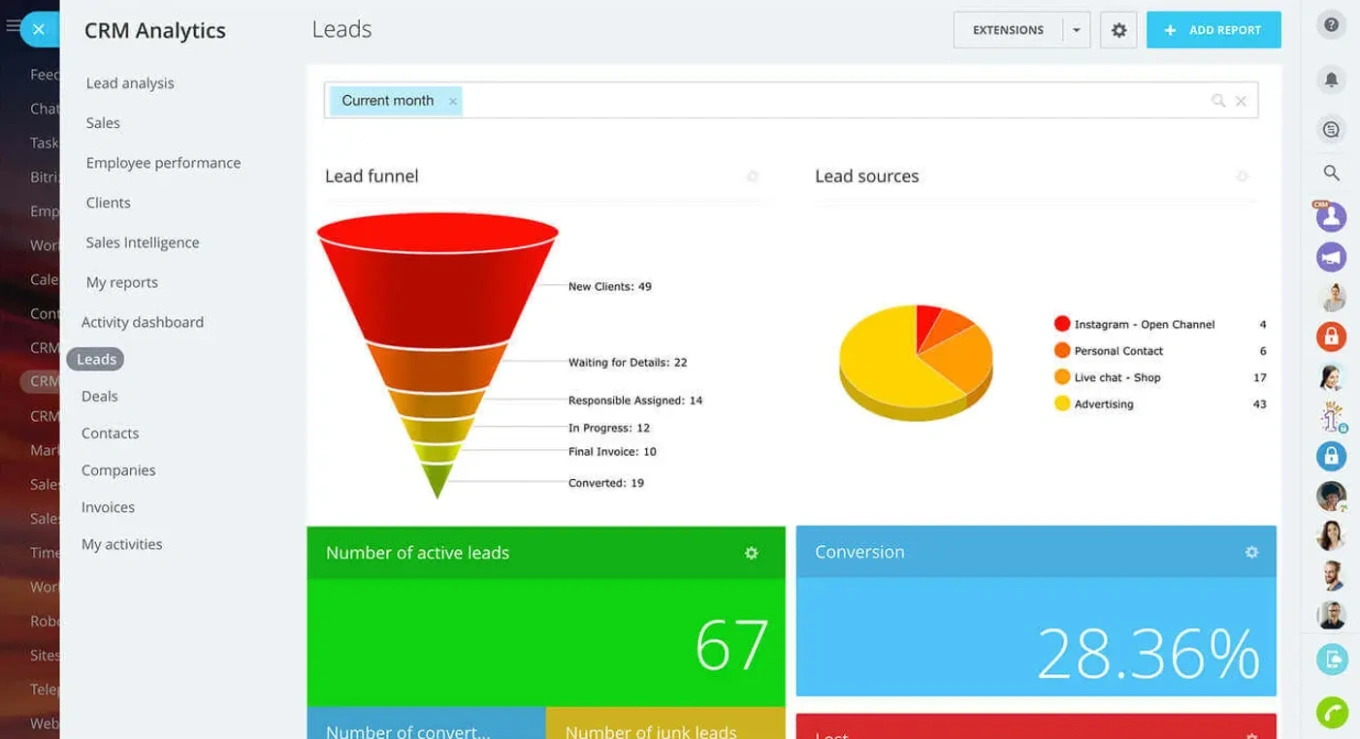
Bitrix24 Tools That Map to These Construction Workflows
Bitrix24 maps the workflows above into a single system. The CRM handles the deal record, custom pipelines for bids vs. signed jobs, document storage on the deal, and version-tracked estimates. The Mobile CRM gives field staff offline-capable access on a phone or tablet, which is the part of CRM for construction software that most contractors underestimate until they roll it out. Automation & Integrations run the bid follow-up cadence - day 7, day 21, day 45 reminders, GC re-engagement sequences, and triggers that move a deal to operations the moment a contract is signed.
The integration layer matters because most contractors already have an estimating tool and an accounting system they will not replace. The CRM has to plug in next to them, not on top of them.

How to Compare Construction CRM Platforms
A construction business CRM comparison gets clearer once you stop reading marketing pages and start asking the same five questions of every vendor. The table below frames the trade-offs that actually decide which tool you live with for the next three years.
|
Decision Factor |
What to Ask |
Why It Matters for Construction |
|---|---|---|
|
Pipeline flexibility |
Can I run separate pipelines for bids, signed jobs, and service work, with different stages and aging logic? |
Bids and service tickets do not behave like the same deal type. One pipeline forces compromises on both. |
|
Document handling |
Are estimates, change orders, and contracts stored on the deal with version history? |
The CRM has to be the single source of truth for what was signed. |
|
Mobile usability |
What can a superintendent do from a phone with intermittent signal? |
If the field cannot log updates easily, you lose half the value of the system. |
|
Integration depth |
Does it connect to my estimating tool and accounting platform with two-way sync, or just import-export? |
One-way imports create stale data. Two-way sync keeps the deal record honest. |
|
Pricing model |
Per-user pricing, tier-based, or flat? What gets gated behind higher tiers? |
Construction teams have a lot of part-time and field users. Per-user pricing scales painfully. |
|
Customization without code |
Can I add custom fields, change pipelines, and build automations without a paid consultant? |
The first six months will involve constant adjustment. Each change should not be a billable hour. |
|
Implementation timeline |
Can a small team get to a working configuration in 4 to 8 weeks? |
Long implementations get abandoned. The first version of the CRM has to deliver value fast. |
A useful exercise: take this table to two or three shortlisted vendors and make them answer with concrete details. Vague answers in the demo are usually an honest preview of vague answers in support tickets later.
Building a Construction CRM Strategy Before You Buy
Software gets blamed for failed CRM rollouts more often than it deserves. The actual cause is usually a missing strategy. Three decisions need to be made before you sign a vendor contract.
Decide which deals enter the system. Not every walk-in lead belongs in the CRM. Some contractors put service calls under $5,000 in a separate workflow and reserve the CRM for project-scale opportunities. Others put everything in. Pick one and document it - the answer matters less than consistency.
Decide who owns the record at each stage. A deal in pre-bid usually belongs to the estimator. Once submitted, ownership might shift to the PM or stay with the estimator. After the contract, it is the project manager. Spell out the handoff so deals do not stall in "whose problem is this" limbo.
Decide which KPIs you will review each Monday. A pipeline report no one reads is a CRM no one uses. Pick three or four numbers - bids out, win rate, average bid age, deals over X days in stage - and make them the reason the CRM exists.
A short, useful indicator set for most construction teams looks like this:
- Number of active bids submitted and pending decision
- Win rate by GC and by project type
- Average bid response time (submit-to-award)
- Conversion rate from site walk to submitted bid
- Pipeline value weighted by stage probability
- Days a deal has spent in the current stage
Six numbers are plenty. Adding a seventh usually means dropping one of the six.

Where a CRM for Construction Stops Being Enough
A CRM is not a project management system, an estimating tool, or accounting software. It is the spine that connects them. Recognizing the limits keeps the rollout sane.
A construction CRM will not run your takeoffs. Bid quantities and unit pricing belong in dedicated estimating software (PlanSwift, STACK, ProEst, Bluebeam), and the CRM stores the resulting PDF or summary. A construction CRM will not handle job costing once the project starts. That belongs in the accounting or job-cost system, where labor, equipment, and material costs roll up against the contract.
It also will not enforce a process the team has not agreed to. If estimators do not log bids in the system, no automation will save the data. The CRM amplifies the discipline that already exists, it does not create discipline from scratch.
For very small operations - a one-truck specialty trade with a single estimator and 8 to 15 active opportunities - a full CRM may be more than you need. A spreadsheet plus a shared inbox can work until the volume creates pain. Most contractors hit that pain somewhere between 25 and 40 concurrent opportunities, which is when a CRM starts paying back the time it costs to maintain.
Rolling Out a CRM for Construction Without Losing the Field
Adoption is the whole game. The cleanest CRM for construction in the world fails if the superintendents refuse to use it.
Start with a pilot. Pick one estimator, one PM, and one site team and run them on the system for 60 days before opening it to the rest of the company. Use that pilot to lock in the pipeline stages, the required fields, and the mobile workflow. Resist the urge to launch company-wide on day one - the cleanup work after a botched launch costs more than a slower rollout.
Train in 30-minute blocks, not three-hour sessions. Construction crews do not retain half-day classroom training. Short, role-specific sessions with the actual screens they will touch tomorrow stick better.
Tie the CRM to something the team already cares about. If estimators see their bid hit rate inside the CRM, they will log bids. If superintendents can see their punch lists update against the deal, they will use the mobile app. The system has to deliver visible value to the user before it asks them to feed it data.
Try Bitrix24 Free for Construction Pipelines, Bids, and Field Updates
Bitrix24 brings the pieces a construction company actually uses onto one platform. The CRM stores bids, contracts, and contact records with version history on documents, while the mobile app keeps the field connected to the office without forcing supers to learn a separate tool. Automation handles the bid follow-up cadence so dormant deals do not quietly disappear, and the integration layer connects to estimating and accounting systems most contractors already use.
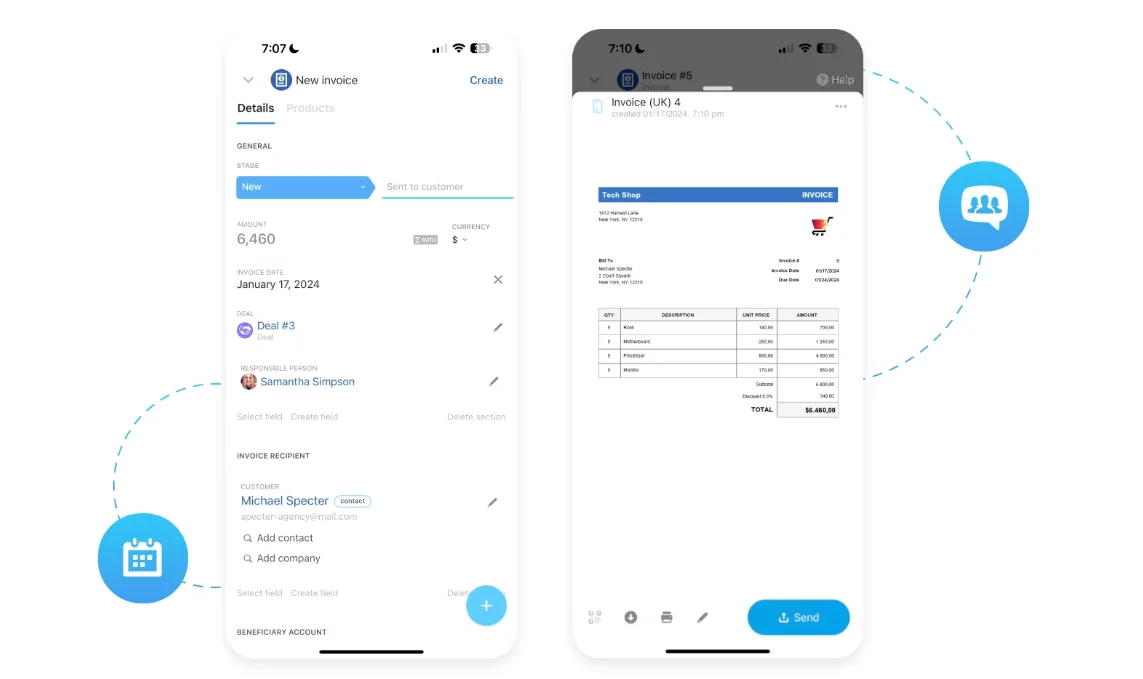
Bitrix24 also centralizes communication - emails, calls, and messages - directly on the deal record, so field updates, documents, and decisions stay attached to the same opportunity instead of splitting across inboxes and tools. When a deal is won, tasks and project work can be triggered automatically, which removes the need to re-key data between sales and operations.
AI-assisted features support the workflow by helping teams capture notes, summarize interactions, and reduce manual entry, but the core value remains the same: one system where bids, documents, and field updates live together and move forward without losing context.
The free plan supports unlimited users, which matters when half your team is part-time field staff who only need occasional access. You can configure custom pipelines for bids, signed jobs, and service work, attach estimates and change orders directly to deals, and run mobile updates from a phone in the field. Paid tiers add deeper automation, advanced reporting, and higher storage limits when the volume grows.
Construction teams that want a CRM that handles bids, docs, and field updates on the same record can start a free Bitrix24 account and have a working pipeline configured in a couple of afternoons.
Streamline Construction Workflows
Experience Bitrix24's powerful CRM designed for Construction industry. Seamlessly manage bids, documents and field updates, and improve project outcomes with all features in one place.
Get Started NowFAQs
Which Bitrix24 tools matter most in a CRM for construction?
The Bitrix24 tools that matter most in a CRM for construction are CRM (for the deal record, custom bid pipelines, and document storage), Mobile CRM (so field supers can update jobs from a phone), and Automation (for bid follow-up cadences and the deal-to-project handoff). Tasks & Projects picks up after a deal is won.
How does a CRM for construction keep job and estimate communication attached to the record?
A CRM for construction keeps job and estimate communication attached to the record by storing every email, call, document, and note on the deal itself rather than in personal inboxes. When sales hands off to operations, the entire history travels with the record, so the PM does not start from scratch.
How important is mobile access in a CRM for construction?
Mobile access in a CRM for construction is the difference between data that exists and data that is current. Field staff log site visits, photos, and updates directly to the deal from their phone, which is where most construction information is generated in the first place.
Which KPIs should a CRM for construction improve?
The KPIs a CRM for construction should improve are bid win rate, average bid response time, pipeline value weighted by stage, conversion from site walk to submitted bid, and days a deal spends in each stage. Six focused metrics outperform fifteen vanity ones.
How does a CRM for construction handle bids that pause for weeks before moving?
A CRM for construction handles bids that pause for weeks before moving by treating "submitted - awaiting decision" as a normal long-running stage with its own follow-up automation. Aging logic triggers nudges at day 7, 21, and 45 instead of marking the deal cold after 30 days of silence.
How should a CRM for construction connect with existing estimating or accounting tools?
A CRM for construction should connect with existing estimating or accounting tools through two-way integrations or APIs that sync customer records, contract values, and invoice status. One-way imports create stale data, so a working integration layer is what keeps the CRM honest as the system of record.